AB1101en_SARev.: 03 / 11.2023
2. Use the
[Adjustment buttons]
to set the desired value.
A numerical value from 200RPM to the maximum rotor speed can be
set.
Adjustable in 10 second increments.
3. Press the
[START/PULSE]
button.
🡆 The setting is transferred to the indicator.
7.1.4
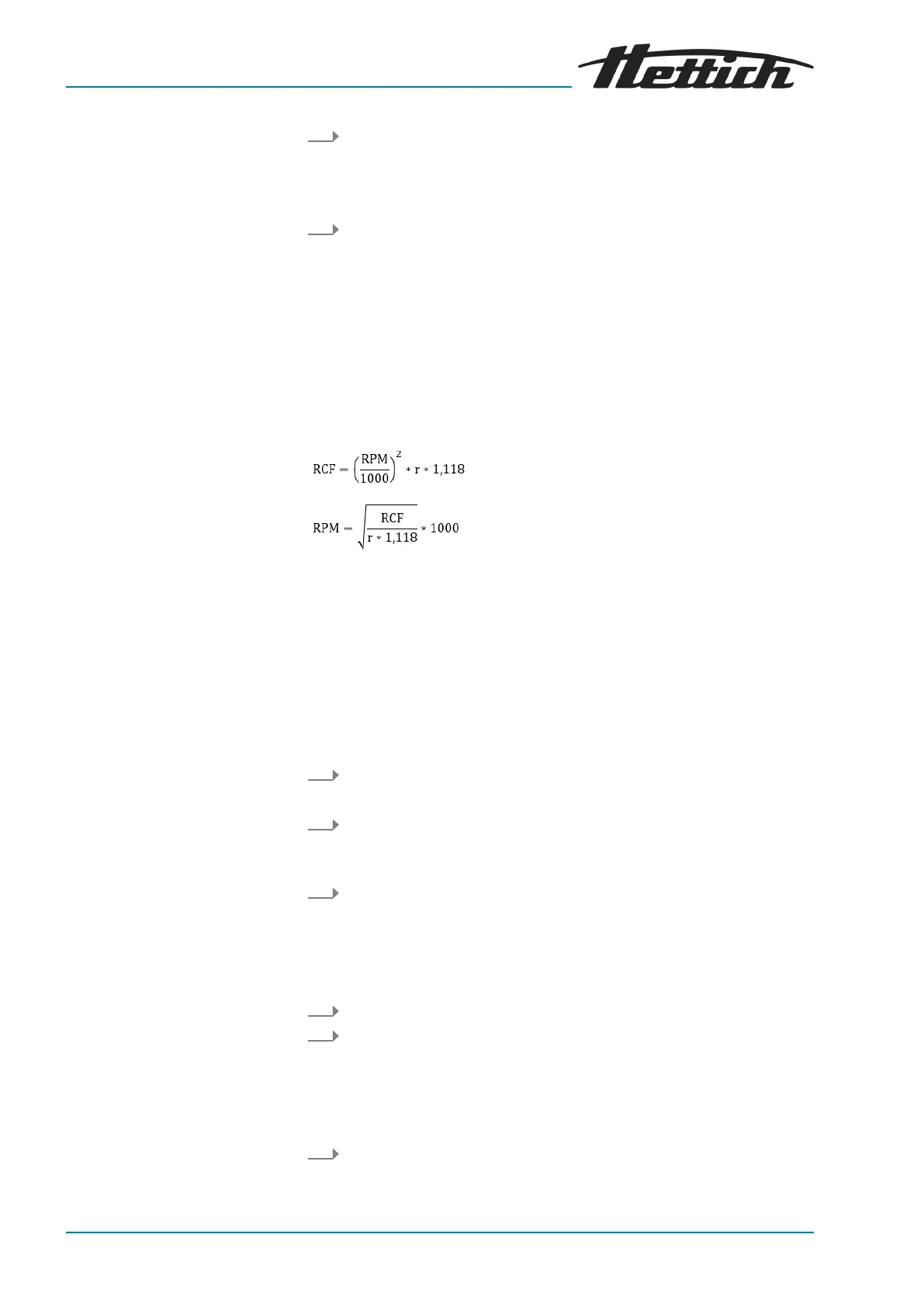
Relative centrifugal force, RCF
The relative centrifugal force RCF is dependent on the speed and the centri-
fuging radius.
The relative centrifugal force RCF is stated as a multiple of the acceleration
due to gravity (g).
The relative centrifugal force RCF is a dimensionless numerical value and is
used to compare the separation and sedimentation performance.
RCF = Relative Centrifugal Force
RPM = speed
r = centrifuging radius in mm = distance from the centre of the axis of
rotation to the bottom of the centrifuge tube.
7.1.5
Relative centrifugal force RCF and centrifuging radius RAD
The relative centrifugal force RCF is dependent on the centrifuging radius
RAD. The centrifuging radius must be set before setting the relative centri-
fugal force.
1.
Press the
[RCF]
button.
🡆
The LED above the button lights up.
2.
Press the
[SELECT]
button repeatedly until
‘R:’
and
‘RCF’
are dis-
played.
🡆
Value of the
‘RCF’
parameter is displayed in brackets ñ á.
3.
Use the
[Adjustment buttons]
to set the desired
‘RCF’
.
A numerical value can be set that gives a speed between 200RPM
and the maximum rotor speed.
Adjustable in 1 second increments.
The set centrifuging radius is displayed while entering the RCF.
4.
Press the
[SELECT]
button repeatedly until
‘RAD/mm’
is displayed.
5.
Use the
[Adjustment buttons]
to set the desired centrifuging radius.
A numerical value from 10mm to 330mm can be set.
Adjustable in 1 millimetre increments
The value of the RCF adjusts automatically when the centrifuging
radius is changed.
6.
Press the
[START/PULSE]
button.
🡆
The setting is transferred to the indicator.



 To Next Page