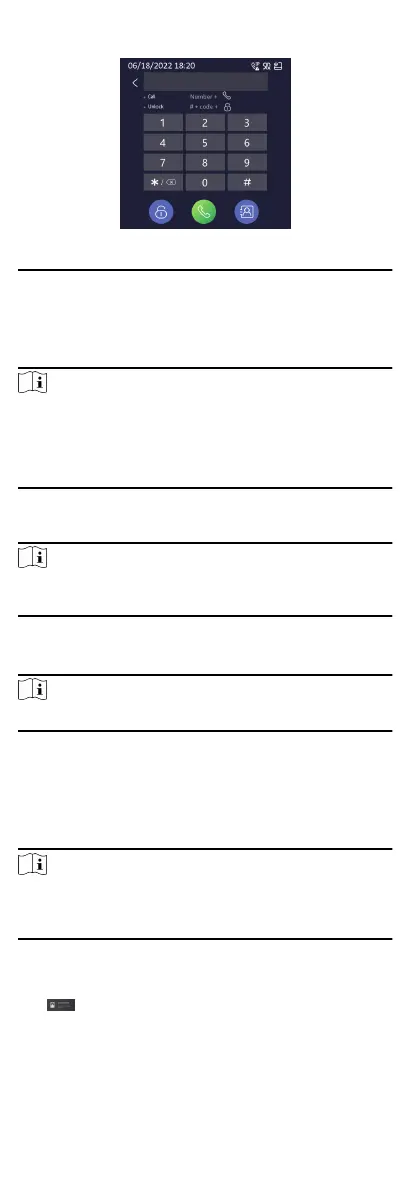
Figure 8-3 Call/Unlock
Four formats of password are supported. They are:
●
【#】+ Public Password +【#】
●
【#】+ Password +【#】
●
【#】+ Duress Password +【#】
Note
●
Password contains 6 digits.
●
You're allowed to set 3 public passwords via iVMS-4200 client
soware.
●
The password varies according to dierent rooms.
Unlock Door by Card
Note
Make sure the card has been issued. You can issue the card via
the door staon, or via iVMS-4200 client soware.
Present the card on the card inducon area via card reader
module or touch-display module (with card reading funcon) to
unlock the door.
Note
The main card does not support unlocking the door.
8.2 Video Intercom Operaon via Client
Soware
The Video Intercom Management module provides the funcon
of video intercom, checking call logs and managing noce via the
iVMS-4200 Client Soware.
Note
For the user with access control module permissions, the user can
enter the Access Control module and manage video intercom and
search informaon.
You should add the device to the soware and congure the
person to link the device in Access Control module before your
conguraon remotely.
Click AccessControlInfo → Video Intercom → Video
Intercom on the le bar to enter the Video Intercom page.
8.2.1 Receive Call from Door
Staon
80



 To Next Page
 Loading...










