8.
Click Save.
5.2 Set Listening Host
The listening host can be used to receive the uploaded informaon and pictures of the device
arming alarm.
Before You Start
The listening service has been enabled for the listening host, and the network
communicaon with
the device is normal.
Steps
1.
Go to Conguraon → Device Conguraon → System Conguraon → TCP/IP .
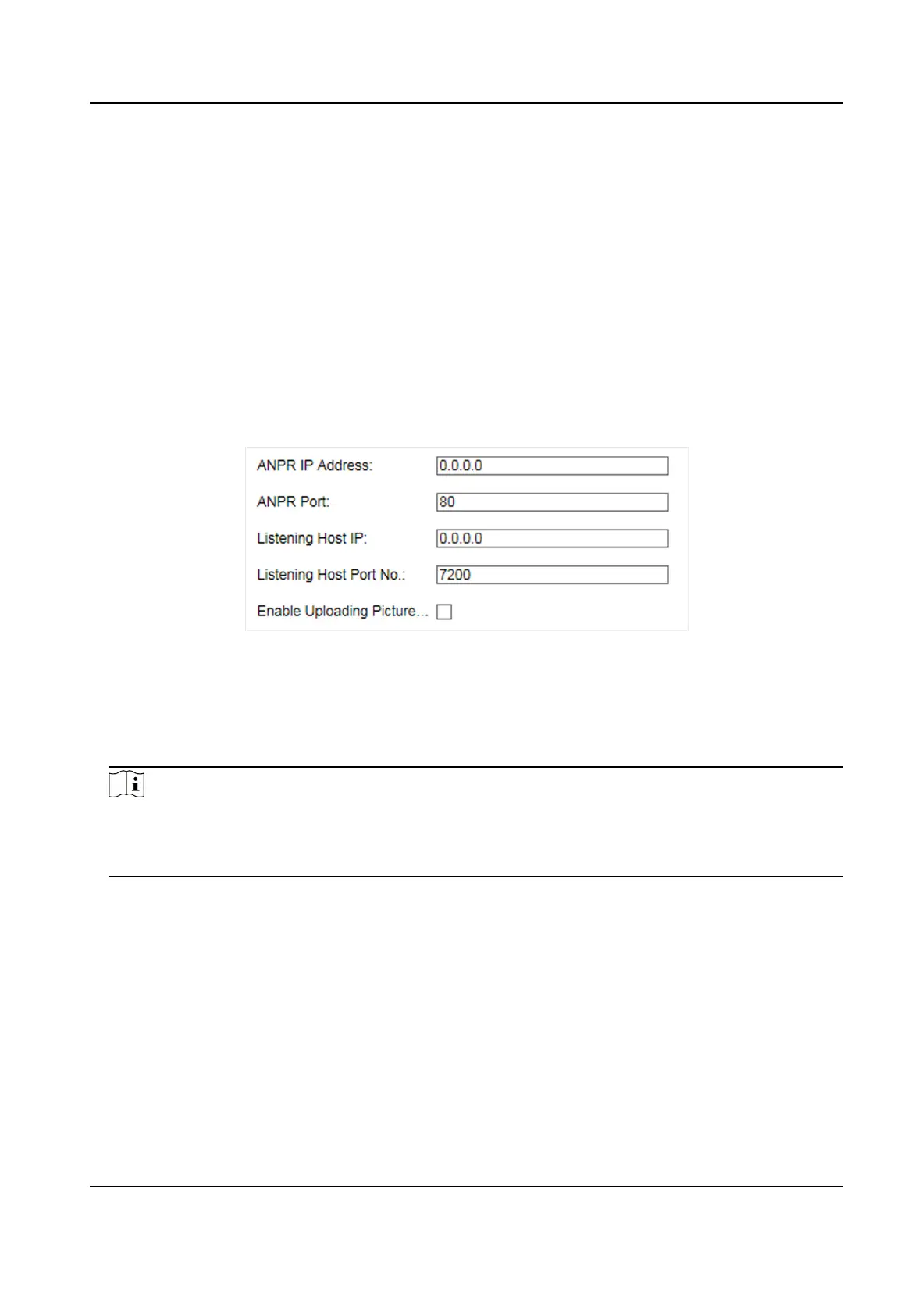
Figure 5-2 Set Listening Host
2.
Set ANPR IP Address/Domain and ANPR Port if you need to upload the alarm informaon and
pictures.
3.
Set Listening Host IP and Listening Host Port No., and check Enable Uploading Picture while
Listening if you need to upload the alarm
informaon and pictures.
Note
ANPR and listening conict with each other. When you enable listening host, pictures will be
uploaded via listening host in priority. When you disable listening and have set ANPR IP address
and port, pictures will be uploaded via ANPR protocol.
4.
Click Save.
5.3 Set Cloud Storage
Cloud storage is a kind of network storage. It can be used as the extended storage to save the
captured pictures.
Before You Start
●
Arrange the cloud storage server.
●
You have enabled level 1 arm in Live View → Live Trac Stascs .
Smart On-Street ANPR Camera User Manual
18















 To Next Page