User Manual of Network Camera
109
6.7 VCA Configuration
6.7.1 Behavior Analysis
The behavior analysis detects a series of suspicious behavior, and certain linkage
methods will be enabled if the alarm is triggered.
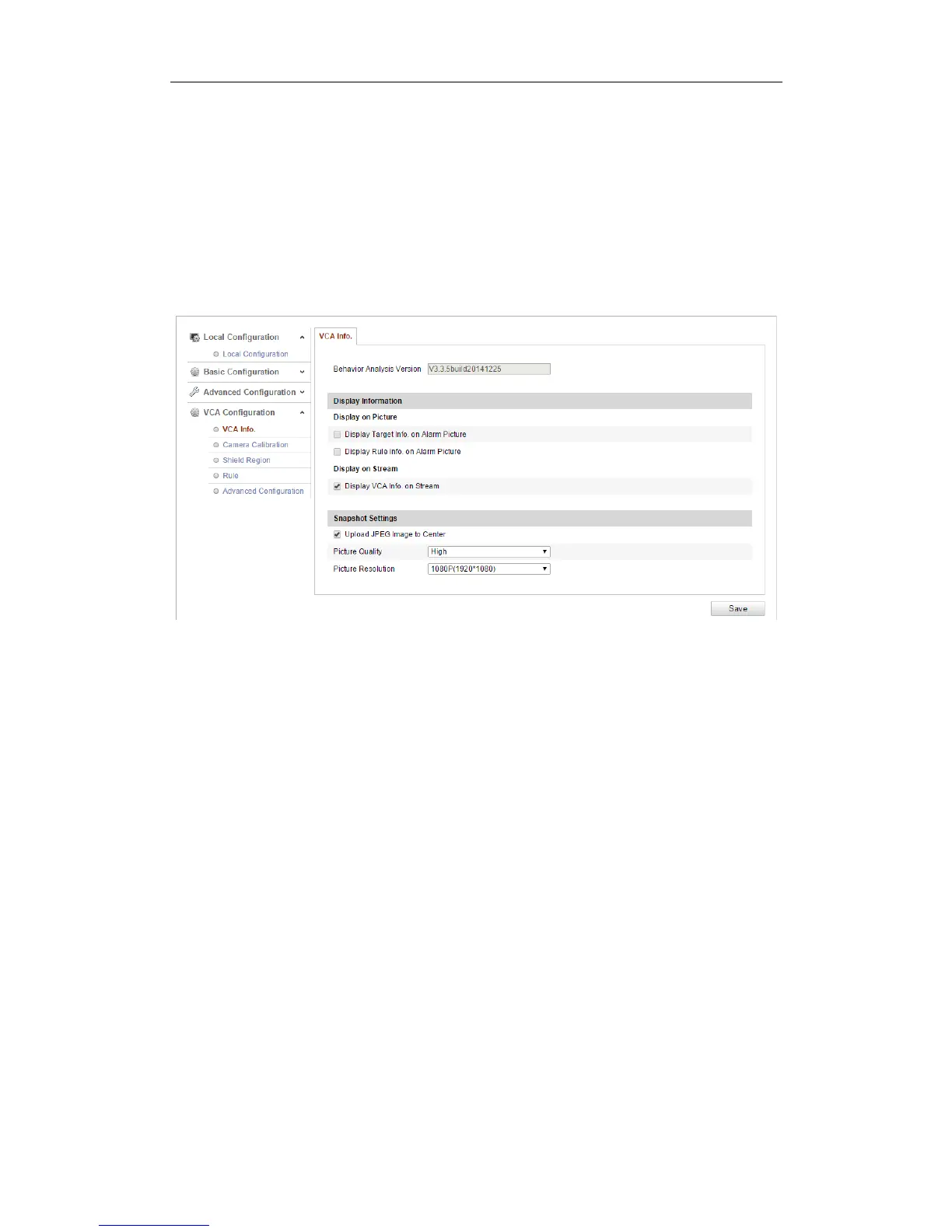
Figure 6-68 Behavior Analysis
VCA Info
Behavior Analysis Version: It lists the version of the algorithms library.
Display information includes the display on picture and display on stream.
Display Target info. on Alarm Picture: There will be a frame on the target on
the uploaded alarm picture if the checkbox is checked.
Display Rule info. on Alarm Picture: The captured target and the configured
area will be framed on the alarm picture.
Display VCA info. on Stream: The green frames will be displayed on the target
if in a live view or playback.
Note: Make sure the rules are enabled in your local settings. Go to
Configuration > Local Configuration > Rules to enable it.
Snapshot Setting: You can set the quality and resolution for the captured picture.
Upload JPEG Image to Center: Check the checkbox to upload the captured





 To Next Page