User Manual of Network Camera
74
1/100,000s. Adjust it according to the actual luminance condition.
Focus Settings
For the camera supports electronic lens, you can set the focus mode as Auto, Manual
or Semi-auto. If auto is selected, the focus is adjusted automatically according to the
actual monitoring scenario; if manual is selected, you can control the lens by adjusting
the zoom, focus, lens initialization, and auxiliary focus via the PTZ control interface;
if semi-auto is selected, the camera will focus automatically when you adjust the
zoom parameters.
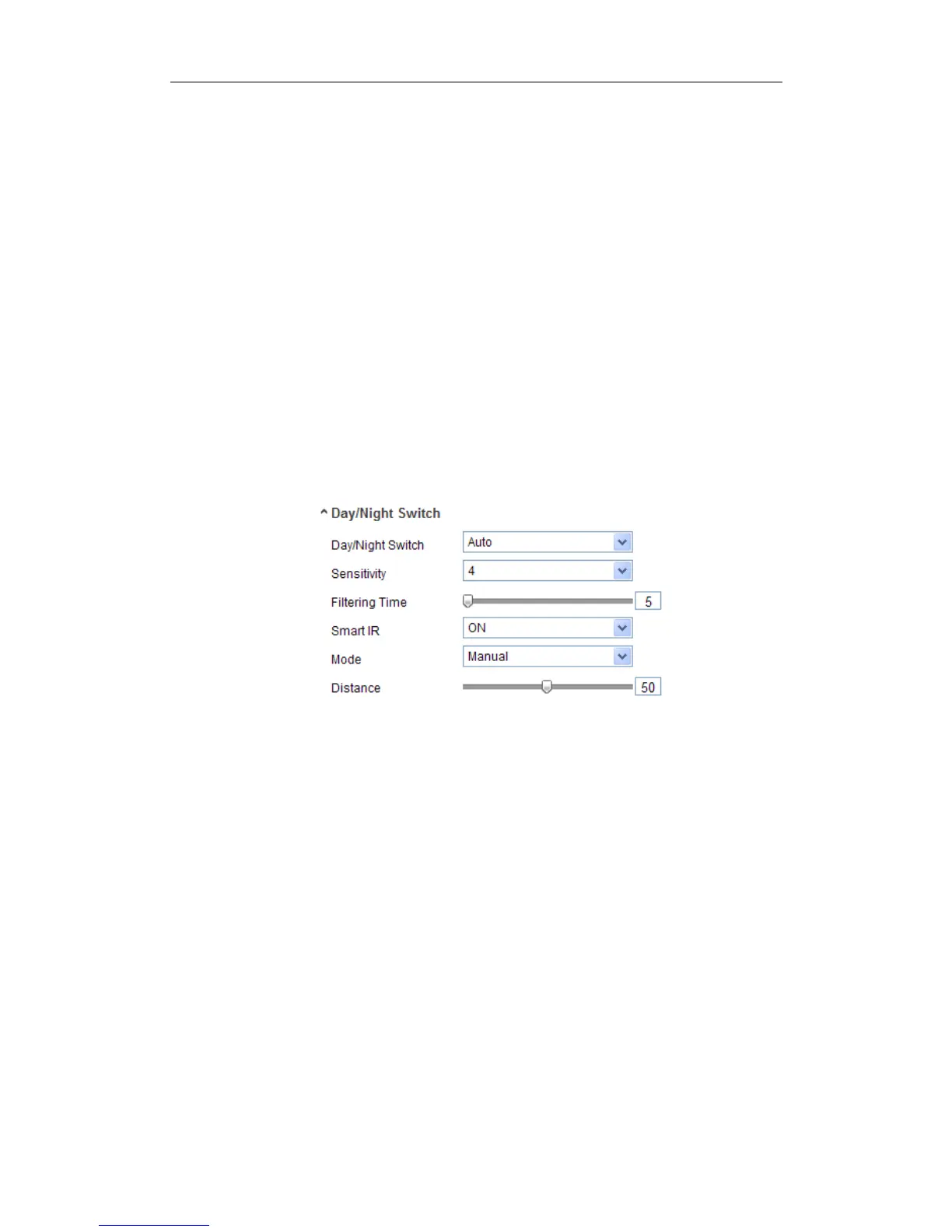
Day/Night Switch
Select the day/night switch mode, and configure the smart IR settings from this
option.
Figure 6-35 Day/Night Switch
Day, night, auto, schedule, and triggered by alarm input are selectable for day/night
switch.
Day: the camera stays at day mode.
Night: the camera stays at night mode.
Auto: the camera switches between the day mode and the night mode according to the
illumination automatically. The sensitivity ranges from 0~7, the higher the value is,
the easier the mode switches. The filtering time refers to the interval time between the
day/night switch. You can set it from 5s to 120s.
Schedule: Set the start time and the end time to define the duration for day/night
mode.
Triggered by alarm input: The switch is triggered by alarm input, and you can set





 To Next Page