EasyManua.ls Logo

Hill-Rom Isolette C2000 - Page 56

Hill-Rom Isolette C2000
93 pages
Print Icon
To Next Page IconTo Next Page
To Previous Page IconTo Previous Page
Loading...
Alarms
Chapter
2:
Troubleshooting
Procedures
For
an
explanation
of
system
prompt
messages,
refer
to
table
2-6
on
page
2-22.
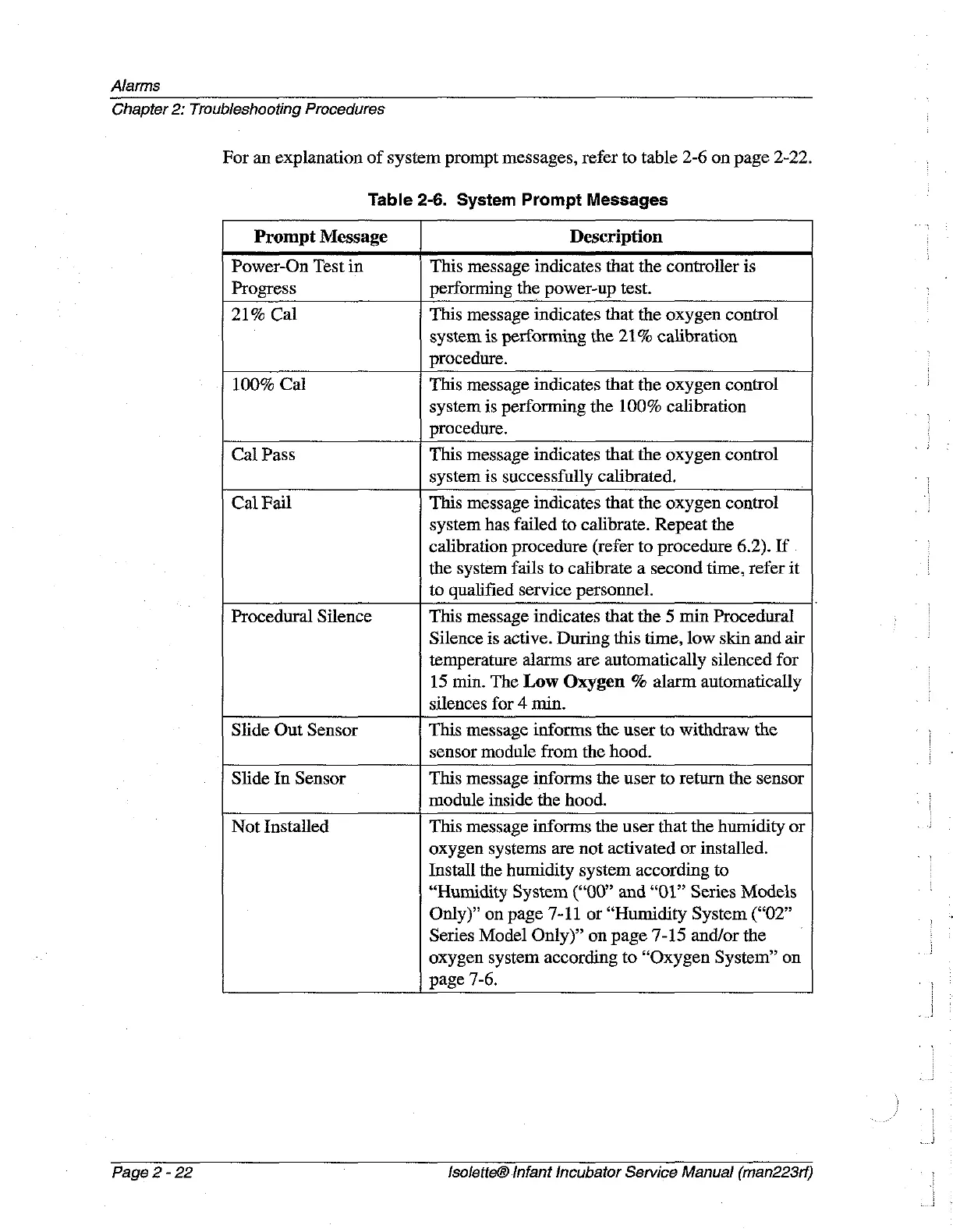
Table
2-6.
System
Prompt
Messages
Prompt
Message
Description
Power-On
Test
in
This
message
indicates
that the
controller
is
Progress
performing
the
power-up
test.
21%
Cal
This
message
indicates
that the
oxygen
control
system
is
performing
the
21%
calibration
procedure.
100%
Cal
This
message
indicates
that the
oxygen
control
system
is
performing
the
100%
calibration
procedure.
Cal
Pass
This
message
indicates
that
the
oxygen
control
system
is
successfully
calibrated.
Cal
Fail
This
message
indicates
that
the
oxygen
control
system
has
failed
to
calibrate.
Repeat
the
calibration
procedure
(refer
to
procedure
6.2).
If
the
system
fails
to
calibrate
a
second
time,
refer
it
to
qualified
service
personnel.
Procedural
Silence
This
message
indicates
that
the
5
min Procedural
Silence
is
active.
During
this
time,
low
skin
and
air
temperature
alarms
are
automatically
silenced
for
15
min.
The
Low
Oxygen
%
alarm
automatically
silences
for
4
min.
Slide
Out
Sensor
This
message
informs
the
user
to
withdraw
the
sensor
module
from
the
hood.
Slide
In
Sensor
This
message
informs
the
user
to
return
the
sensor
module
inside
the
hood.
Not
Installed
This
message
informs
the
user
that the
humidity
or
oxygen
systems
are
not
activated
or
installed.
Install
the
humidity
system according
to
“Humidity
System
(“00”
and
“01”
Series
Models
Only)”
on
page
7-11
or
“Humidity
System
(“02”
Series
Model
Only)”
on
page
7-15 and/or
the
」
oxygen
system
according
to
“Oxygen
System”
on
page
7-6.
Page
2
-
22
Isolette®
Infant
Incubator
Service
Manual
(man223rf)

Table of Contents