EasyManua.ls Logo

Hill-Rom Isolette C2000 - Page 55

Hill-Rom Isolette C2000
93 pages
Print Icon
To Next Page IconTo Next Page
To Previous Page IconTo Previous Page
Loading...
Alarms
Chapter
2:
Troubleshooting
Procedures
For
an
explanation
of
humidity
alarms,
refer
to
table
2-4
on
page
2-21.
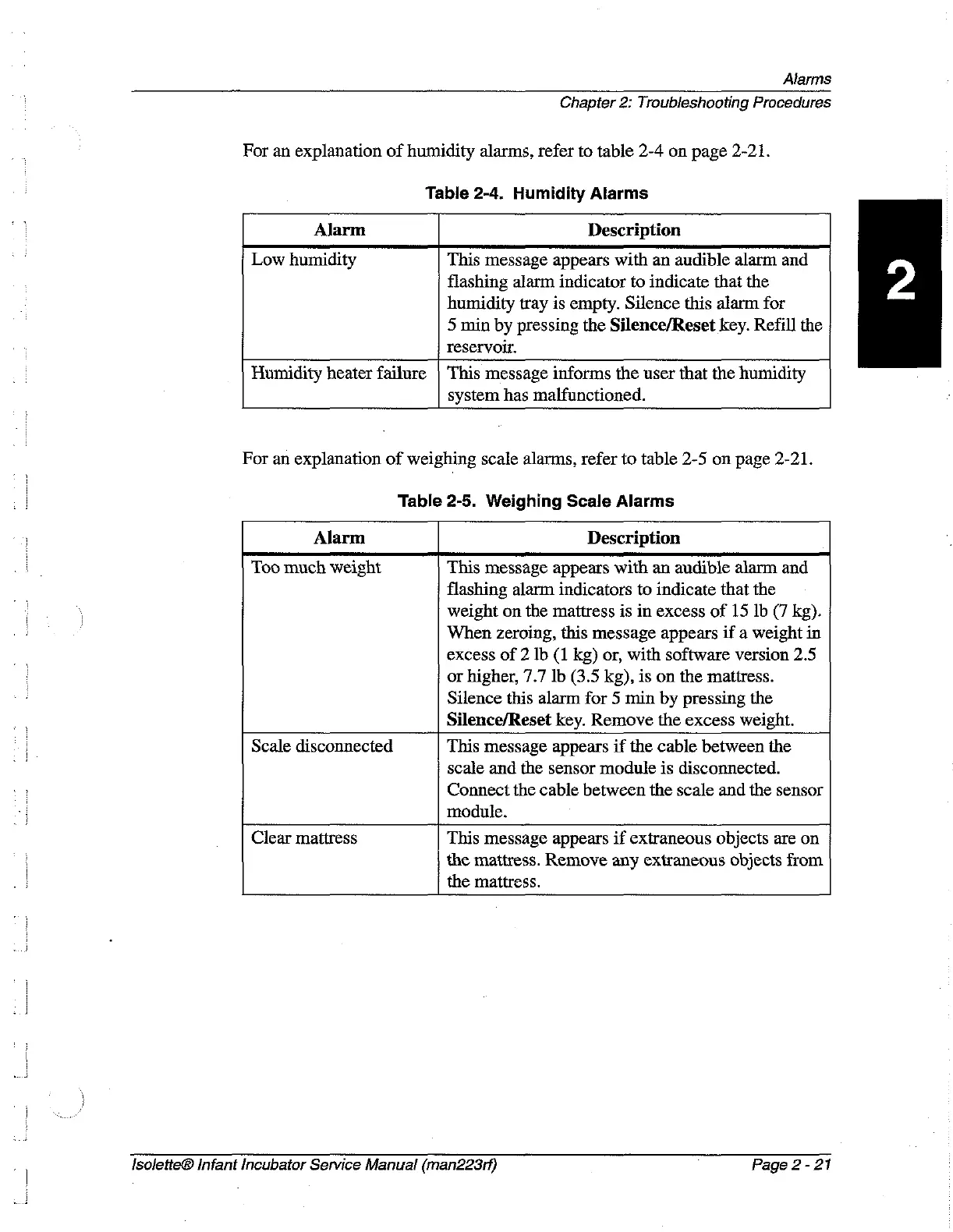
Table
2-4.
Humidity
Alarms
Alarm
Description
Low
humidity
This
message
appears
with
an
audible
alarm
and
flashing
alarm
indicator
to
indicate
that the
humidity
tray
is
empty.
Silence
this
alarm
for
5
min
by
pressing
the
Silence/Reset
key.
Refill
the
reservoir.
Humidity
heater
failure
)
This
message
informs
the
user
that
the
humidity
system
has
malfunctioned.
For
an
explanation
of
weighing
scale
alarms,
refer
to
table
2-5
on
page
2-21.
Table
2-5.
Weighing
Scale
Alarms
Alarm
Description
Too
much
weight
This
message
appears
with
an
audible
alarm
and
flashing
alarm
indicators
to
indicate
that
the
x
weight
on
the
mattress
is
in
excess
of
15
1b (7
kg).
|
When
zeroing,
this
message
appears
if
a
weight
in
excess
of
2
Ib
(1
kg)
or,
with
software
version
2.5
or
higher,
7.7
lb
(3.5
kg),
is
on
the
mattress.
Silence
this
alarm
for
5
min
by
pressing
the
Silence/Reset
key.
Remove
the
excess
weight.
Scale
disconnected
This
message
appears
if
the
cable
between
the
scale
and
the
sensor
module
is
disconnected.
Connect
the
cable
between
the
scale
and
the
sensor
module.
Clear
mattress
This
message
appears
if
extraneous
objects
are
on
the
mattress.
Remove
any
extraneous
objects
from
the
mattress.
IsoletteĀ®
Infant
Incubator
Service
Manual
(man223rf)
-
Page
2-21

Table of Contents