EasyManua.ls Logo

Hill-Rom Isolette C2000 - Page 54

Hill-Rom Isolette C2000
93 pages
Print Icon
To Next Page IconTo Next Page
To Previous Page IconTo Previous Page
Loading...
Alarms
Chapter
2:
Troubleshooting
Procedures
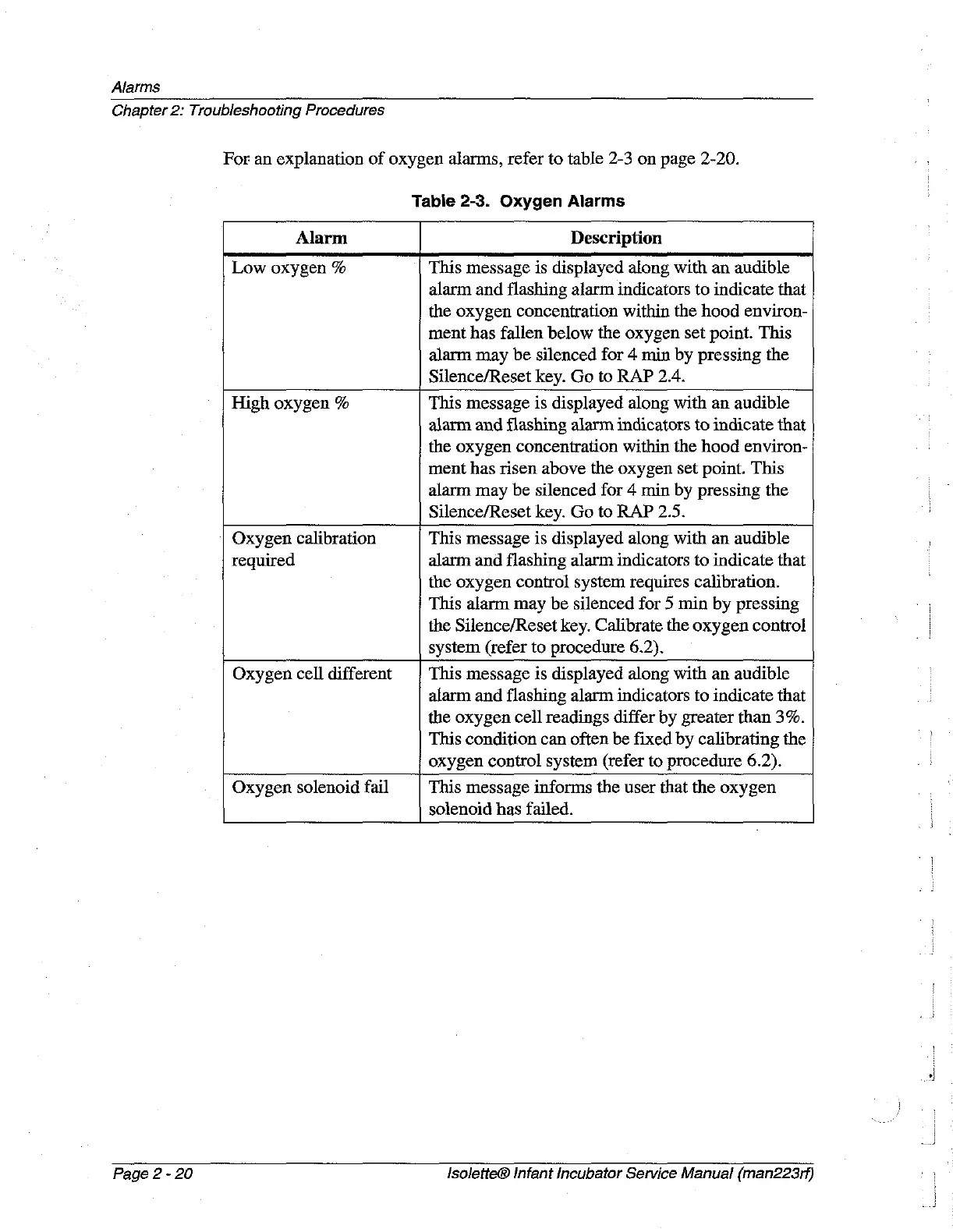
For
an
explanation
of
oxygen
alarms,
refer
to
table
2-3
on
page
2-20.
Table
2-3.
Oxygen
Alarms
Alarm
Description
Low
oxygen
%
This
message
is
displayed
along
with
an
audible
alarm
and
flashing
alarm
indicators
to
indicate
that
the
oxygen
concentration
within
the
hood
environ-
ment
has
fallen
below
the
oxygen
set
point.
This
alarm
may
be
silenced
for
4
min
by
pressing
the
Silence/Reset
key.
Go
to
RAP
2.4.
High
oxygen
%
This
message
is
displayed
along
with
an
audible
alarm
and
flashing
alarm
indicators
to
indicate
that
the
oxygen
concentration
within
the
hood
environ-
ment
has risen
above
the
oxygen
set
point.
This
alarm
may
be
silenced
for
4
min
by
pressing
the
Silence/Reset
key.
Go
to
RAP
2.5.
Oxygen
calibration
required
This
message
is
displayed
along
with
an
audible
alarm
and
flashing
alarm
indicators
to
indicate
that
the
oxygen
control
system
requires
calibration.
This
alarm
may
be
silenced
for
5
min
by
pressing
the
Silence/Reset
key.
Calibrate
the
oxygen
control
system
(refer
to
procedure
6.2).
Oxygen
cell
different
This
message
is
displayed
along
with
an
audible
alarm
and
flashing
alarm
indicators
to
indicate
that
the
oxygen
cell
readings
differ
by
greater
than
3%.
This
condition
can
often
be
fixed
by
calibrating
the
oxygen
control
system
(refer
to
procedure
6.2).
Oxygen
solenoid
fail
This
message
informs
the
user
that
the
oxygen
solenoid
has
failed.
Page
2
-
20
IsoletteĀ®
Infant
Incubator
Service
Manual
(man223rf)

Table of Contents