EasyManua.ls Logo

Hill-Rom Isolette C2000 - Page 53

Hill-Rom Isolette C2000
93 pages
Print Icon
To Next Page IconTo Next Page
To Previous Page IconTo Previous Page
Loading...
Alarms
Chapter
2:
Troubleshooting
Procedures
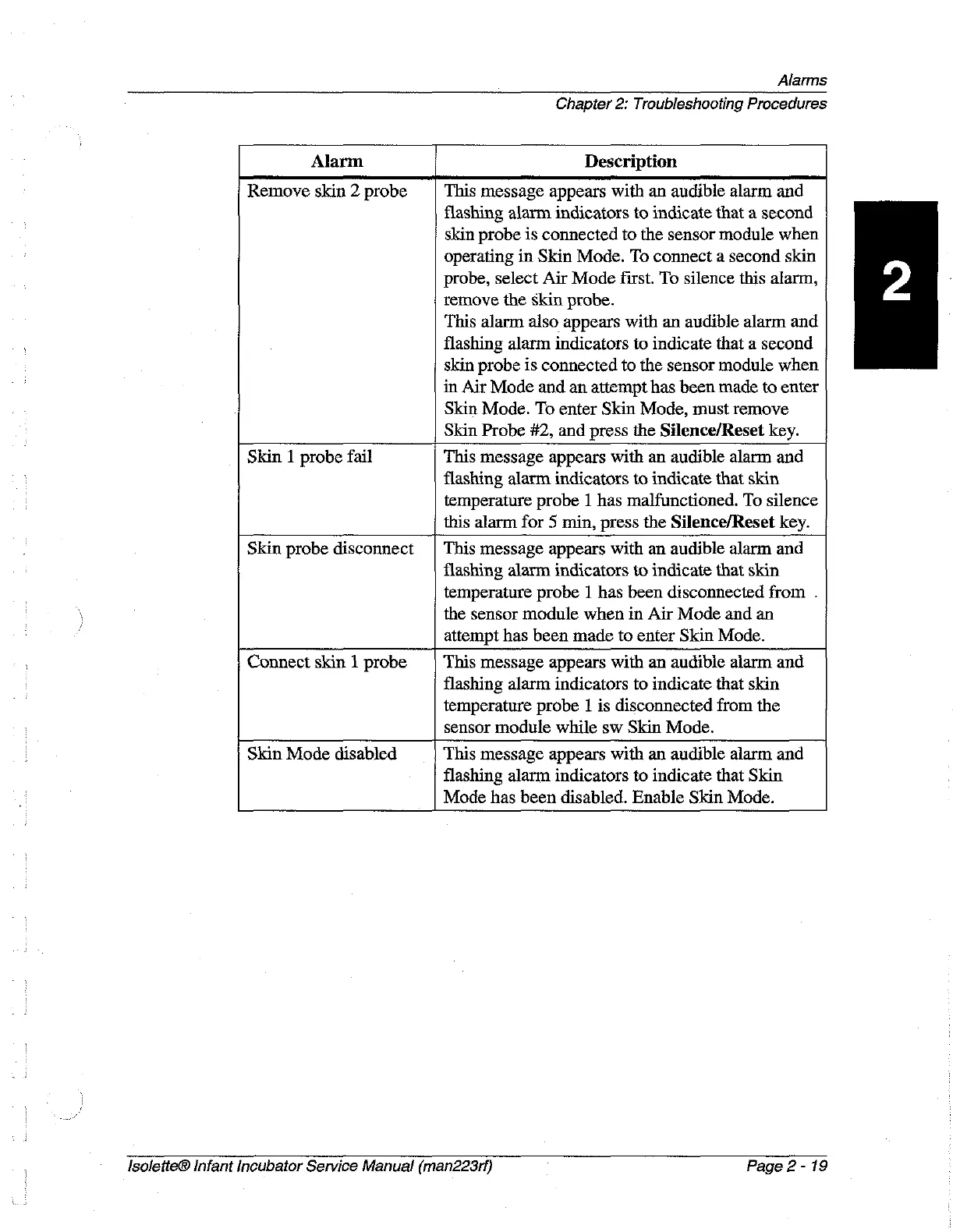
Alarm
Description
Remove
skin
2
probe
This
message
appears
with
an
audible
alarm
and
flashing
alarm
indicators
to
indicate
that
a
second
skin
probe
is
connected
to
the
sensor
module
when
operating
in
Skin
Mode.
To
connect
a
second
skin
probe,
select
Air
Mode
first.
To
silence
this
alarm,
remove
the
skin
probe.
This
alarm
also
appears
with
an
audible
alarm
and
flashing
alarm
indicators
to
indicate
that
a
second
skin
probe
is
connected
to
the
sensor
module
when
in
Air
Mode
and
an
attempt
has
been
made
to
enter
Skin
Mode.
To
enter
Skin
Mode,
must
remove
Skin
Probe
#2,
and
press
the
Silence/Reset
key.
Skin
1
probe
fail
This
message
appears
with
an
audible
alarm
and
flashing
alarm
indicators
to
indicate
that
skin
temperature
probe
1
has
malfunctioned.
To
silence
this
alarm
for
5
min,
press
the
Silence/Reset
key.
Skin
probe
disconnect
|
This
message
appears
with
an
audible
alarm
and
flashing
alarm
indicators
to
indicate
that
skin
temperature
probe
|
has
been
disconnected
from
.
the
sensor
module
when
in
Air
Mode
and
an
attempt
has
been
made
to
enter
Skin
Mode.
Connect
skin
1
probe
This
message
appears
with
an
audible
alarm
and
flashing
alarm
indicators
to
indicate
that
skin
temperature
probe
1
is
disconnected
from
the
sensor
module
while
sw
Skin
Mode.
Skin
Mode
disabled
This
message
appears
with
an
audible
alarm
and
flashing
alarm
indicators
to
indicate
that
Skin
Mode
has
been
disabled.
Enable
Skin
Mode.
lsoletteĀ®
Infant
Incubator
Service
Manual
(man223rf)
Page
2-19

Table of Contents