6. RAS FEATURES IN HF-W100E/IoT
6-26
6.3.6 Changing the startup setting
The following is a procedure to change the startup setting of the CODESYS runtime
environment to Start the PLC with the basic system service. If this option is not selected
for the startup setting, the CODESYS runtime environment will not be stopped or restarted
even if the action at the time of time-out is set to Codesys Stop or Codesys Restart.
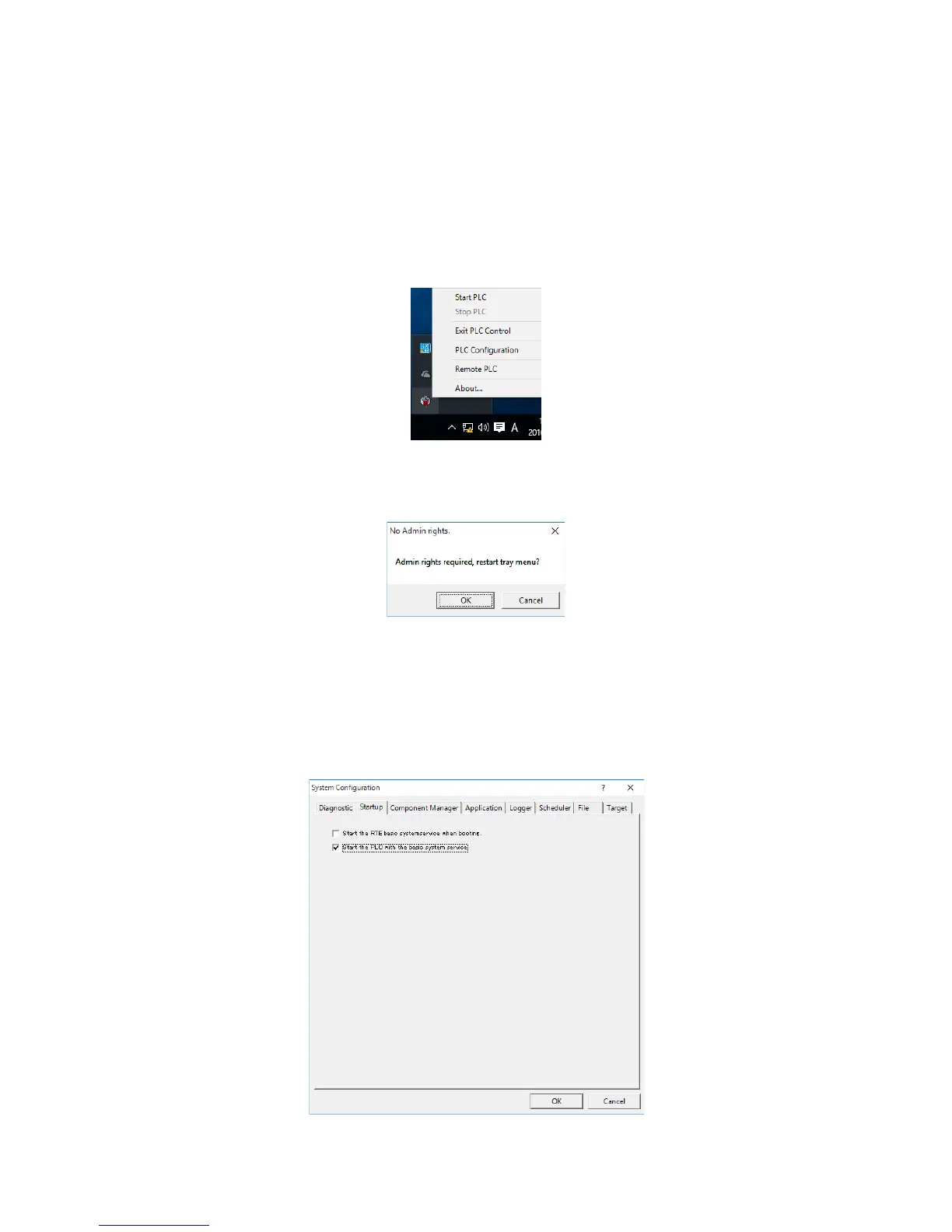
1. Click the CODESYS Control RTE V3 icon in notification area on the taskbar. (The icon
is hidden by default, and you must click “^” to find it.) Then click PLC Configuration.
2. If a window is displayed to indicate that admin rights are required, click OK to obtain the
admin rights.
If the User Account Control window is displayed, click Yes.
When the admin rights are granted, click the icon again, and then click PLC
Configuration.
3. The System Configuration dialog box is displayed. Click the Startup tab, select the
Start the PLC with the basic system service checkbox, and then click OK.







 To Previous Page