3. CREATING A PLC PROGRAM
3-1
CHAPTER 3 CREATING A PLC PROGRAM
3.1 PLC Program Creation Procedure
3.1.1 Creating a project
The following shows how to create a new project.
1. Start the CODESYS development environment in the following steps. Wait until the
startup process is complete. Be aware that it may take dozens of seconds.
• If the OS is Windows® Embedded Standard 7, click Start, and click All Programs >
3S CODESYS > CODESYS > CODESYS V3.5 SP10 Patch1.
• If the OS is Windows® 10, click Start, and click 3S CODESYS > CODESYS >
CODESYS V3.5 SP10 Patch1 from the list of applications.
(Alternatively, double-click the CODESYS V3.5 SP10 Patch1 icon on the desktop.)
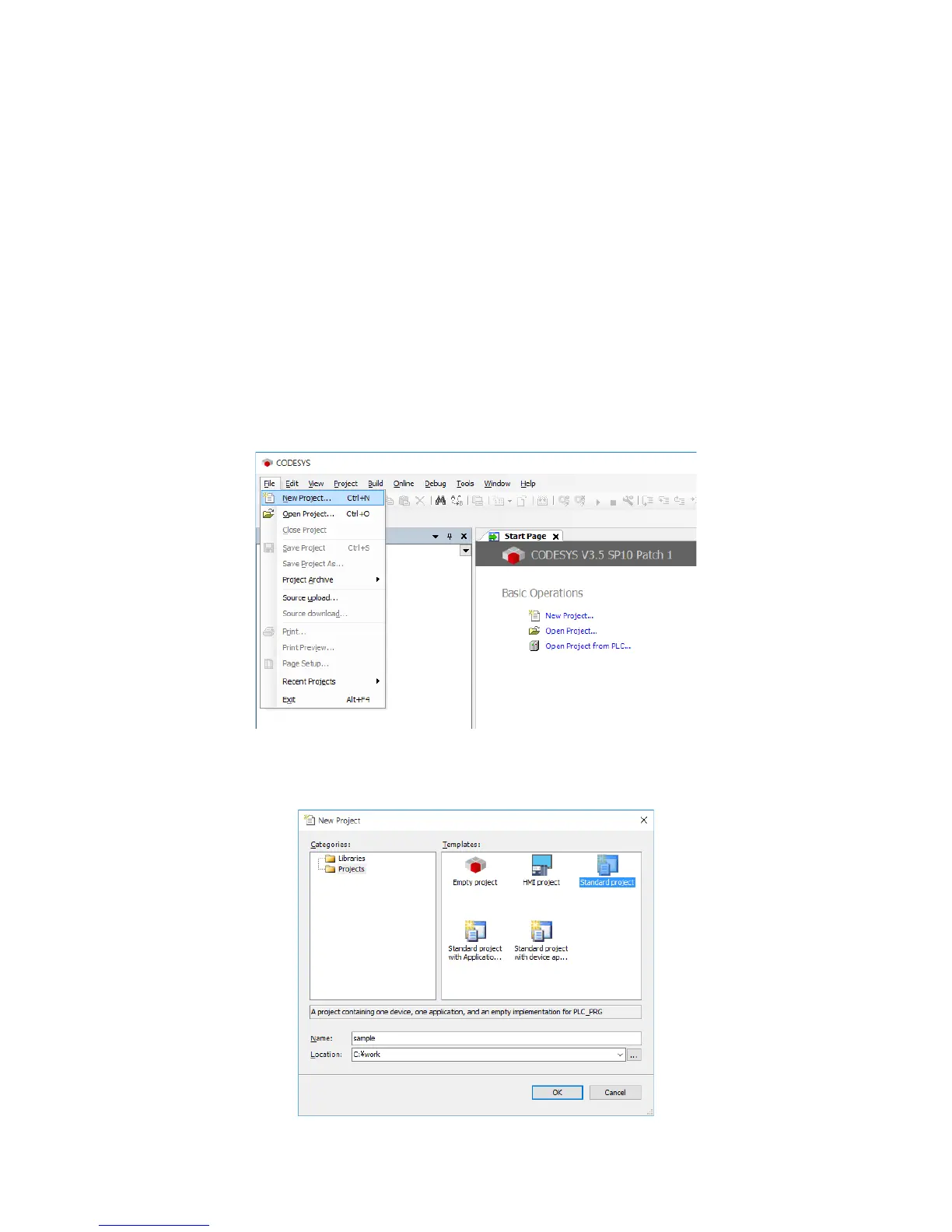
2. Click the File menu, and on the menu, click New Project.
3. The New Project window is displayed. Select Standard project under Templates.
Specify a project name for Name and a save location for Location, and then click OK.














 To Next Page