4. CONFIGURATION OF EtherCAT CONNECTION
4-25
4.2.5 SoftMotion Axis setting
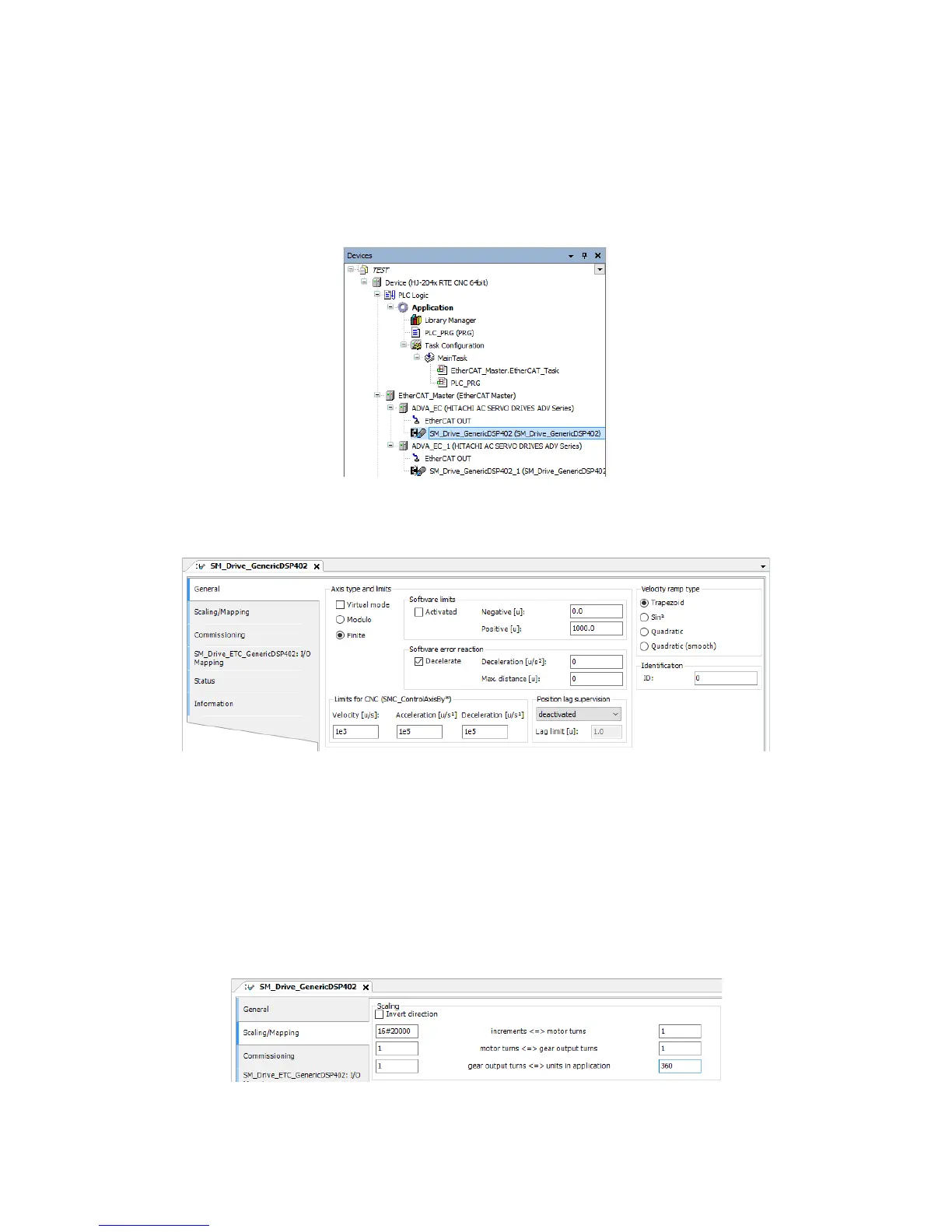
In this example, an Axis setting is configured.
• Repeat this action for each Axis according to your needs.
1. Double-click SM_Drive_GenericDSP402 (SM_Drive_GenericDSP402) in the Devices
window to display a window for Axis configuration.
2. Click General, and configure Axis type and Limits and Velocity ramp type.
In this example, default values are used.
If CNC is used
If CNC is used in your program, the function block that starts with
“SMC_ControlAxisBy” must be used for the axis control. To use this function, you
must define the upper limits of the velocity, acceleration, and deceleration under
Limits for CNC (SMC_ControlAxisBy*) in the above screen.
3. Click Scaling/Mapping to configure Scaling.
In the following setting example, 360 counts in the CODESYS program correspond to
one rotation of the motor. (This setting is for using a 17-bit encoder (16#0~16#1FFFF).)














 To Next Page