3. CREATING A PLC PROGRAM
3-13
Selecting another device as a device to run
To connect another device and select the device as a device to run, follow the procedure
below.
Note that, in order to connect to another device, PLC must be running on the device.
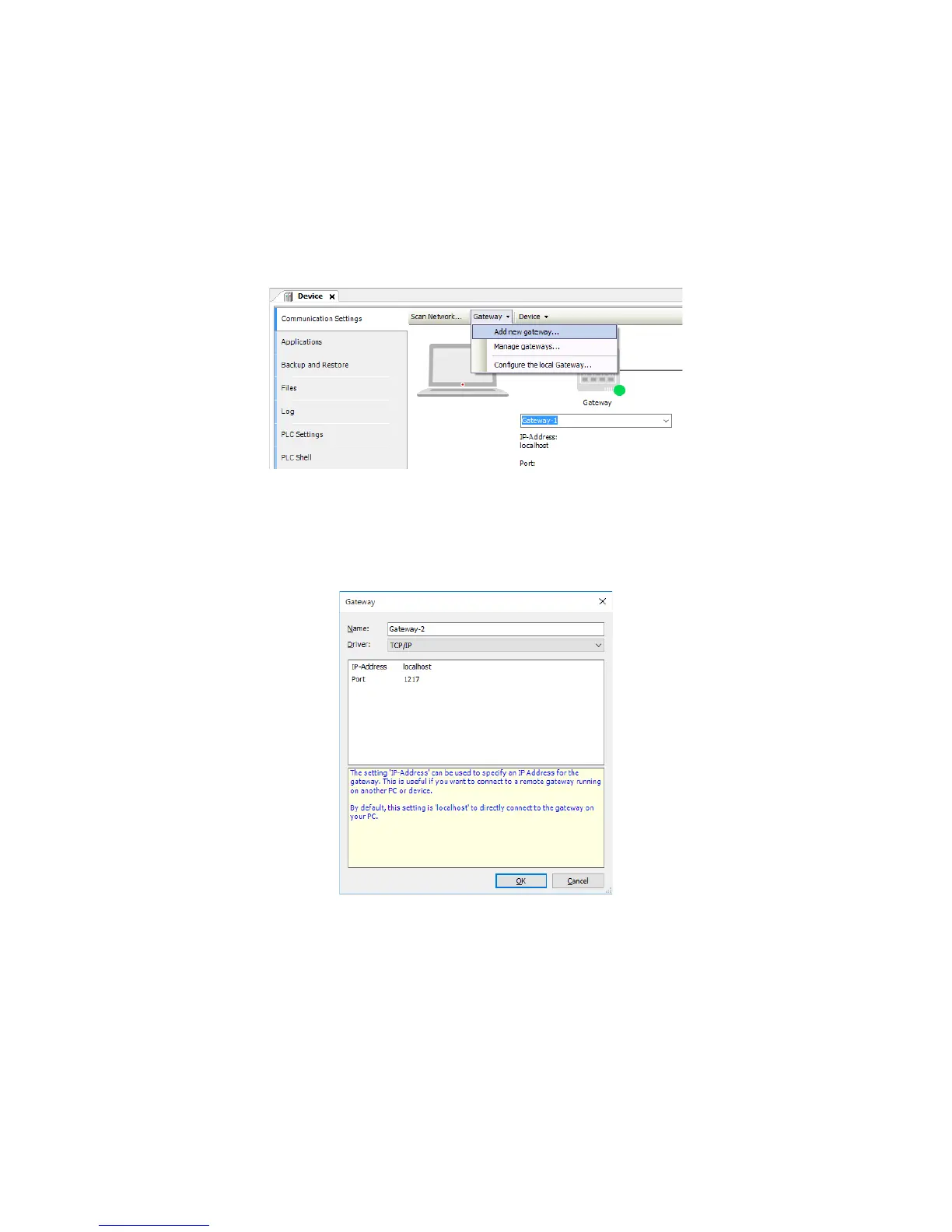
1. Double-click Device (*****) in the Devices window to display a window for setting up
device configuration. ((*****) shows the selected device name.)
2. In the Communication Settings window, click Gateway. On the menu, click Add
new gateway to open a window for adding a new gateway.
3. In the Select Device window, select the device you want to connect to, and click OK.
Enter IP-Address and Port for the new device, and click OK.
Note that, if you specify “localhost” for IP-Address, you can connect to a device
connected as “localhost”.
4. In the Communication Settings window, click Scan network to display the Select
Device window. Select the new device, and click OK.














 To Next Page