BASE STATION SETTINGS
42
5.5.1 Basic Network Settings
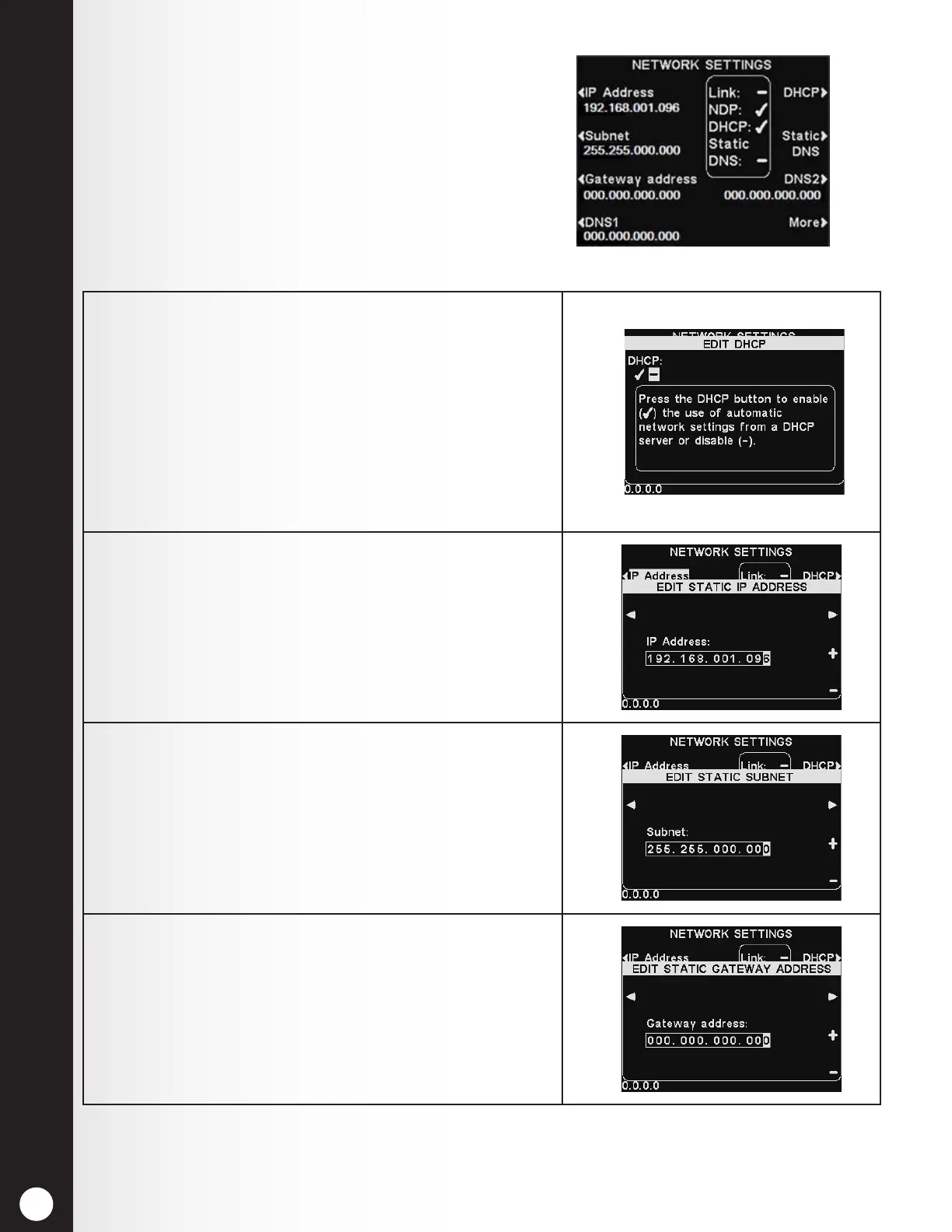
On the NETWORK SETTINGS display, press the button
for each setting you want to adjust, and make the
desired changes.
To edit IP, Subnet, Gateway and DNS addresses, press
the corresponding buttons to access the respective
display menus, and then use the ◄ and ► buttons to
move the highlight to each number you would like to
change, and press the + or − button to enter the desired
number.
1. DHCP allows the base to automatically acquire
network settings from a DHCP server installed on the
local network.
To edit this setting, press the DHCP button to
highlight ✔ (on) or − (off).
If set to Off, the base will use static network settings
entered via the NETWORK SETTINGS and ADVANCED
NETWORK SETTINGS displays.
2. IP Address is the internet protocol address of the
base, used to identify the base on the local network.
3. Subnet is a setting used by the base to identify
whether outgoing network packets are intended for
the local network or if they are intended to be routed
to an external network via the gateway.
4. Gateway address is a router address on the local
network used to move network packets from an
external network into the local network and vice-
versa.



 To Next Page