BASE STATION SETTINGS
69
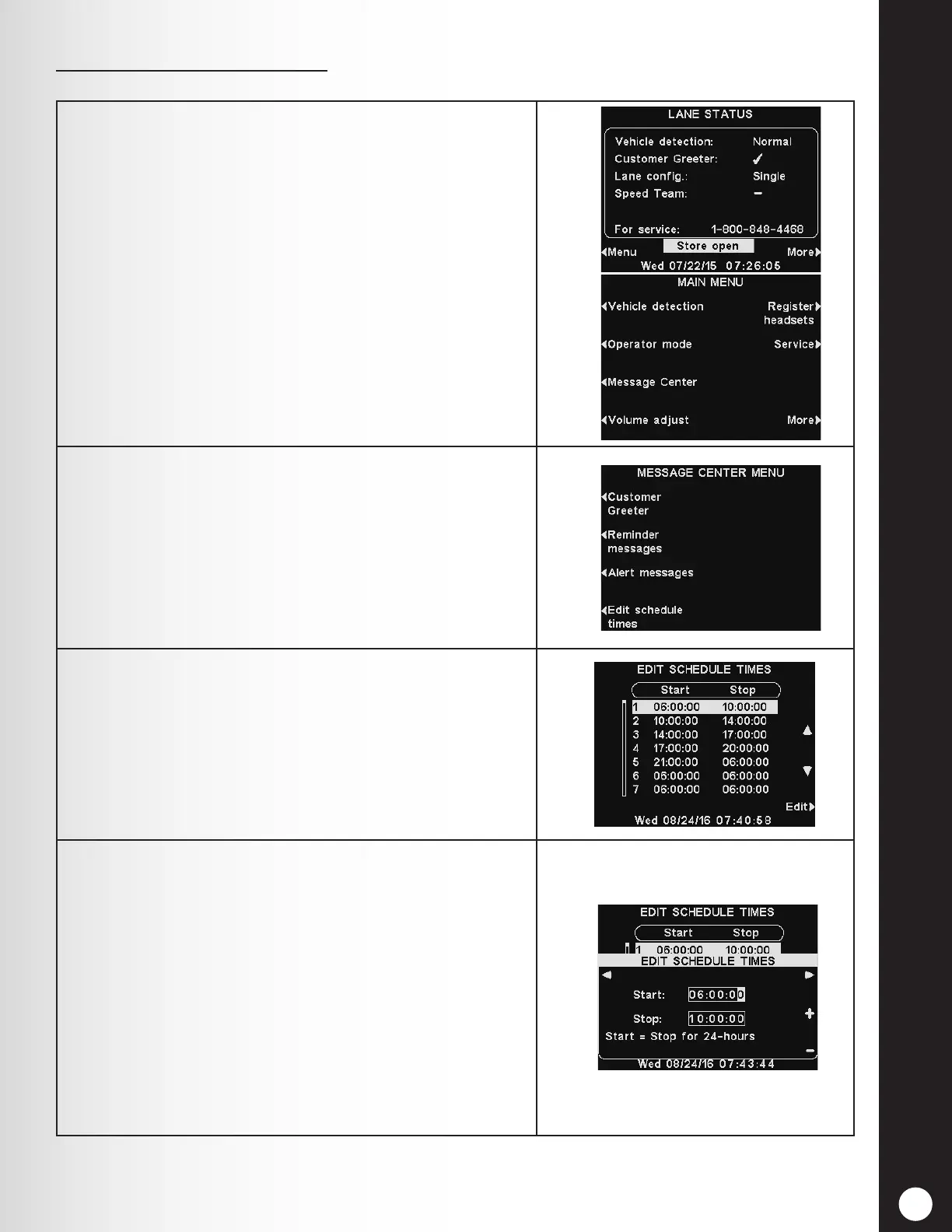
1. To set up all the time periods during each day that
all Message Center messages can be scheduled, press
the Menu button on the base station LANE STATUS
display.
On the MAIN MENU press the Message Center
button.
2. Press the Edit schedule times button on the
MESSAGE CENTER MENU. There are 12 possible time
periods.
Note: Changing these time periods will affect all
Message Center message schedules. Time periods
for Scheduled Outbound Volume Settings will not be
affected.
3. To select a time period to be edited, use the ▲(up) and
▼(down) buttons to scroll through the 12 available
time periods.
When the desired time period is highlighted, press the
Edit button.
4. On the drop-down EDIT SCHEDULE TIMES display, to
edit the Start or Stop time, use the ◄ and ► buttons
to move the highlight in the Start or Stop eld, and
use the + and − buttons to change the highlighted
numbers.
Note: Times are in 24 hour format (ex: 0500 = 5 AM,
1700 = 5 PM., 0000 = Midnight, etc).
To move from one eld to the other, repeat pressing
the ◄ or ► button until the highlight moves from one
eld to the other.
Press the Back button to save these settings.
4. Message Schedule Times



 To Next Page