BASE STATION SETTINGS
80
VAA Settings
VAA (Variable Audio Attenuation) settings can be adjusted to eliminate echo, feedback or uctuating
inbound audio levels.
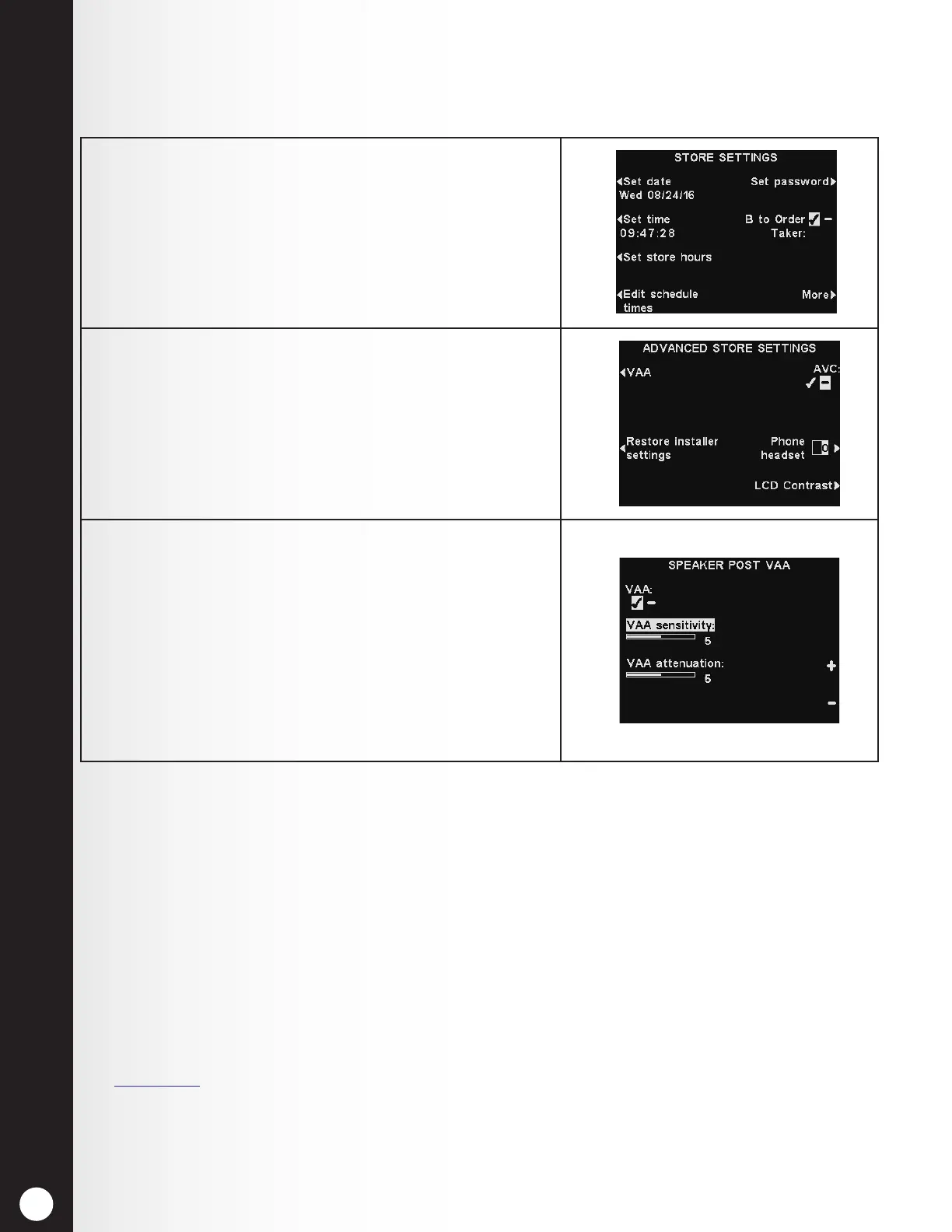
1. To turn the VAA feature on/off, or to adjust VAA
levels, press the More button on the STORE
SETTINGS display.
2. On the ADVANCED STORE SETTINGS display, press
the VAA button and then press the VAA button to
select ✔ (on) or − (off).
3. To adjust VAA sensitivity or VAA attenuation, select
the corresponding button and then press the + and –
buttons.
Notes:
In multiple-lane congurations, VAA settings will appear
for Lanes 1 and 2. Settings will be similar for both lanes.
If you have a dual lane drive-thru operation, you may
need to make this adjustment for each lane.
See below for details on VAA.
VAA Sensitivity Level
This is the volume level of the order taker’s voice required to activate the VAA circuit. During normal
operation, the inbound audio level should be reduced when the Order Taker speaks to the customer,
and should recover when the Order Taker stops speaking. If speaking to the customer does not
automatically reduce the inbound level, press the VAA sensitivity button and then press the + and −
buttons to adjust sensitivity to the Order Taker’s voice.
VAA Attenuation Level
This is the amount that the inbound volume level is reduced when the Order Taker speaks to the
customer. The attenuation level is factory set at 15dB, and should not require adjustment.
If the Order Taker cannot hear the inbound audio at all while speaking, the VAA attenuation can be
adjusted to a lower level. To make this adjustment, press the VAA attenuation button and then press
the + and − buttons until the desired level is reached. If you do not want any attenuation, please just
turn off VAA without adjusting this setting.
See Section 6.1, pg. 86, for more information on VAA.



 To Next Page