Home
HP
Printer
M351
Page 68 (Create printing shortcuts)
HP M351 - Create printing shortcuts
170 pages
Manual
Save Page as PDF
To Next Page
To Next Page
To Previous Page
To Previous Page
Loading...
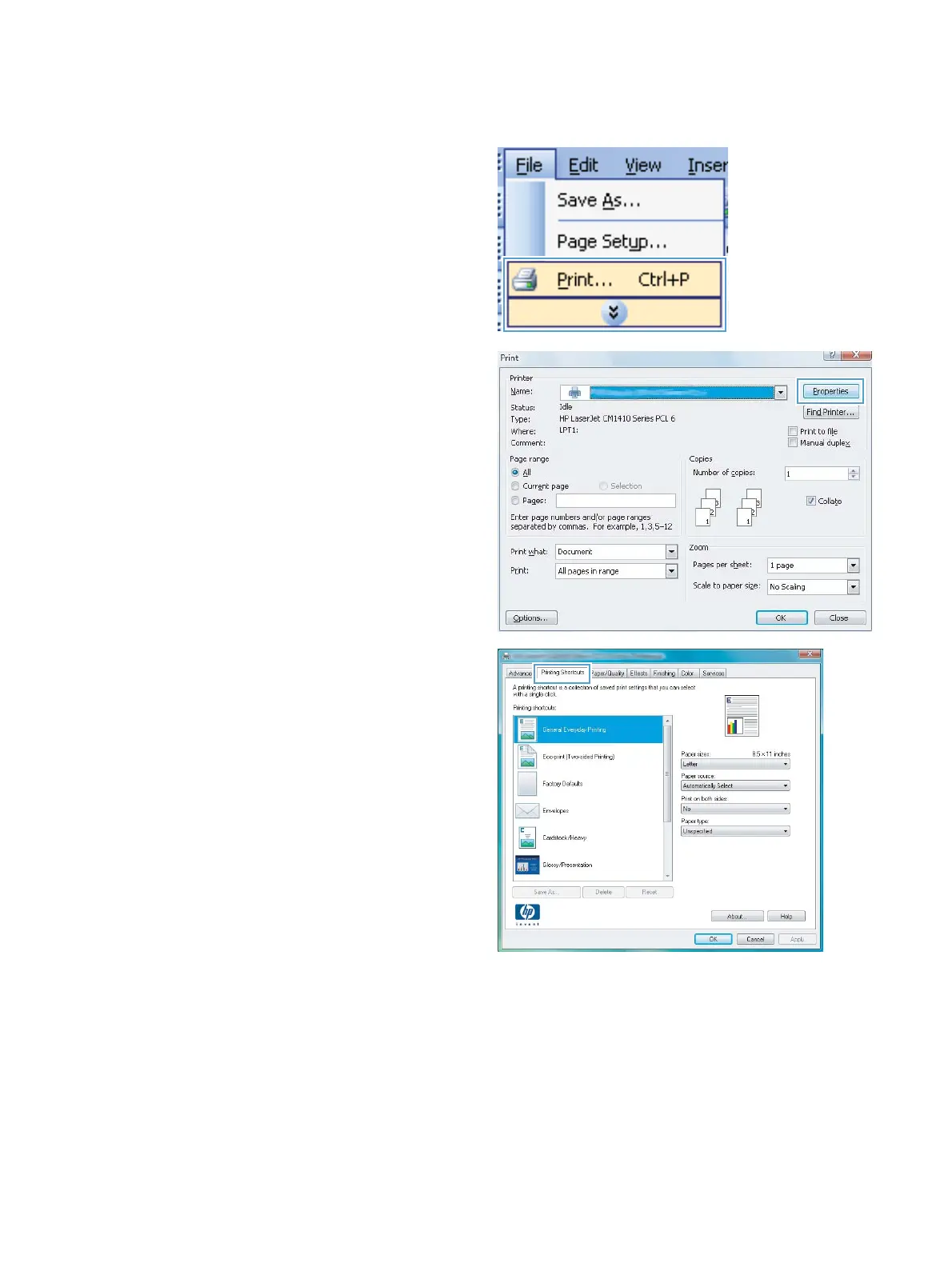
Create printing shortcuts
1.
On the
File
menu in the software program,
click
Print
.
2.
Select the product, and then
click the
Properties
or
Pr
efer
enc
es
button.
3.
Click the
Printing Shortcuts
tab.
54
Chapter 6 Print tasks
ENWW
67
69
Table of Contents
Main Page
Product basics
15
Product comparison
16
Control panel layout
18
Serial number and model number location
19
Control panel menus
21
HP Web Services menu
22
Reports menu
23
Quick Forms menu
24
System Setup menu
25
Service menu
30
Network Setup menu
31
Connect the product
33
Connect to a network
34
Supported network protocols
34
Install the product on a wired network
34
Obtain the IP address
34
Install the software
35
Install the product on a wireless network (wireless models only)
35
Connect the product to a wireless network using WPS
36
Connect the product to a wireless network using WPS by using the control panel menus
36
Connect the product to a wireless network using a USB cable
36
Install the software for a wireless product currently on the network
37
Disconnect from the wireless network
37
Reduce interference on a wireless network
37
Configure IP network settings
38
View or change network settings
38
Set or change the product password
38
Manually configure IPv4 TCP/IP parameters from the control panel
38
Link speed and duplex settings
39
Paper and print media
41
Understand paper use
42
Change the printer driver to match the paper type and size in Windows
43
Supported paper sizes
44
Supported paper types and tray capacity
46
Load paper trays
49
Load Tray 1
49
Load Tray 2 or optional Tray 3
50
Configure trays
52
Print cartridges
53
Print cartridge information
54
Supplies views
55
Print cartridge views
55
Manage print cartridges
56
Change settings for print cartridges
56
Print when a print cartridge is at estimated end of life
56
Enable or disable the At Very Low settings from the control panel
56
Print with EconoMode
57
Recycle supplies
57
Print-cartridge storage
57
HP policy on non-HP supplies
57
HP anticounterfeit Web site
58
Replacement instructions
59
Replace the print cartridges
59
Print tasks
63
Cancel a print job
64
Basic print tasks with Windows
65
Open the printer driver with Windows
65
Get help for any printing option with Windows
66
Change the number of print copies with Windows
66
Save custom print settings for reuse with Windows
66
Use a printing shortcut with Windows
66
Create printing shortcuts
68
Improve print quality with Windows
70
Select the page size with Windows
70
Select a custom page size with Windows
70
Select the paper type with Windows
71
Select the paper tray with Windows
71
Print on both sides (duplex) with Windows
71
Print on both sides manually with Windows
71
Automatically print on both sides with Windows
73
Print multiple pages per sheet with Windows
74
Select page orientation with Windows
76
Additional print tasks with Windows
78
Print colored text as black (grayscale) with Windows
78
Print on preprinted letterhead or forms with Windows
78
Print on special paper, labels, or transparencies with Windows
80
Print the first or last page on different paper with Windows
83
Create a booklet with Windows
85
Color
89
Adjust color
90
Change the color theme for a print job
90
Change the color options
91
Manual color options
91
Use the HP EasyColor option
93
Match colors
94
Manage and maintain
95
Print information pages
96
Use the HP Embedded Web Server
97
Open the HP Embedded Web Server
97
Features
97
Use HP Web Jetadmin software
98
Install memory DIMMs
99
Install memory DIMMs
99
Enable memory
103
Check DIMM installation
104
Memory allocation
104
Clean the product
105
Product updates
105
Solve problems
107
Self help
108
Solve problems checklist
109
Factors that affect product performance
111
Restore factory settings
112
Interpret control panel messages
113
Control panel message types
113
Control panel messages
113
10.XXXX Supply error
113
49 Error Turn off then on
113
50.X Fuser error Turn off then on
114
51.XX Error Turn off then on
114
54.XX Error Turn off then on
114
55.X Error Turn off then on
115
57 Fan error Turn off then on
115
59.X Error Turn off then on
115
79 Error Turn off then on
115
79 Service error Turn off then on
116
Black cartridge low
116
Black in wrong position
116
Black very low
116
Cleaning . . .
117
Cyan cartridge low
117
Cyan in wrong position
117
Cyan very low
117
Device error Press [OK]
118
Front door open
118
Genuine HP supply installed
118
Incompatible <color>
118
Incorrect supplies
118
Install <color> cartridge
119
Invalid driver Press [OK]
119
Jam in <location>
119
Jam in tray # Clear jam and then Press [OK]
119
Load tray # <TYPE> <SIZE>
119
Load tray 1 plain <SIZE> Cleaning Mode [OK] to start
120
Load tray <X> Press [OK] for available media
120
Load tray 1 <TYPE> <SIZE>
120
Magenta cartridge low
120
Magenta in wrong position
120
Magenta very low
121
Manual duplex Load tray <X> Press [OK]
121
Manual feed <TYPE> <SIZE> Press [OK] for available media
121
Memory is low Press [OK]
121
Misprint Press [OK]
122
Print failure, press OK. If error repeats, turn off then on.
122
Rear door open
122
Remove shipping lock from <color> cartridge
122
Remove shipping locks from cartridges
123
Replace <color>
123
Supplies low
123
Unexpected size in tray # Load <size> Press [OK]
123
Unsupported <color> Press [OK] to continue
124
Used <color> in use
124
Used <color> installed Press [OK] to continue
124
Used supplies in use
124
Yellow cartridge low
124
Yellow in wrong position
125
Yellow very low
125
Paper feeds incorrectly or becomes jammed
126
The product does not pick up paper
126
The product picks up multiple sheets of paper
126
Prevent paper jams
126
Clear jams
127
Jam locations
127
Clear jams in Tray 1
128
Clear jams in Tray 2
128
Clear jams in the fuser area
129
Clear jams in the output bin
131
Clear jams in the duplexer (duplexing models only)
131
Supplies and accessories
135
Order parts, accessories, and supplies
136
Part numbers
136
Service and support
137
Hewlett-Packard limited warranty statement
138
HP's Premium Protection Warranty: LaserJet print cartridge limited warranty statement
140
Data stored on the print cartridge
141
End User License Agreement
142
OpenSSL
144
Customer support
145
Repack the product
146
Product specifications
147
Physical specifications
148
Power consumption, electrical specifications, and acoustic emissions
148
Environmental specifications
148
Regulatory information
149
FCC regulations
150
Environmental product stewardship program
151
Protecting the environment
151
Ozone production
151
Power consumption
151
Toner consumption
151
Paper use
151
Plastics
151
HP LaserJet print supplies
151
Return and recycling instructions
152
United States and Puerto Rico
152
Multiple returns (more than one cartridge)
152
Single returns
152
Shipping
152
Residents of Alaska and Hawaii
153
Non-U.S. returns
153
Paper
153
Material restrictions
153
Disposal of waste equipment by users in private households in the European Union
153
Chemical substances
153
Material Safety Data Sheet (MSDS)
154
For more information
154
Declaration of conformity
155
Declaration of Conformity (wireless models)
157
Safety statements
159
Laser safety
159
Canadian DOC regulations
159
VCCI statement (Japan)
159
Power cord instructions
159
Power cord statement (Japan)
159
EMC statement (Korea)
160
Laser statement for Finland
160
GS statement (Germany)
161
Substances Table (China)
161
Restriction on Hazardous Substances statement (Turkey)
161
Additional statements for wireless products
162
FCC compliance statement—United States
162
Australia statement
162
Brazil ANATEL statement
162
Canadian statements
162
European Union regulatory notice
162
Notice for use in France
163
Notice for use in Russia
163
Korean statement
163
Taiwan statement
163
Index
165
Other manuals for HP M351
Getting Started Guide
20 pages
Related product manuals
HP Color LaserJet Pro M351
8 pages
HP M601
8 pages
HP M402
16 pages
HP M401
160 pages
HP M176
158 pages
HP M401n
16 pages
HP M225dn
146 pages
HP M452dw
16 pages
HP M477fnw
182 pages
HP M1522 MFP
4 pages
HP CM6040 MPF
4 pages
HP M601 series
264 pages



 To Next Page