Removal and replacement procedures 29
7. Power up the server.
Remove the system board assembly
1. Power down the server (on page 24).
2. Disconnect the power cord from the AC source.
3. Disconnect the power cord from the server.
4. Remove the chassis cover (on page 27).
5. It is recommended that you take a picture of the current system board cable connections for reference
during server reassembly.
6. If the drive cage is connected to a storage controller board, disconnect the Mini-SAS cable from the
board.
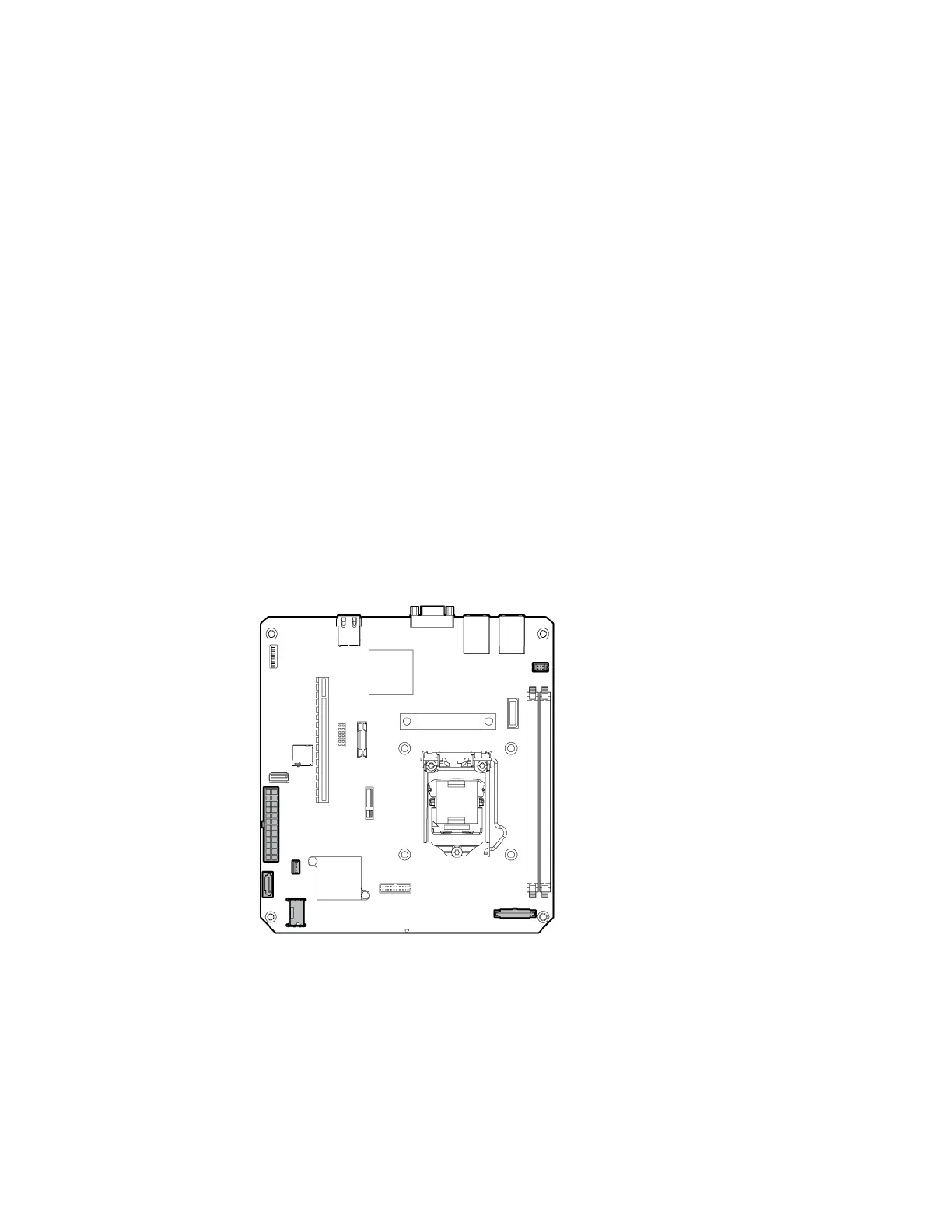
7. Disconnect all cables connected to the system board:
o 24-pin system board power supply cable
o SATA cable (only if an optical drive is installed)
o Mini-SAS cable (only if the drive cage is connected to the system board)
o Front I/O cable (pulling up the blue loop to disconnect the cable)
o Fan cable
o Ambient temperature sensor cable (pulling up the brown loop to disconnect the cable)
In the following system board illustration, the gray connectors correspond to the system board cables
that you must disconnect.



 To Next Page
 Loading...