Component identification 68
Front panel LEDs and buttons
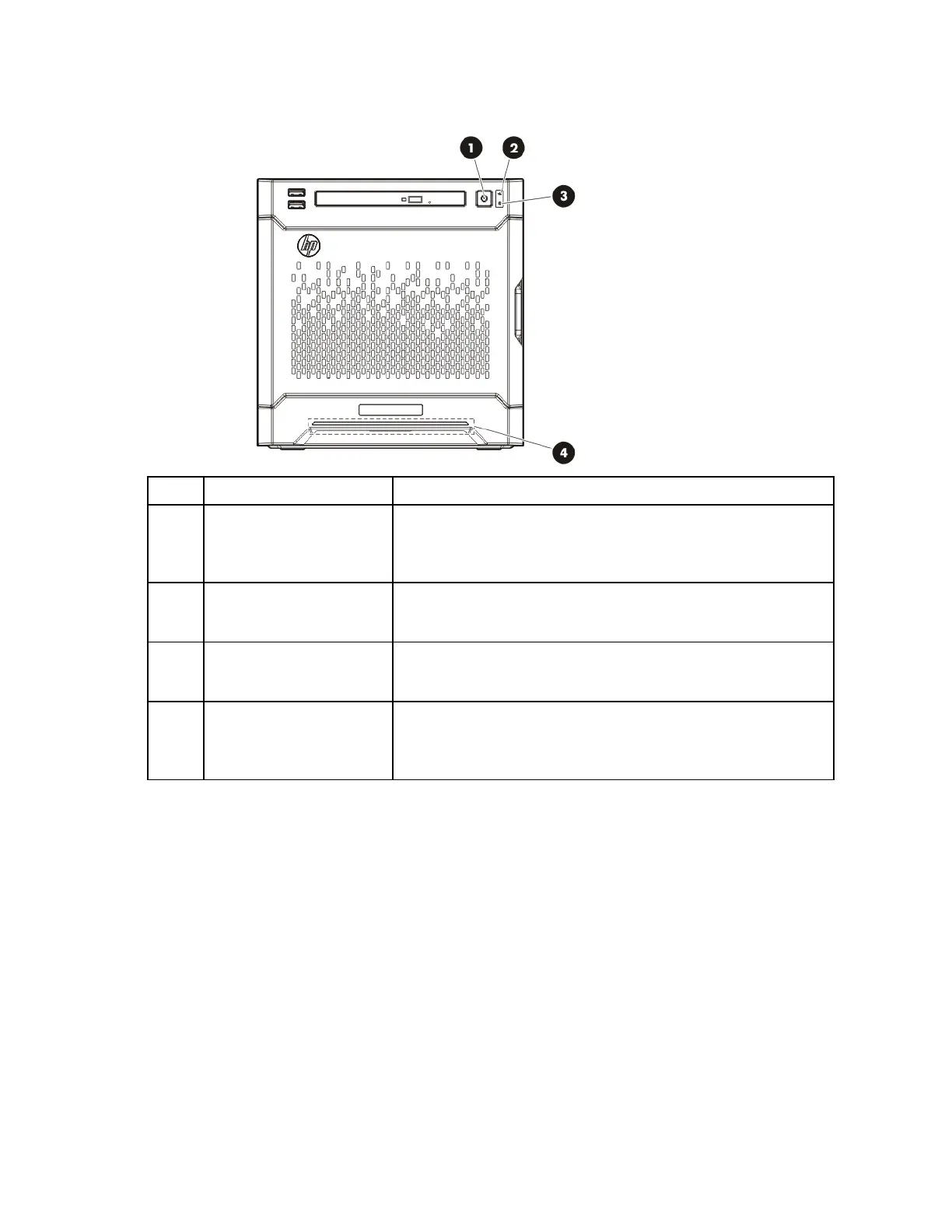
Item Description Status
1
Power On/Standby button
and system power LED
Solid green = System on
Flashing green (1 Hz/cycle per sec) = Performing power on sequence
Solid amber = System in standby
Off = No power present*
2
NIC status LED Solid green = Link to network
Flashing green (1 Hz/cycle per sec) = Network active
Off = No network activity
3
Drive status LED Solid green = System on
Flashing green = Drive activity
Off = System in standby or no power present
4
Health LED Solid blue = Normal
Flashing amber = System degraded
Flashing red (1 Hz/cycle per sec) = System critical
Fast-flashing red (4 Hz/cycles per sec) = Power fault**
* Facility power is not present, power cord is not attached, no power supplies are installed, power supply failure has
occurred, or the power button cable is disconnected.
** To identify components in a degraded or critical state, see the iLO/BIOS logs and the server troubleshooting guide.



 To Next Page
 Loading...