Removal and replacement procedures 50
Heatsink
To remove the component:
1. Power down the server (on page 24).
2. Disconnect the power cord from the AC source.
3. Disconnect the power cord from the server.
4. Remove the chassis cover (on page 27).
5. Remove the system board assembly (on page 29).
WARNING: To reduce the risk of personal injury from hot surfaces, allow the heatsink to cool
before touching it.
CAUTION: Heatsink retaining screws should be tightened or loosened in diagonally opposite
pairs (in an "X" pattern). Do not overtighten the screws as this can damage the board, connectors,
or screws. Use the wrench supplied with the system to reduce the possibility of overtightening the
screws.
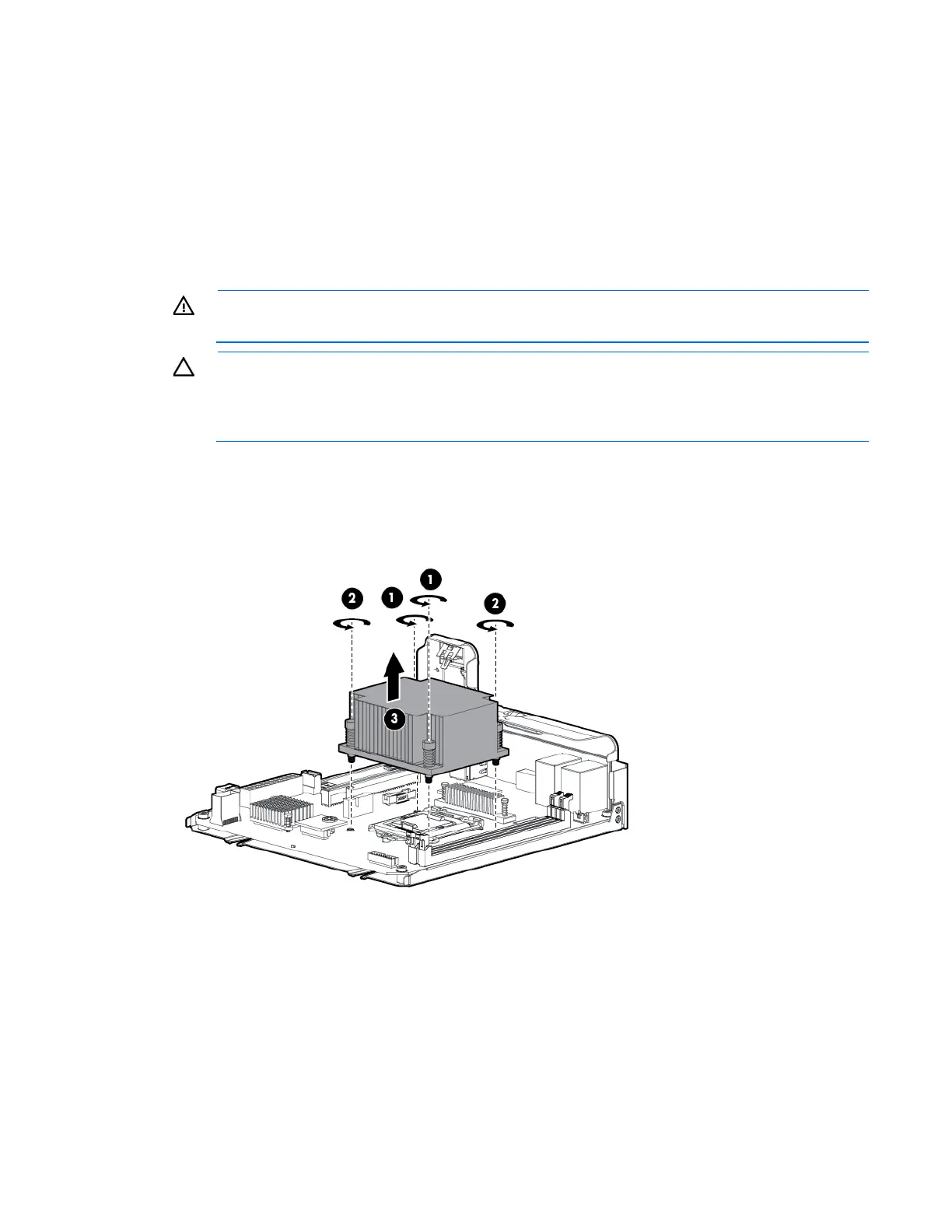
6. Remove the heatsink:
a. Loosen one pair of diagonally opposite screws halfway, and then loosen the other pair of screws.
b. Completely loosen all screws in the same sequence.
c. Remove the heatsink from the processor backplate.
To replace the component:
1. Clean the old thermal grease from the processor with the alcohol swab. Allow the alcohol to evaporate
before continuing.



 To Next Page
 Loading...