Removal and replacement procedures 34
Optical drive blank
To remove the component:
1. Power down the server (on page 24).
2. Disconnect the power cord from the AC source.
3. Disconnect the power cord from the server.
4. Remove the chassis cover (on page 27).
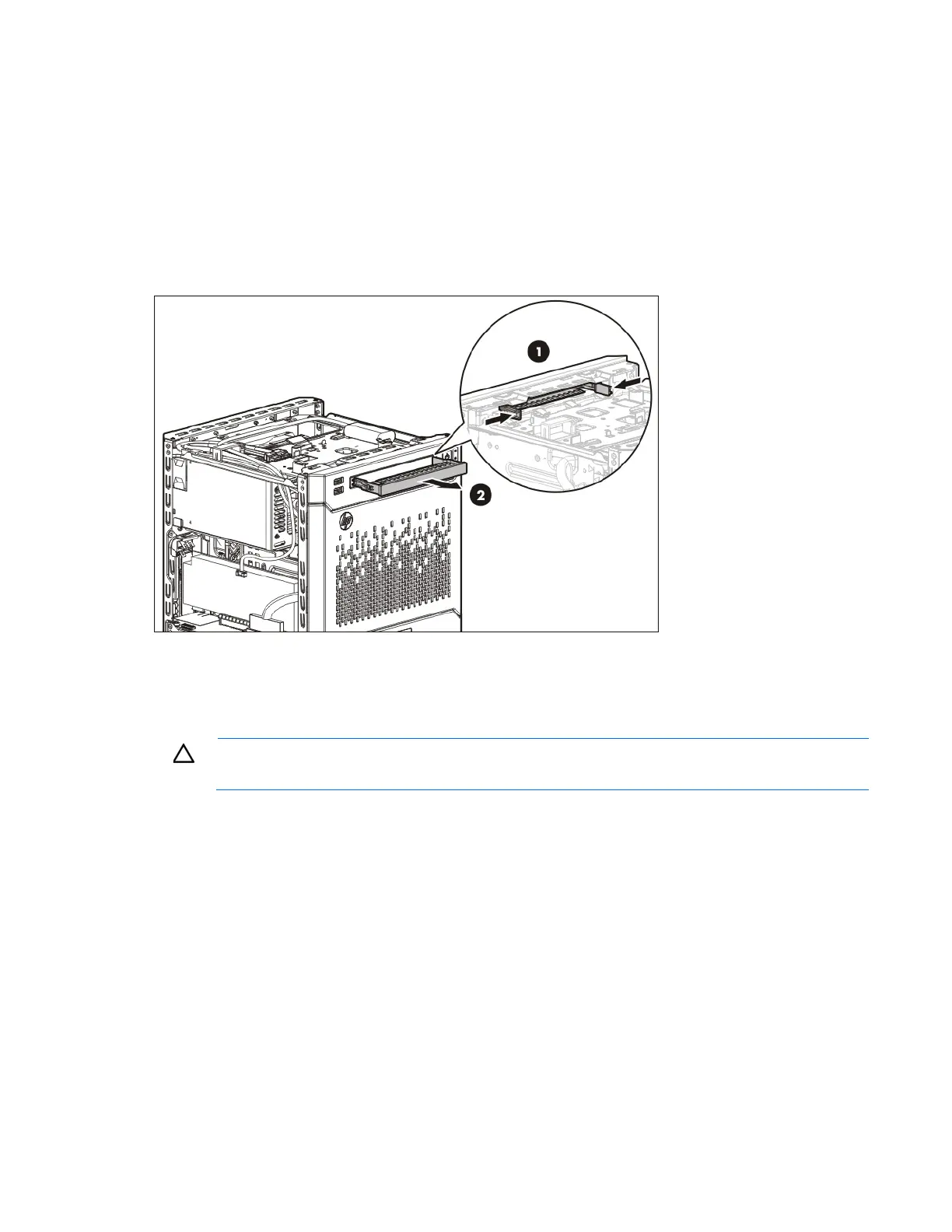
5. Press the optical drive blank release latches, and then pull the blank out of the drive bay.
To replace the component, reverse the removal procedure.
Optical drive
CAUTION: To prevent improper cooling and thermal damage, do not operate the server unless
all bays are populated with either a component or a blank.
To remove the component:
1. Power down the server (on page 24).
2. Disconnect the power cord from the AC source.
3. Disconnect the power cord from the server.
4. Remove the chassis cover (on page 27).
5. Disconnect the optical drive cable from the drive.













 To Next Page