Removal and replacement procedures 42
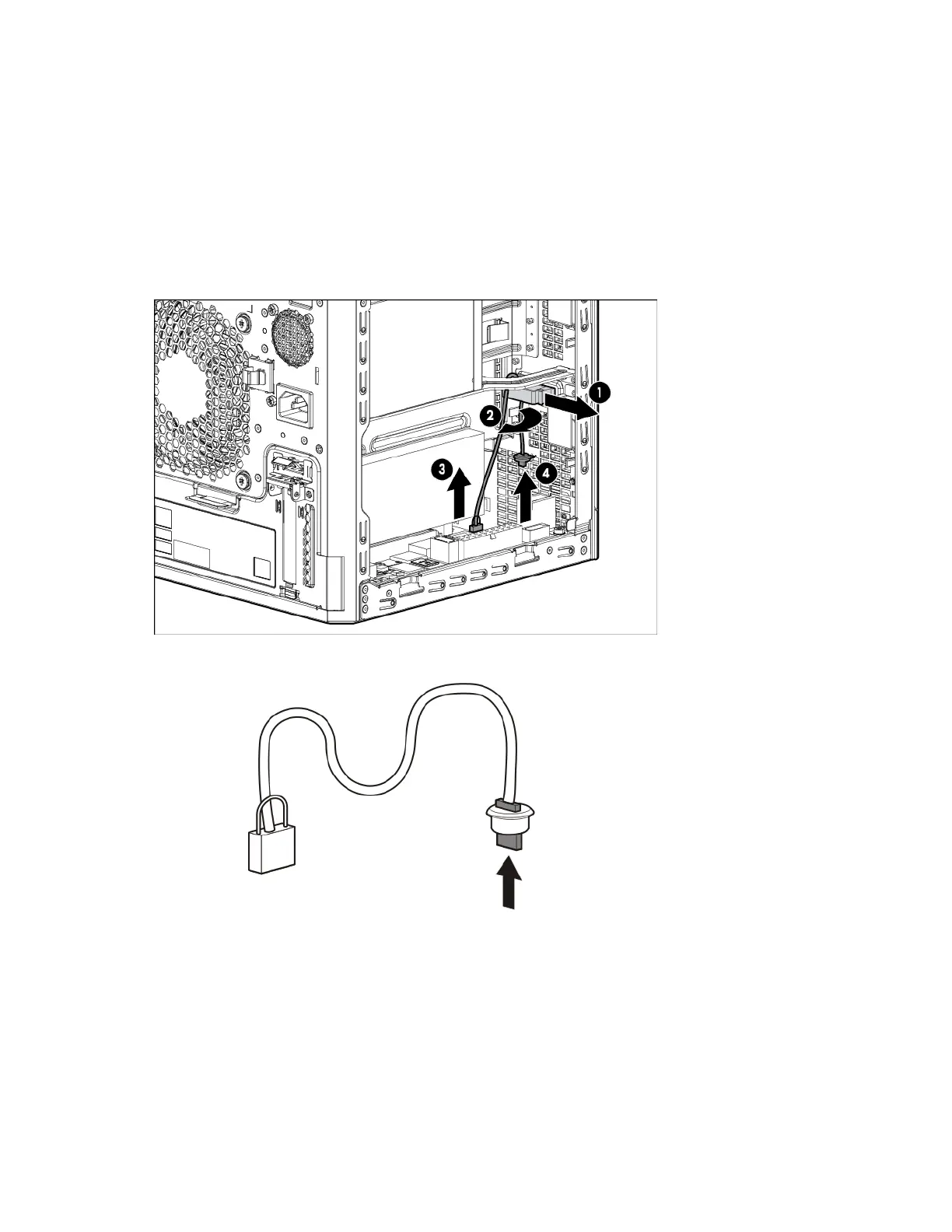
6. Remove the ambient temperature sensor cable:
a. Open the left-side chassis cable clip.
b. If more working room is required, disconnect the following cables from the system board:
— System board power cable
— Optical drive SATA cable
— Mini-SAS cable
c. Pull the brown loop to disconnect the sensor cable from the system board.
d. Detach the cable end with the rubber stopper from the chassis.
e. Remove the rubber stopper from the sensor cable.
To replace the component, reverse the removal procedure.
LFF non-hot-plug drive cable assembly
The four-bay LFF non-hot-plug drive cable assembly consists of the drive power and Mini-SAS cables attached
to a bracket. If either the drive power or Mini-SAS cable becomes defective, the entire cable assembly will
need to be replaced (spare PN: 724493-001).



 To Next Page
 Loading...