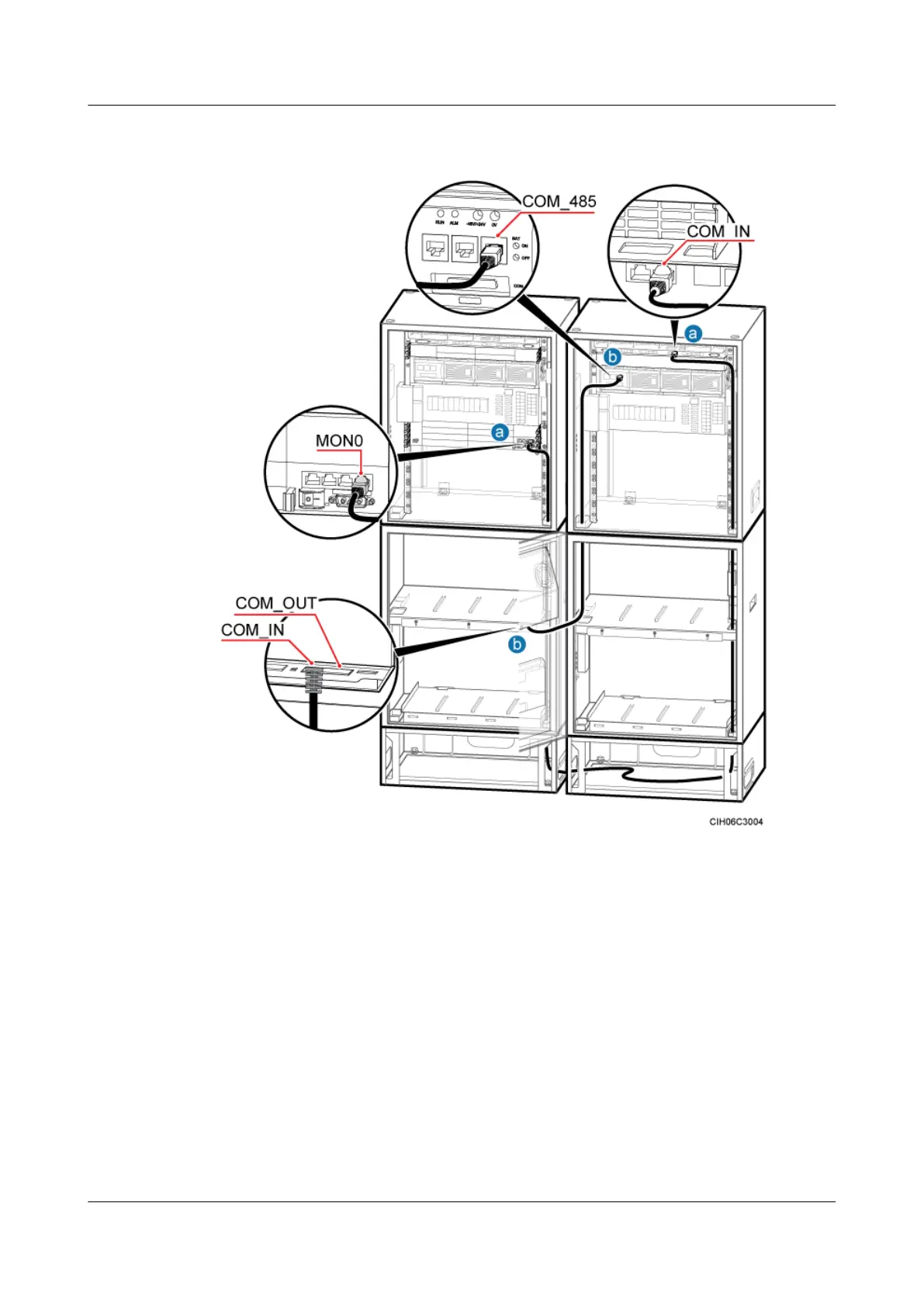
Figure 6-101 Installing monitoring signal cables in the scenario of two APM30Hs+two
IBBS200Ds/IBBS200Ts
Step 4 Route the cable by referring to 6.5.1 Cabling Requirements, and then use cable ties to bind the
cable.
Step 5 Label the installed cables. For details, see Attaching an L-Shaped Label.
Step 6 Run each cable that leaves the cabinet in the PVC corrugated pipe, and then tie the pipe to the
cable hole in the cabinet.
----End
Installing Monitoring Signal Cables in a Scenario of one APM30H+two
IBBS200Ds/IBBS200Ts
If a DBS3900 is configured with one APM30H and two IBBS200Ds or IBBS200Ts, monitoring
signal cables between the CMUA and the BBU in an APM30H, between the APM30H and the
DBS3900 (Ver.B)
Installation Guide
6 Outdoor Scenario with AC Power Supply (BBU Installed
in an APM30H)
Issue 06 (2011-09-15) Huawei Proprietary and Confidential
Copyright © Huawei Technologies Co., Ltd.
108



 To Next Page