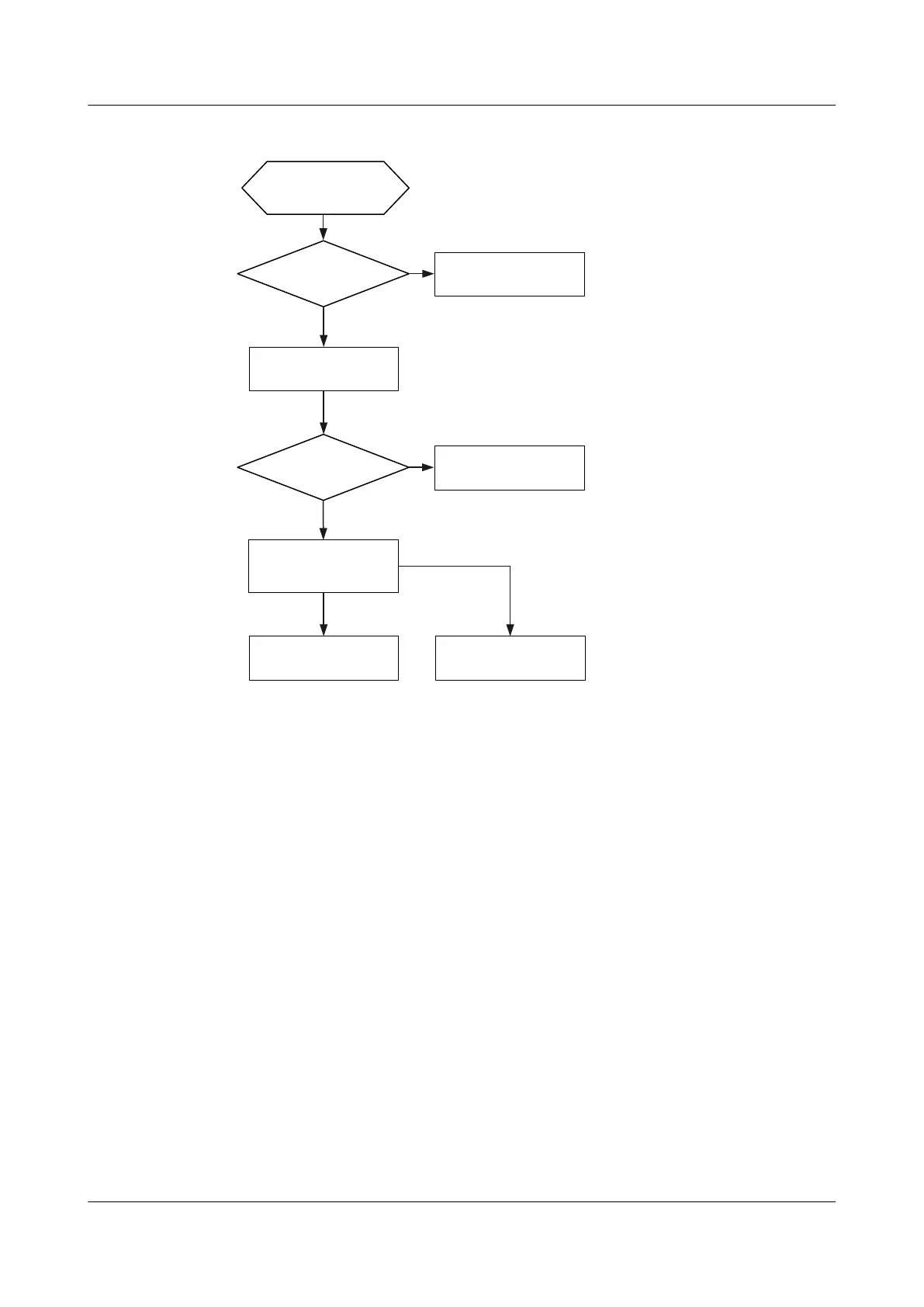
Figure 12-1 Power supply troubleshooting flowchart
Measure input voltage
Is the voltage
in normal range?
Yes
Adjust the input
voltage
No
No
Is the fault rectified?
End
Yes
Replace the power
module
Reinstall the power
module
Fault on power
supply
Fault on device
Seek technical
support
Repair the power
module
Procedure
1. Use a multimeter to measure the input voltage and compare the input voltage against the
working voltage range of the power supply.
2. Reinstall the power module and power cable to ensure that they are connected properly.
3. Install the power module in another switch, or install another power module in this
switch.
– If the power module is faulty, send it to Huawei for repair.
– If the device is faulty, contact technical support of Huawei or the equipment
supplier.
12.1.2 A Switch Cannot Be Powered On
Fault Description
The SYS and PWR indicators of a switch are off, and no information is displayed on the serial
port.
S2700&S3700&S5700&S6700 Switch
Hardware Installation and Maintenance Guide
12 Hardware Troubleshooting
Issue 13 (2017-11-20) Huawei Proprietary and Confidential
Copyright © Huawei Technologies Co., Ltd.
88





 To Next Page