Copyright © Huawei Technologies Co., Ltd.
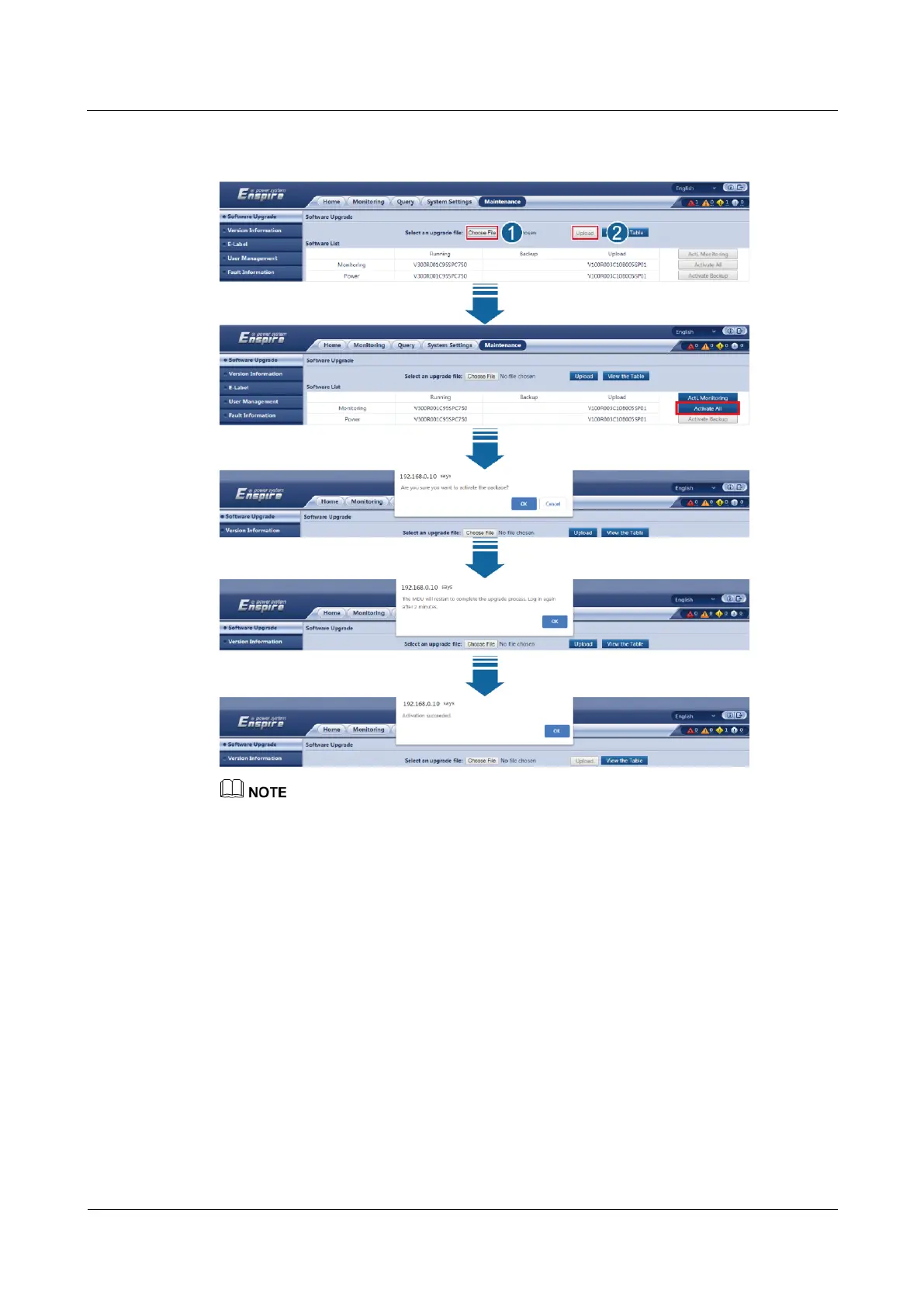
Figure 8-2 Uploading and activating the software (the BCB switches of all battery cabinets are
OFF)
The system starts the upgrade process. The upgrade sequence is MDU, battery cabinet 1, battery cabinet
2, ..., and battery cabinet N. The upgrade progress percentage is displayed in the corresponding Status
column. During the MDU upgrade, the message The MDU will restart to complete the upgrade
process. Log in after 2 minutes. is displayed. Click OK. The MDU will restart to complete the upgrade
task. Wait for about 2 minutes and log in to the WebUI again.
LCD
Choose Maintenance > USB Operations > Upgrade Software, tap Upload and find the
correct package in the corresponding path. After the upload is complete, tap Details. On the
screen displayed, select All, tap Activate, and perform operations as prompted.











 To Next Page