3 - 18 Machine Maintenance 704-0212-209 VM Series Maintenance and Safety Manual
Spindle Chiller Control Panel for Model HWK
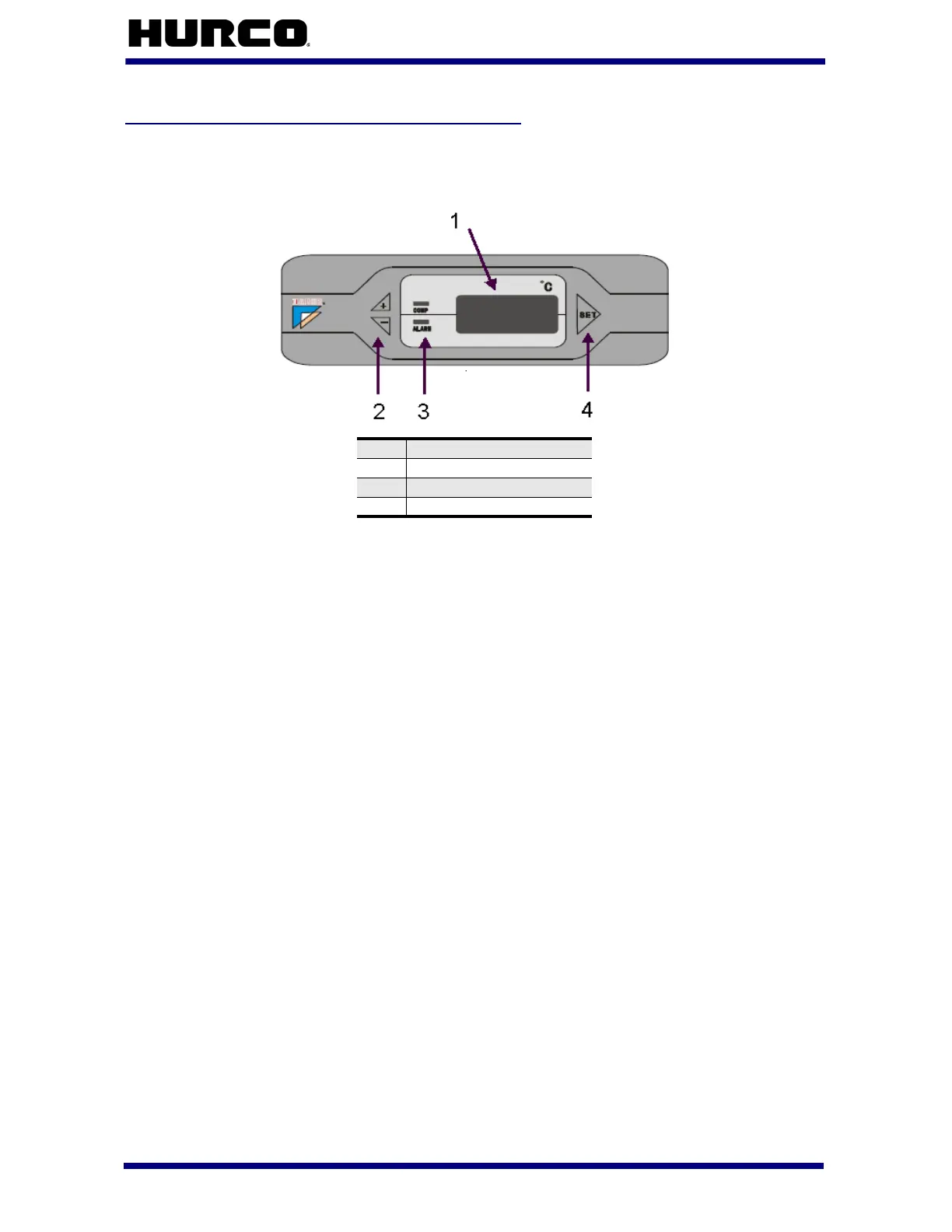
Here is the control panel located on the HWK spindle chiller:
Figure 3–2. HWK Spindle Chiller Control Panel
The spindle chiller turns on when machine and control power is on. The spindle chiller
displays 888 initially, then the current liquid temperature appears, and the system begins
operation. A temperature sensor monitoring the ambient temperature is located on the
left side of the control panel.
If an error occurs with the spindle chiller unit, a code may appear on the spindle chiller
display. Please refer to the label on the front of the spindle chiller for troubleshooting
information.
The control panel has 2 LED indicators.
•The COMP field displays a green light to indicate the Compressor is operating
properly. The green light flashes to indicate the Compressor is in the delay
phase.
•The ALARM field displays a red light to indicate there is an alarm. When the
red light is off, there is no alarm and the unit is operating properly.
The control panel has 3 function keys.
•The Plus (+) and Minus (-) keys on the left side of the panel adjust the
display value.
•The Set key on the right side of the panel accesses the chiller parameters.
Press the Plus (+) function key to display the room temperature.
Press the Minus (-) function key to display the liquid temperature.
1
Display
2
+/- Function keys
3
LED Indicators
4
Set Function key



 To Next Page