3 - 20 Machine Maintenance 704-0212-209 VM Series Maintenance and Safety Manual
Spindle Chiller Control Panel for Model HWT
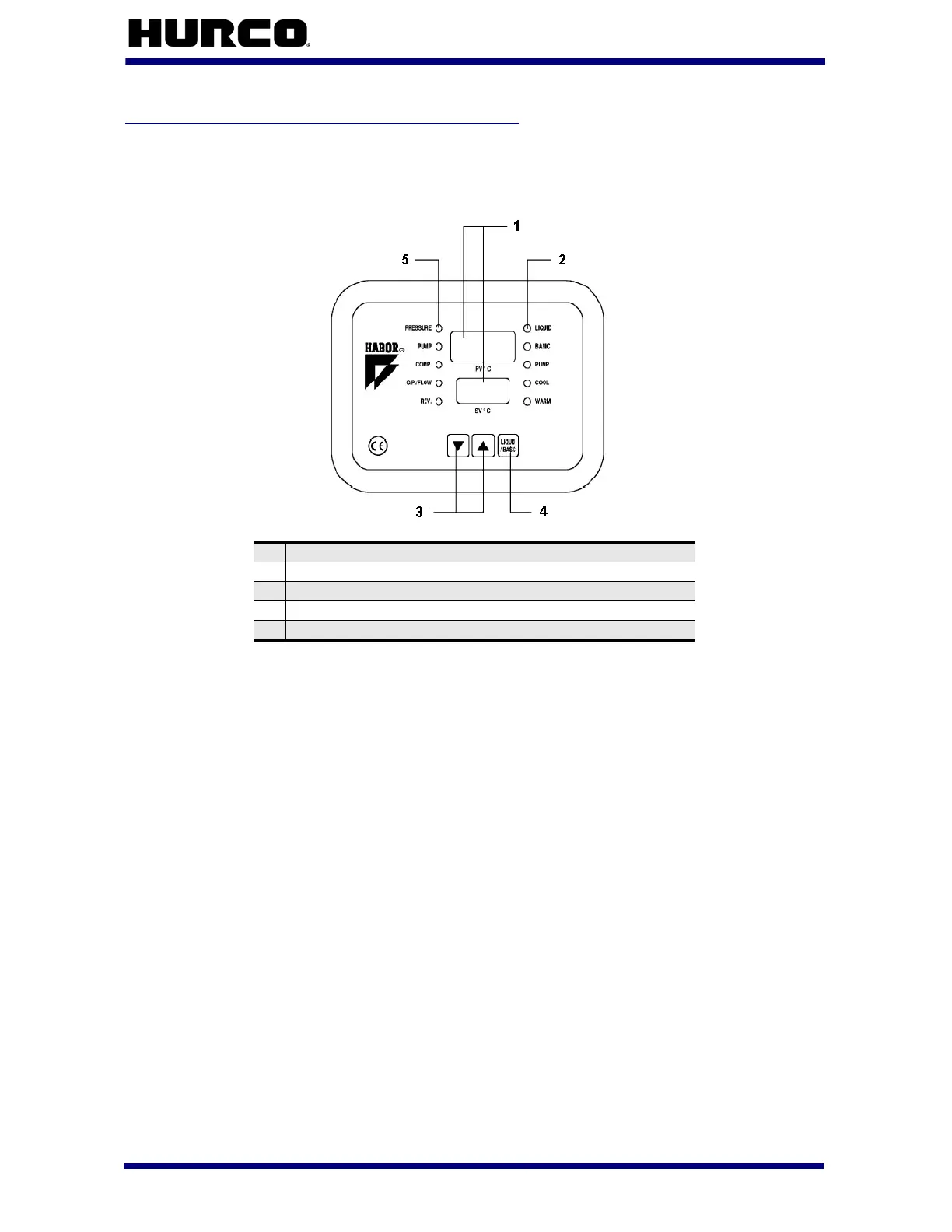
Here is the control panel located on the spindle chiller:
Figure 3–3. HWT Spindle Chiller Control Panel
The spindle chiller turns on when machine power is On. The spindle chiller displays show
dashes followed by the temperatures, and the system operation begins. The objects on
the control panel are defined as follows:
• Temperature Display—displays temperature information in LED screens:
• PV
°C—displays the current temperature of the liquid or ambient air
temperature.
• Select the Liquid/Basic button on the spindle chiller control panel
until the Basic Operation Lamp lights to display the ambient air
temperature.
• Select the Liquid/Basic button on the spindle chiller control panel
until the Liquid Operation Lamp lights to display the liquid
temperature.
• SV
°C—displays the differential temperature between ambient air and
liquid, the temperature at which the liquid cooling occurs.
1 Temperature Display
2 Operation Lamps
3 Temperature Setting Buttons
4 Liquid/Basic Temperature Display Switch
5 Alarm Message Indicators



 To Next Page