Pg 17 S22A/S23A 2001b 2100 v1.0
ACTIVATING THE PLC
Position the head, fixed vise, and shuttle vise switches to the NEUTRAL (center) positions. If any of these
switches are not in the NEUTRAL position, the hydraulics will not start. The PLC control will become active
when the HYDRAULIC START button is depressed and "held in" momentarily. First, the HMI and PLC's current
revision number, 2100 1.0, will be shown on the display window and finally the MANUAL MODE display window will
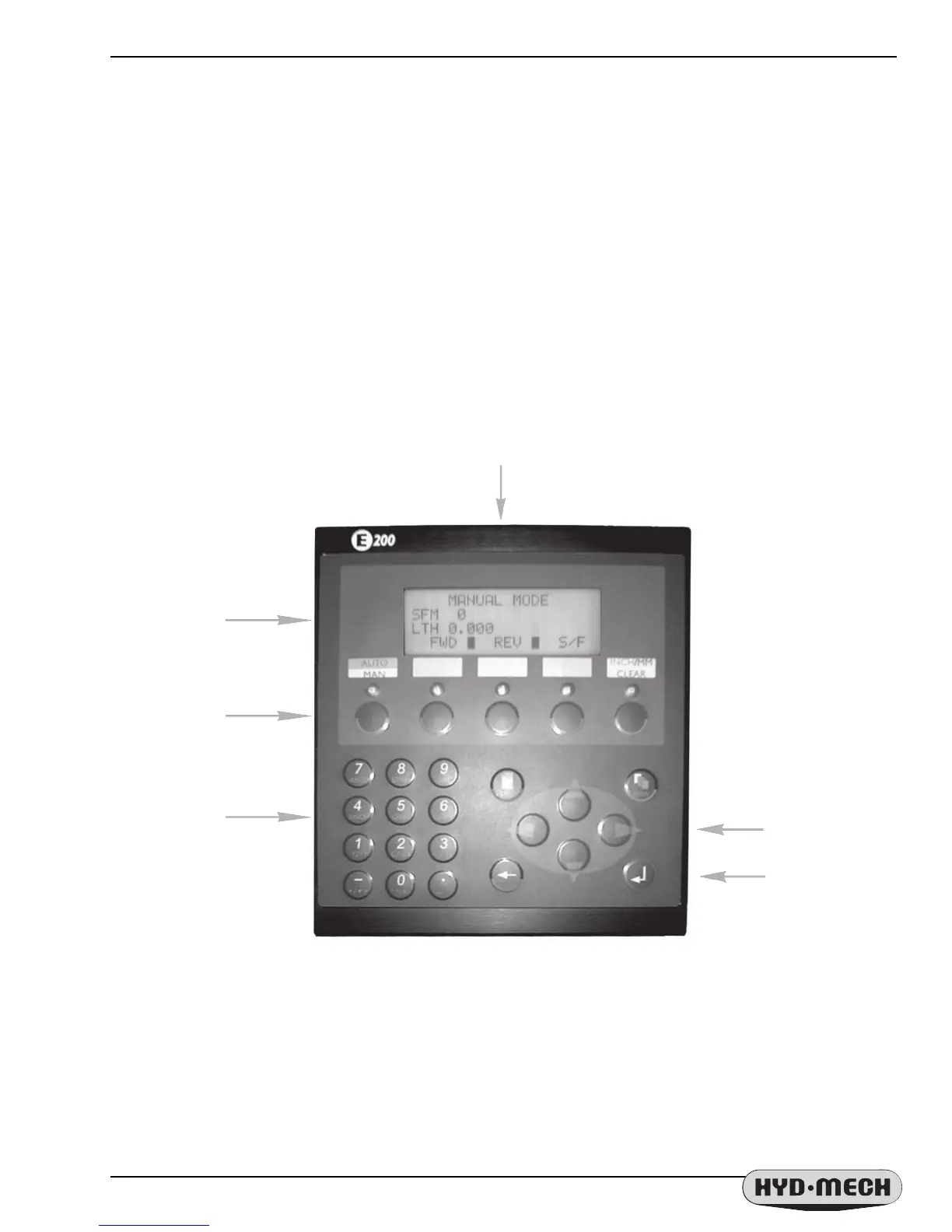
appear as shown below. The AUTO/MAN green indicator light will be on and all MANUAL controls are enabled. The
"LTH" value (shuttle vise position) will always display zero at start up. The "LTH" value can be reset or cleared
at any time in MANUAL mode by pressing the CLEAR function button.
PLC CONTROL PANEL
PLC FUNCTION
KEYS
CURSOR KEYS
DISPLAY WINDOW
ENTER KEY
NUMERIC KEY PAD
BLADE SPEED (SFM)
IN SURFACE FEET
(METERS) PER
MINUTE and
SHUTTLE VISE (LTH)
POSITION


 To Next Page