21 | P a g e
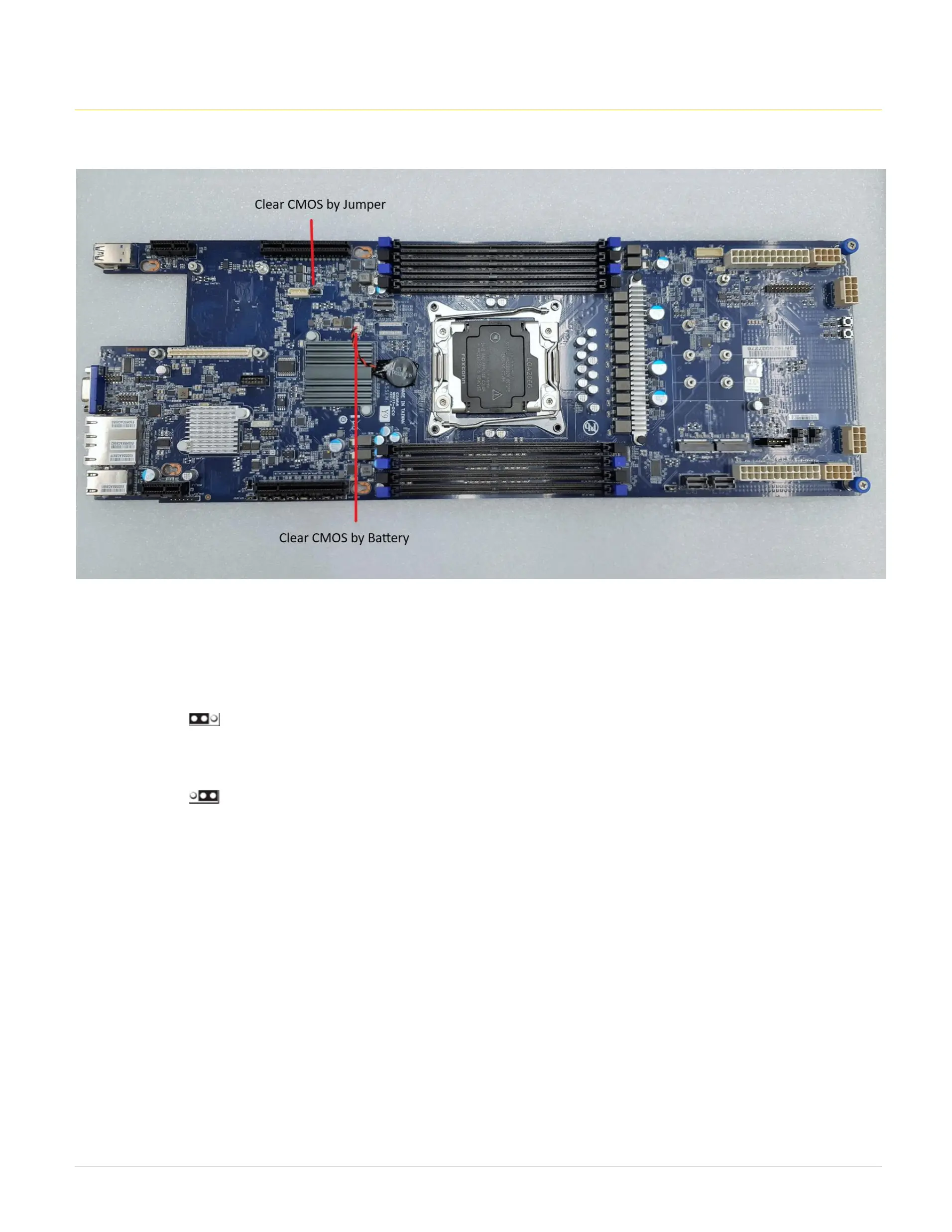
13. How to clear the CMOS with jumper and battery.
This section provides information on how to clear the CMOS by jumper and battery.
Clear CMOS by Jumper
a. Power system off
b. Unplug power from system
c. Move jumper from PIN 1-2 to 2-3
d. Wait 5-10 seconds
e. Move jumper back from PIN 2-3 to PIN 1-2
f. Plug power back in
g. Turn system ON
h. Allow system to go through a complete power cycle in order to initialize all components
i. NOTE: ALL BIOS settings will be erased after clearing CMOS (Customer will need to re-upload)
Clear CMOS by Battery
a. Power system off
b. Unplug power from system
c. Remove CMOS battery connector from motherboard
d. Wait 5-10 seconds
e. Plug CMOS battery connector back onto motherboard
f. Plug power back in
g. Turn system ON
h. Allow system to go through a complete power cycle in order to initialize all components



 To Next Page