59 | P a g e
29.7 IPMI
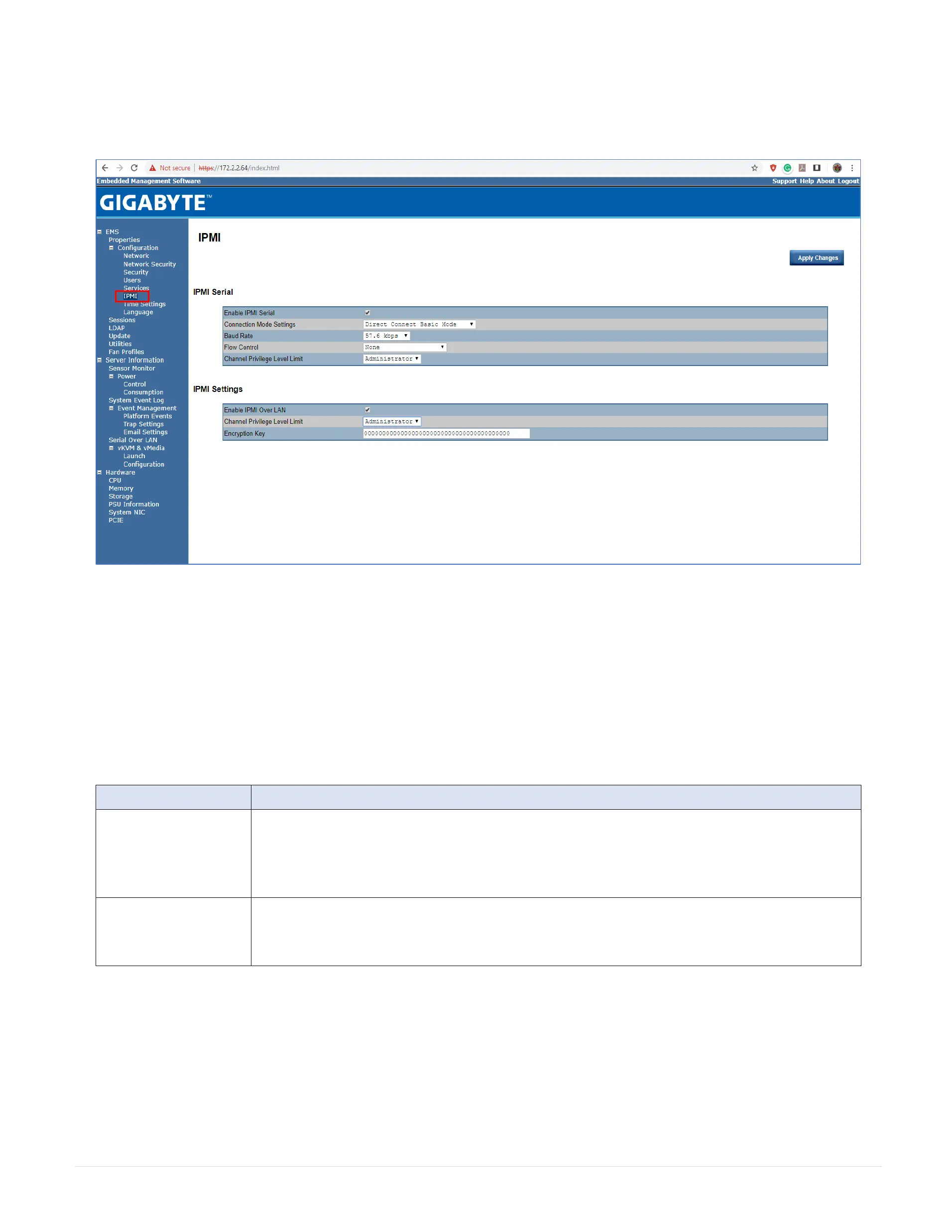
The IPMI page contains two sections: IPMI Serial and IPMI Settings.
29.7.1 IPMI Serial
There are four serial configuration in IPMI Serial: Connection Mode Settings, Baud Rate, Flow Control, and Channel Privilege Level Limit.
The Connection Mode Settings allows user to select the Console redirection type and to manage the system from a remote location.
Once the connection mode is set, select the Baud Rate and Flow Control from the drop-down list.
With Channel Privilege Level Limit, users can be configure to operate with a particular maximum Privilege Level. Privilege levels tell the BMC which commands are
allowed to be executed. The following table shows the Channel Privilege Level.
This may be considered the lowest privilege level.
All BMC commands are allowed, except for configuration commands that can change the behavior of the out-of-band
interfaces. For example, Operator privilege does not allow the capability to disable individual channels, or change user
access privileges.
All BMC commands are allowed, including configuration commands. An Administrator can even execute configuration
commands that would disable the channel that the Administrator is communicating
29.7.2 IPMI Settings
IPMI Settings provides remote configuration over LAN. To activate IPMI remote configuration by LAN, check Enable IPMI over LAN option, define the Channel
Privilege Level Limit, and enter the Encryption Key.
When you finish the configuration, click Apply Changes.



 To Next Page