© 2023 HyQuest Solutions 27
Configuration
3.2 Configuration Menus
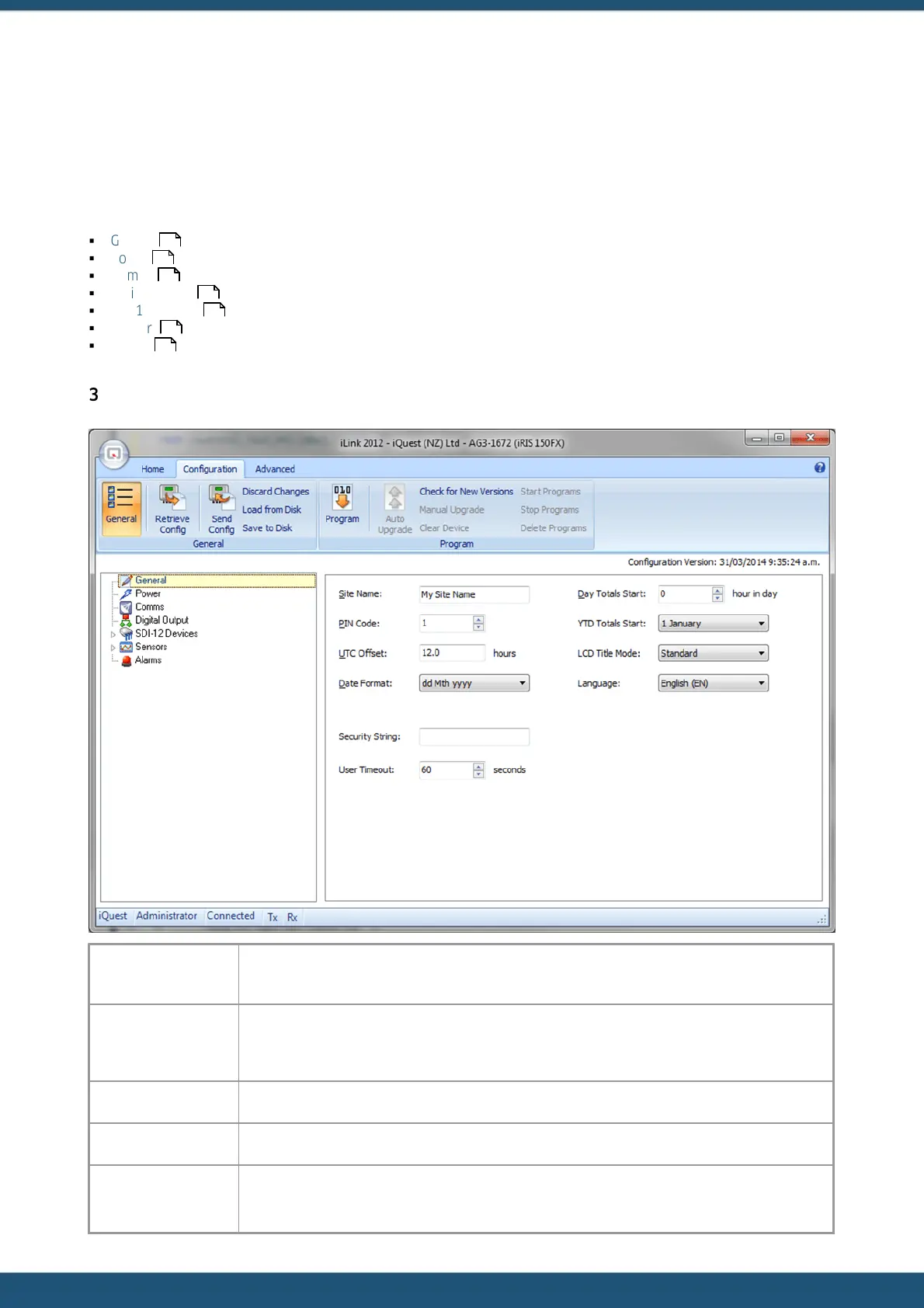
All the configuration can be done by connecting the device using iLink 2012. Once the iRIS is connected to your computer,
open up iLink 2012 and click on the ‘Quick Connect’ button. Select the COM port from the drop down menu and set the
baud rate as 115200. When the device is connected successfully, click on the Configuration tab to see the configuration
settings for the device.
§
General
§
Power
§
Comms
§
Digital Output
§
SDI-12 Devices
§
Sensors
§
Alarms
3.2.1 General
This setting is used to enter a name for the site that will be displayed on the main title screen of
the LCD. Note that the maximum length of the site name is fixed at 19 characters.
Enter a security PIN code between 0 and 9999. This PIN code is used to restrict access to
specific LCD screens. If the PIN code is set to 0 (factory default) then only the four status and
the totaliser (view only) LCD screens are accessible.
Enter the UTC offset in this column.
Choose the date format from the drop down box.
The Security String (of up to 10 characters) is used to prevent unauthorised access to the
terminal menus. If used, the code is set using iLink 2012 that is registered to "Administrator"
27
28
29
30
31
32
37



 To Next Page