If the breakers are not fully installed or are not installed "square"
they may cause intermittent power loss or unexpected behavior
for the load devices.
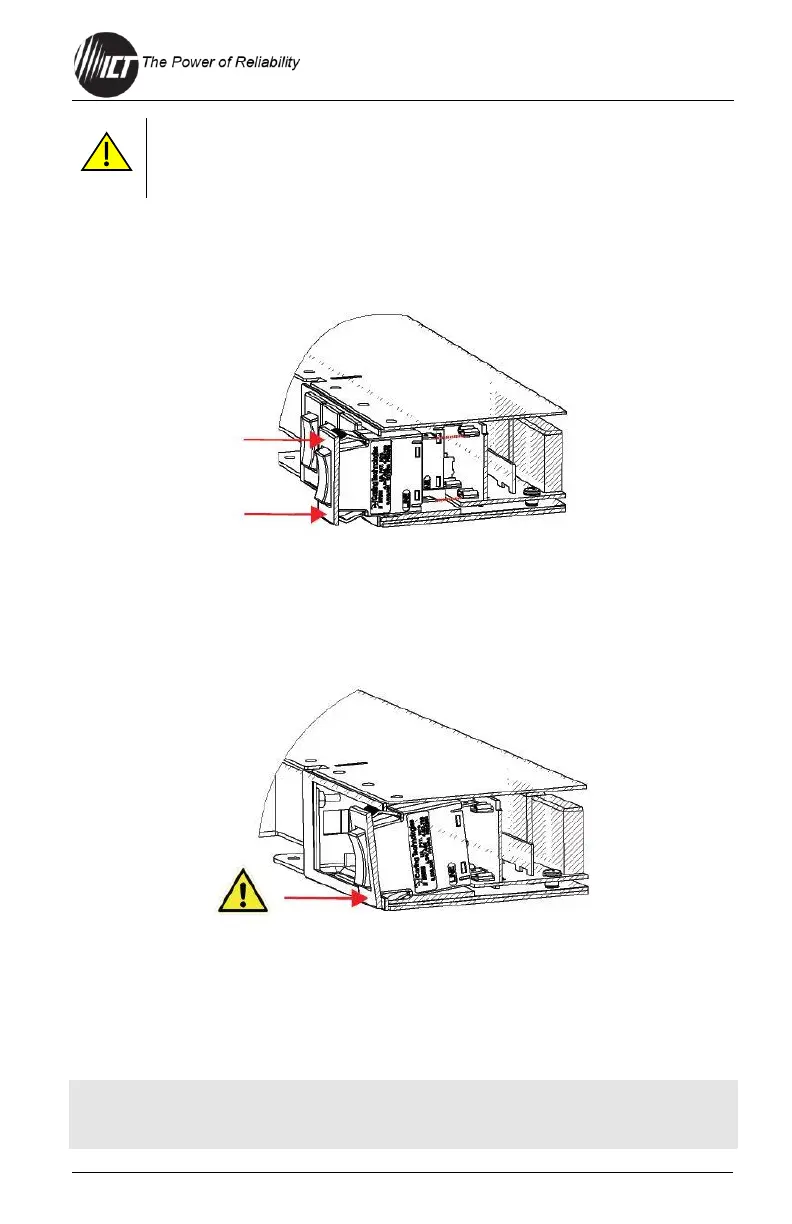
When installing load breakers, apply even pressure to the top and bottom
of the breaker to ensure proper engagement of the breaker with the rear
contacts (see Figure 3).
Figure 3. Installing breaker with even pressure
Applying pressure unevenly may result in misalignment of the contacts (see
Figure 4).
Figure 4. Installing breaker with uneven pressure
2.9 System Wiring Final Verification
1. Connect a 10/100 Base-T Ethernet cable to the RJ45 LAN port on
the rear panel to allow for remote monitoring and control of the unit.
NOTE: See the Network Monitoring and Control section for information on
configuring and using the built in GUI, e-mail, or SNMP functions
(see Section 4.7).



 To Next Page
 Loading...