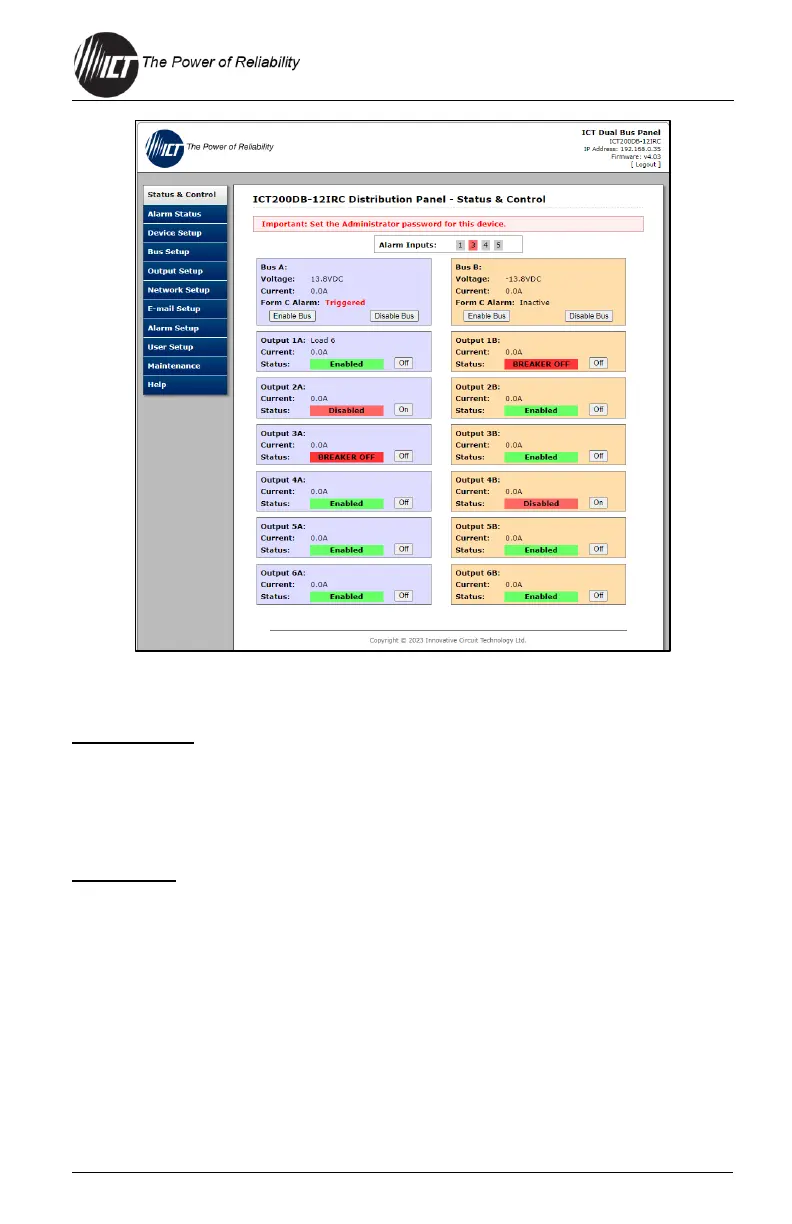
This tab provides the operating status of the unit.
Alarm Inputs
Shows the status of any of the five Input Alarms that have been enabled
(see Section 4.9). Will show grey if inactive or red if an alarm is active.
An alarm input indicator box will not be displayed if the alarm is not
enabled.
Bus Status
Bus x: Shows name of each bus if one was assigned.
Voltage: Shows output DC voltage on this bus. This value does specify
polarity.
Current: Shows total amps being supplied by this bus.
Form C Alarm: Shows whether the unit is broadcasting a form-C alarm
for that bus (Triggered or Inactive).
Enable Bus Buttons: Use these to close the six channel relays on each
bus, applying power to all external loads. The outputs will be enabled in


 To Next Page
 Loading...