23
UK
2
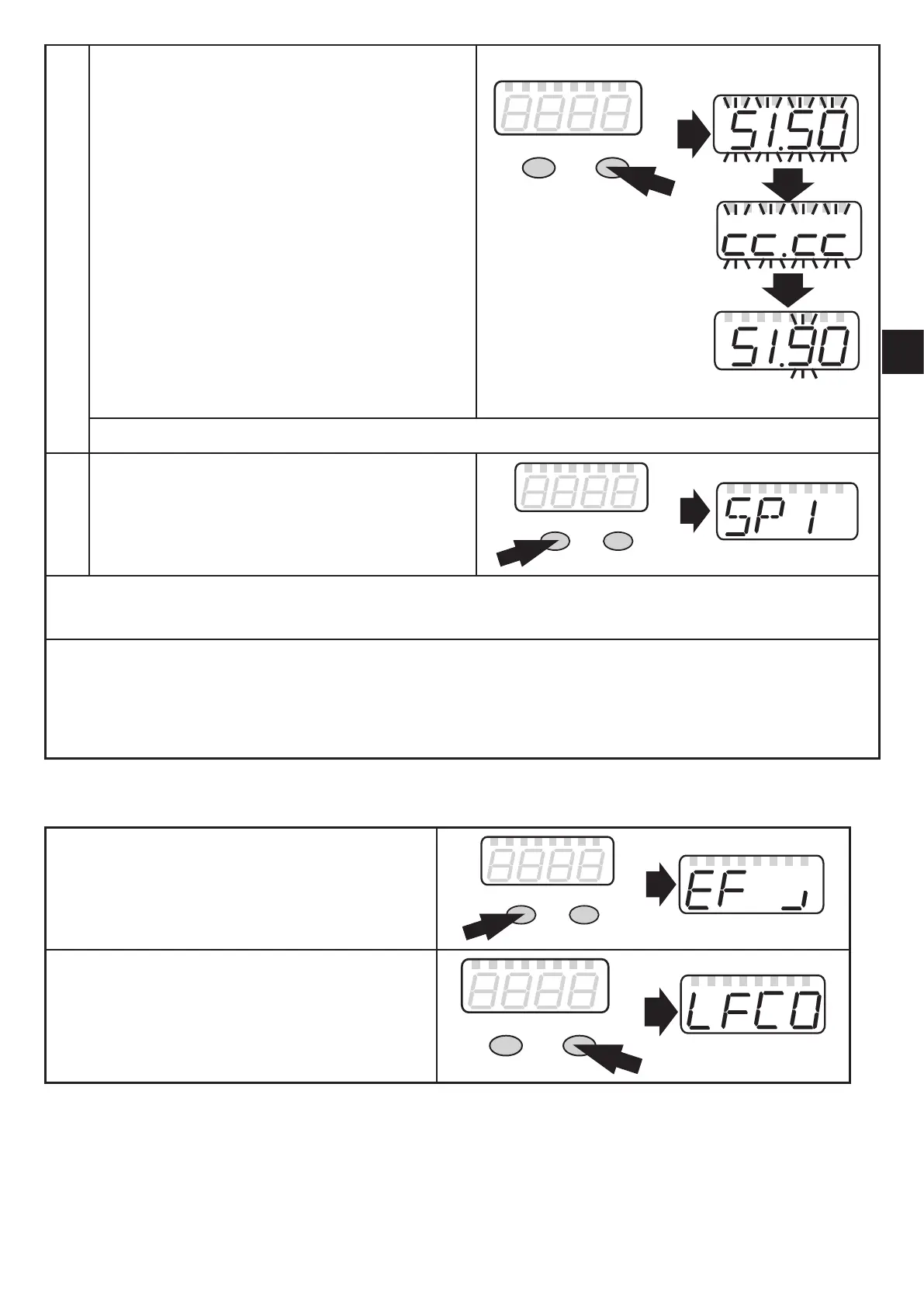
Set parameter value
► Press [Set].
> The current setting value of the
parameter is displayed�
► Press [Set] for 3 s.
► Setting of the decimal point (cc�
cc) and the sign by pressing [Set]
several times�
► Press [Mode/Enter] to confirm.
► Set an individual digit with [Set] and
confirm with [Mode/Enter].
► Repeat with all digits�
3
Acknowledge parameter value
► Press [Mode/Enter].
> The parameter is displayed again�
The new setting value is saved�
Mode/Enter Set
Set other parameters
► Start again with step 1�
Change the operating mode
► Press [Mode/Enter] several times until the current measured value is displayed.
> The unit returns to the operating mode�
If no button is pressed within 30 s, the unit automatically returns to the operating mode�
10.1.1 Change from menu level 1 to the sub-menu
► Press [Mode/Enter] until [EF
┘
] is
displayed�
Mode/Enter Set
► Briefly press [Set].
> The first parameter of the submenu is
displayed (here: [LFCO]).
Mode/Enter Set


 To Next Page