Chapter 2 Hardware
AC Box
This component contains high voltage. Always power off the gaming machine and
unplug the power cord prior to servicing.
Service outlets are circuit breaker protected and should not be used for high current
devices.
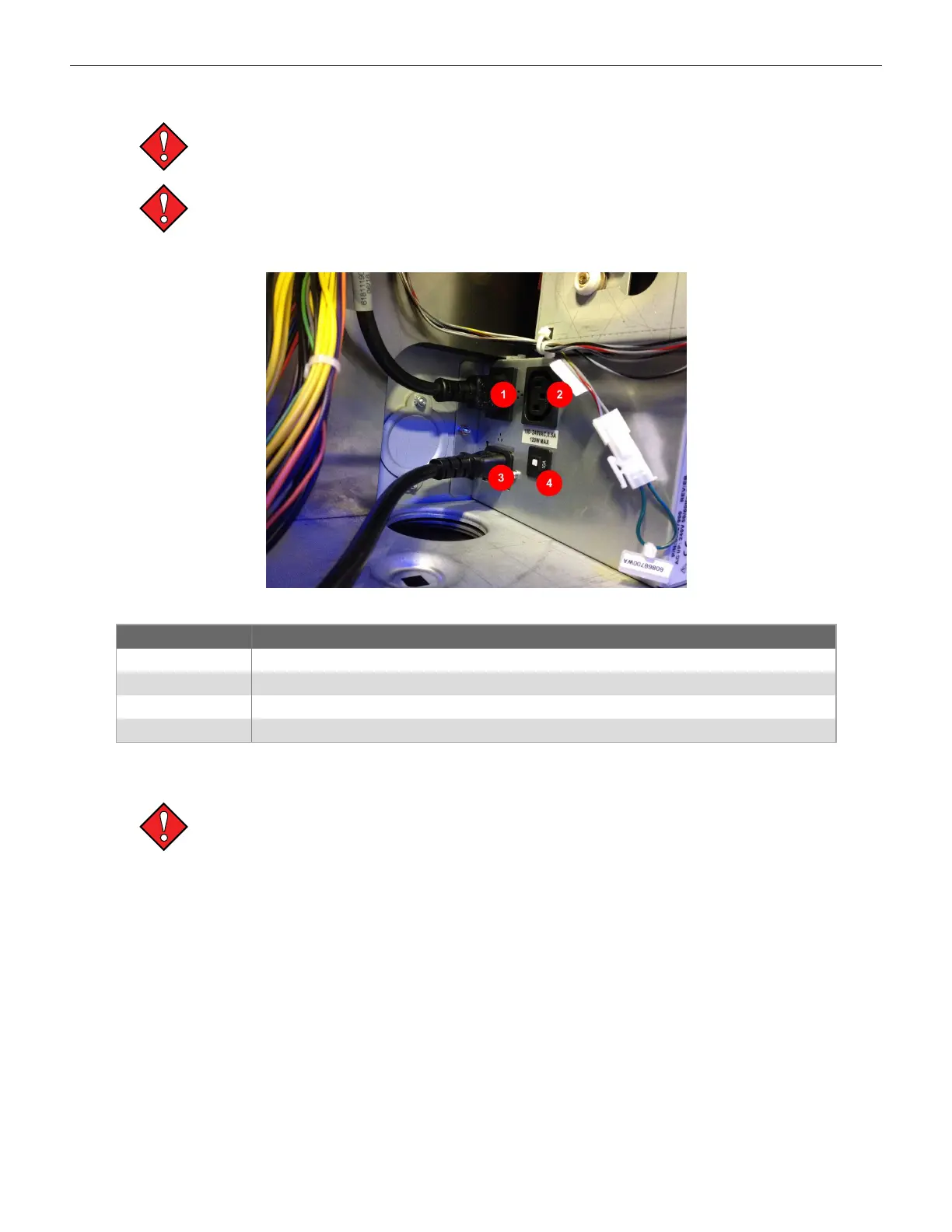
The AC box (100-240V 50/60Hz, 10A) provides auxiliary AC outlets to the terminal.
Figure 2-7 AC Box
Item Description
1 Supplies AC power to the DC power supply.
2 Available power connector: 100-240VAC, 0.5A, 120W Max.
3 Power Inlet: Connector for the terminal’s AC power cord.
4 10A Circuit Breaker.
AC Box Removal
Always observe proper ESD precautions and use an ESD wrist strap when working on
components inside the terminal.
To remove the AC Box:
1. Open the main door and power off the cabinet.
2. Open the lower door.
3. Remove the power coming into the AC Box.
4. Remove the connection from the AC Box to the Power Supply.
5. Remove the two M4 nuts.
6. Remove the AC Box from the cabinet. Pay special attention to the wiring on the side of the
cabinet when removing the AC Box.
32 Cobalt™ 27



 To Next Page