i product typE
En
7
Language
English
Service Manual
Yate Production Dryers
Edition
2006.09.21
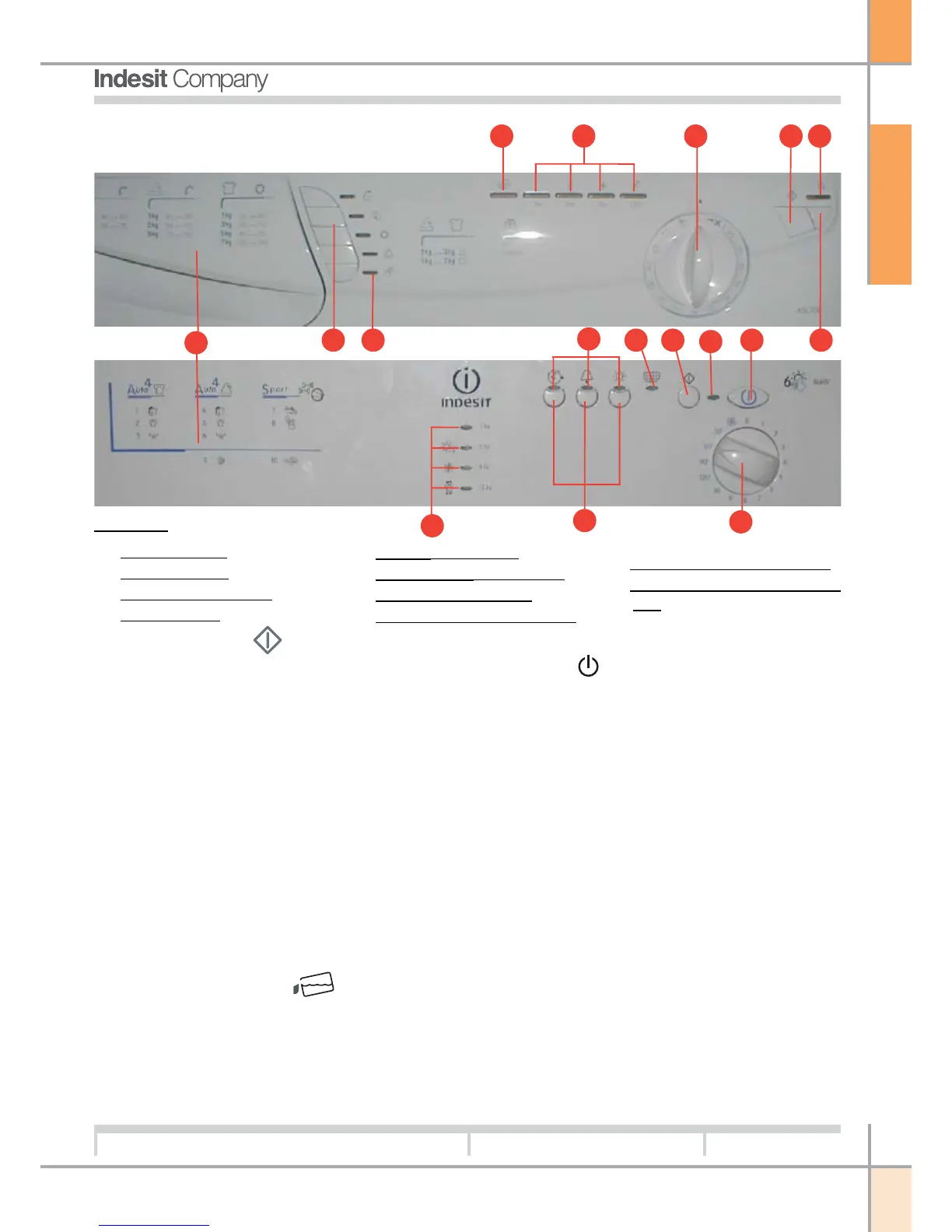
The START/CANCEL button starts a selected
programme. Pressing this button, a beep is heard
and the progress icons blink on and off to confirm
the action. If no programme has been selected, a
succession of four beeps will be heard. Once a pro-
gramme is running, pressing this button cancels the
programme and the dryer will stop (see Start and
programmes section).
The OPTION buttons activate the options available
for the selected programme (see Start and program-
mes section).
Each Option indicator lights up to confirm that an
option has been selected by pressing the button on
the left of the indicator.
The Drying Guide is a simple table indicating the
relationship between different fabrics and the loading
capacity of the drum.
The luminous Empty Water indicator warns
that the water collection tray must be emptied.
When the indicator blinks, the tray is full.
The indicator will stop blinking a few seconds after
the empty tray has been replaced; for this to occur,
the dryer must be in operation (see Controls).
The ON/OFF indicator confirms that the dryer is
in operation, or ready for selection of a programme.
If this indicator blinks, there is a fault in the machine
(see Fault finding).
ON/OFF
button: with the dryer in operation, pressing
this button will stop the cycle and shut off the machine.
Pressing the button again, the machine restarts.
The Progress or Delay indicators show the current
status of the programme or, when blinking, the time
interval set for delayed programming.
During a delayed start, the Leds blink to indicate
the selected delay. When not in blink mode, each
single indicator remains permanently alight while the
corresponding step of the programme is in progress
(see Start and programmes section).
The PROGRAMMES knob is used to select the
desired programme: simply rotate the knob until
the indicator is positioned on the programme to be
selected (see Start and programmes section).
Legend:
1. DRYING GUIDE
2. OPTION buttons
3. OPTION indicator Leds
4. ON/OFF button
5. ON/OFF indicator Led
6. PROGRAMME selector knob
7. START/CANCEL button
8. EMPTY WATER indicator Led
9. CLEAN FILTER indicator Led
10. PROGRAMME PROGRESS indicator
Leds
4
1
2
3
56 7
44
5
6
47
3
8
9
10
2
10



 To Next Page