INFOSEC UPS SYSTEM - 4, rue de la Rigotière - 44700 Orvault - FRANCE - www.infosec-ups.com
Hot Line – Tel + 33 (0)2 40 76 15 82 - Fax + 33 (0)2 40 94 29 51 - hotline@infosec.fr – 05 13 AA 59 208 13
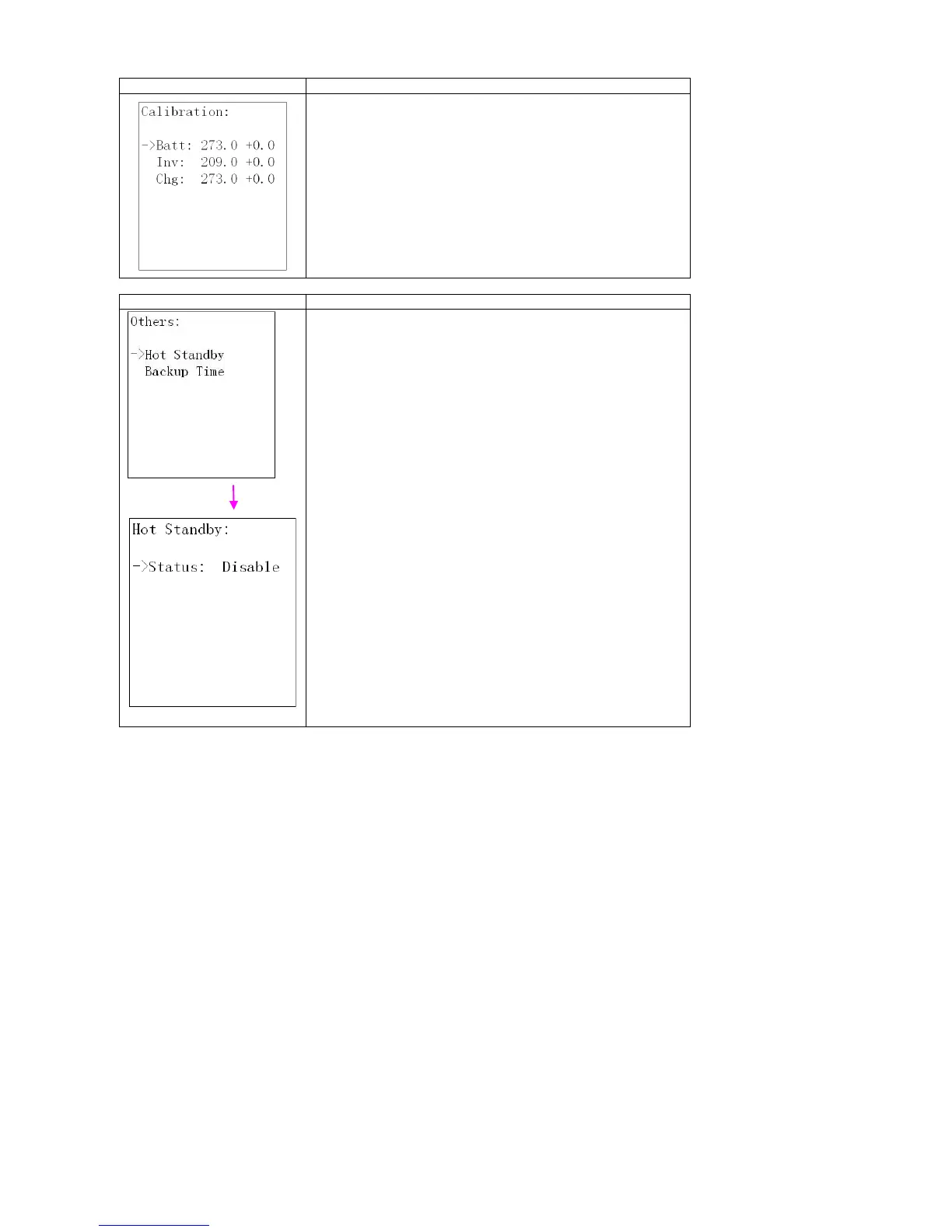
1. Batt: Calibrate the battery voltage measurement. Calibration
range is from 0V to 5.7V. The default value is 0V. It is available
on all operation modes.
2. Inv: Adjust the inverter output voltage; the adjustable range is
from 0V to 6.4V, the default value is 0V. It is only available in line
/ battery / converter mode;
3. Chg: Adjust the Charger output voltage; the adjustable value is
from 0V to 6.9V, the default value is 0V. It is only available in
bypass / line / ECO /converter mode.
(NOTE: Before making charger output voltage adjustment, be
sure to disconnect all batteries first to get the accurate charger
voltage; Be careful that the adjustment should be suitable to
battery specifications, or the battery maybe destroyed.)
Hot standby:
Enable: Hot standby function is enabled. It means that the current
UPS is set to be host of hot standby system, and it will automatically
restart after AC recovery even without battery connected.
Disable: Hot standby function is disabled. The UPS is running at
normal mode and can’t restart without battery.
Disable is default setting.















 To Next Page