INFOSEC UPS SYSTEM - 4, rue de la Rigotière - 44700 Orvault - FRANCE - www.infosec-ups.com
Hot Line – Tel + 33 (0)2 40 76 15 82 - Fax + 33 (0)2 40 94 29 51 - hotline@infosec.fr – 05 13 AA 59 208 13
2.2 Install the UPS
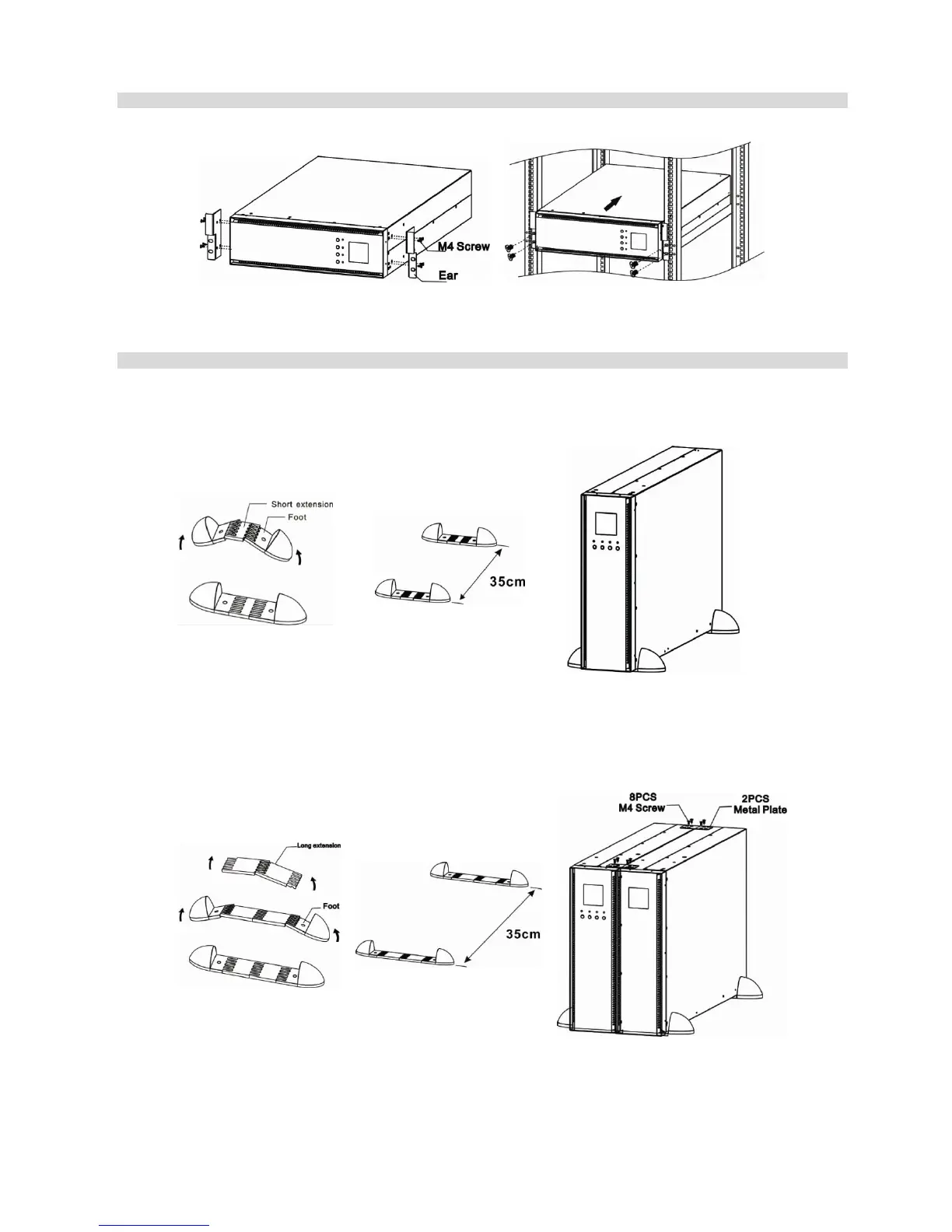
Rack-mount installation
Step 1: Attach mounting ears to the side mounting
holes of UPS using the screws provided and the ears
should face forward.
Step 2: Lift the UPS module and slide it into rack
enclosure. Attach the UPS module to the rack
with screws, nuts and washers (user-provided)
through its mounting ears and into the rack rails.
Tower installation
The UPS system is shipped with four plastic feet and 6 plastic extensions (2 short extension plus 4 long extensions). Those
can be used to tower install the UPS power module in 3U or UPS power module with one battery bank in 6U.
To install in 3U, it’s not necessary to use long extensions.
Assemble two feet and one
short extension together as
one supporter with 13cm
width available. Another
supporter could be
assembled in same method
Align the two stands
approximately 35cm apart in step
2.
Then, put UPS module in the
stands as shown in step 3. Be
sure that the LCD of UPS should
be on upper half part of front
panel.
To install in 6U, it’s not necessary to use short extensions.
Assemble two feet and
two long extensions
together. Then, one set
of plastic supporter with
26cm width is done.
Another set of supporter
could be assembled in
same way.
Align the two stands approximately
35cm apart in step 2.
Then, put UPS module and battery
bank in the stands as shown in step 3.
Be sure that the LCD of UPS should be
on upper half part of front panel.















 To Next Page