13
En
Connecting the AV Controller
The AV controller is designed to be used with a separate
multichannel power amplifier. You connect the AV con-
troller’s PRE OUT jacks to the amplifier’s inputs, and
connect your speakers to the amplifier’s speakers termi-
nals. Speaker settings such as crossover frequency and dis-
tance are set on the AV controller.
Speaker Configuration
The following table indicates the channels you should use
depending on the number of speakers that you have.
For 7.1-channel surround-sound playback, you need 7
speakers and a powered subwoofer.
*1
If you’re using only one surround back speaker, connect it to
the SURR BACK L terminals.
*2
Front high, surround back and front wide speakers cannot be
used at the same time.
No matter how many speakers you use, a powered sub-
woofer is recommended for a really powerful and solid
bass.
To get the best from your surround sound system, you
need to set the speaker settings. You can do this automati-
cally (➔ 27) or manually (➔ 48).
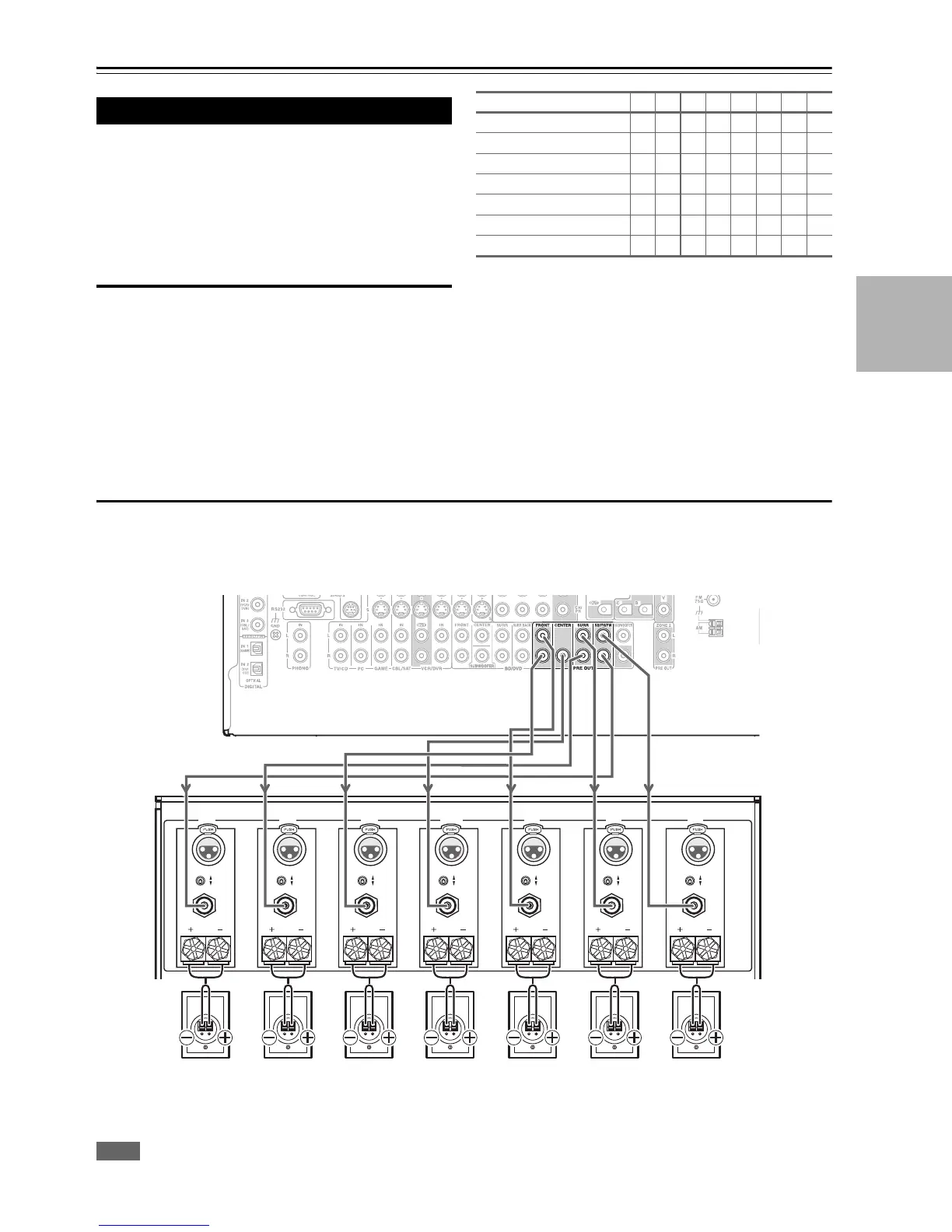
Connecting a Power Amplifier with RCA Inputs
You can connect the AV controller to a multichannel power amplifier with RCA input jacks by using a multichannel RCA
audio cable or several stereo RCA audio cables.
See your multichannel power amplifier’s instruction manual for more information on connecting speakers.
*
Specify crossover frequency for the channel that you want to output in “Speaker Configuration” (➔ 48).
Connecting Your Speakers
Number of speakers 23456777
Front speakers ✔✔✔✔✔✔✔✔
Center speaker ✔ ✔✔✔✔✔
Surround speakers ✔✔✔✔✔✔
Surround back speaker
*1*2
✔
Surround back speakers
*2
✔
Front high speakers
*2
✔
Front wide speakers
*2
✔
INPUT
SELECT
SURR OUND B A CK
R GHT
SURR OUND
RIGHT
SURR OUND
LEFT CENTER
FR ONT
LEFT
SURR OUND B A CK
LEFT
FR ONT
RIGHT
NPUT
SELECT
INPUT
SELECT
INPUT
SELECT
INPUT
SELECT
INPUT
SELECT
NPUT
SELECT
OUTPUT OUTPUT OUTPUT OUTPUT OUTPUT OUTPUT OUTPUT
Surround back/
Front high/
Front wide
right speaker*
AV controller
Multichannel
power amplifier
Front right
speaker
Center
speaker
Front left
speaker
Surround back/
Front high/
Front wide
left speaker*
Surround
left
speaker
Surround
right
speaker



 To Next Page