103
Advanced Setup
—Continued
Note:
• This procedure can also be performed on the AV
receiver by using its [Setup], [Enter], and arrow but-
tons.
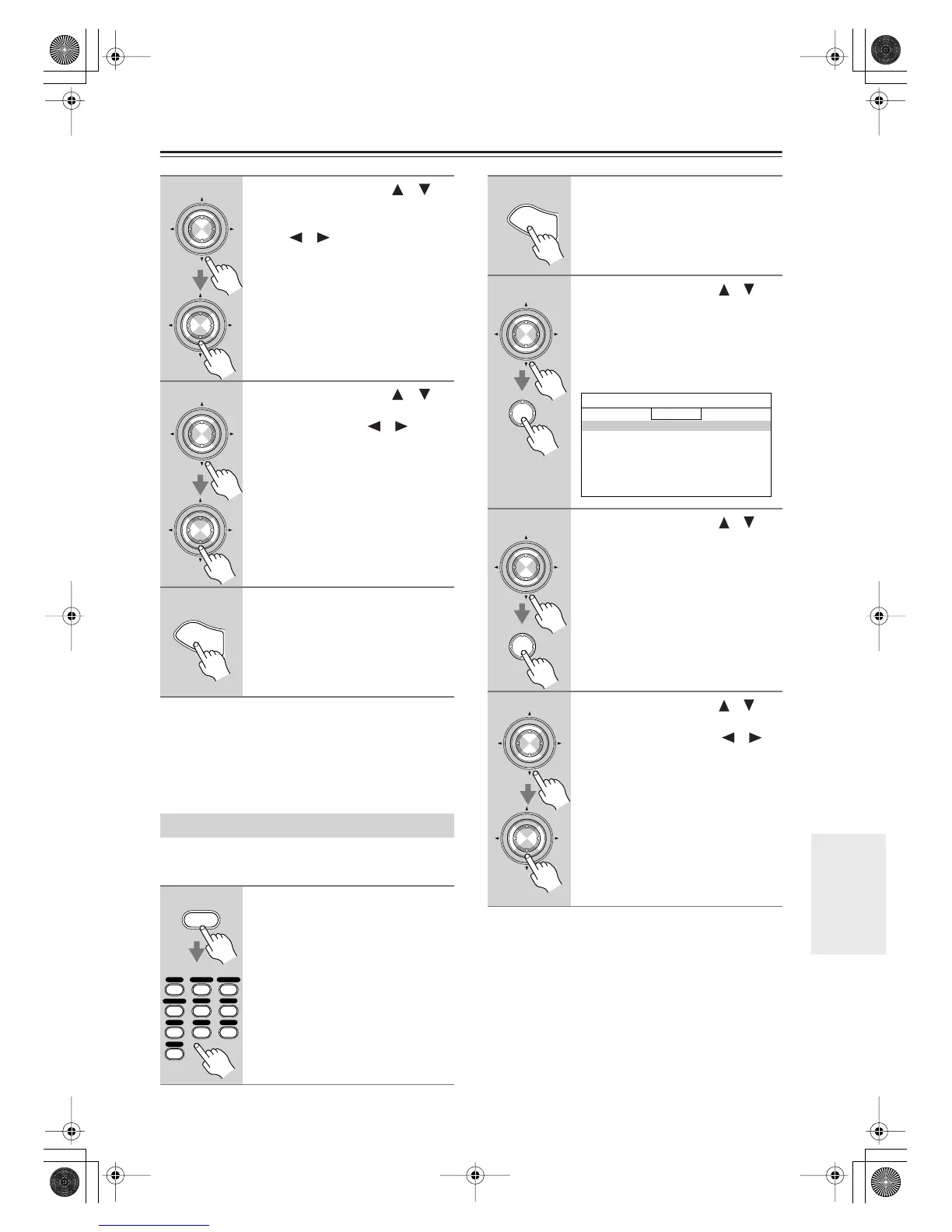
This section explains items on the Source Setup menu.
Items can be set individually for each input selector.
5
Use the Up and Down [ ]/[ ]
buttons to select “THX Sub-
woofer,” and use the Left and
Right [ ]/[ ] buttons to select:
No:
Select this if you do not have
a THX-certified subwoofer.
Yes:
Select this if you have a THX-
certified subwoofer.
6
Use the Up and Down [ ]/[ ]
buttons to select “BGC,” and use
the Left and Right [ ]/[ ] but-
tons to select:
Off:
Select this to turn off BGC.
On:
Select this to turn on BGC.
Note:
• This setting is only available if THX
Subwoofer is set to Yes (step 5).
7
Press the [Setup] button.
The setup menu closes.
Source Setup
1
Press the [Receiver] Remote
Mode button, and then use the
input selector buttons to select
an input source.
Enter
Enter
Enter
Enter
S
e
t
u
p
Receiver
+10
123
456
789
VCR
/
DVR CBL
/
SAT
DVD
Tape
Tuner
CD
Phono
Game
/
TV
AUX 1 AUX 2
2
Press the [Setup] button.
The main menu appears onscreen.
3
Use the Up and Down [ ]/[ ]
buttons to select “4. Source
Setup,” and then press [Enter].
The Source Setup menu appears. The
name of the currently selected input
selector is displayed in a box.
4
Use the Up and Down [ ]/[ ]
buttons to select an item, and
then press [Enter].
The screen for that item appears.
5
Use the Up and Down [ ]/[ ]
buttons to select an option, and
use the Left and Right [ ]/[ ]
buttons to change it.
The Source Setup menu items are
explained below.
S
e
t
u
p
Enter
Enter
4.Source Setup
1.IntelliVolume
2.A/V Sync
3.Name Edit
4.Satellite Radio
5.SIRIUS Parental Lock
DVD
Enter
Enter
Enter
Enter
DTR-7.8En.book Page 103 Friday, April 27, 2007 2:18 PM



 To Next Page