58
First Time Setup
—Continued
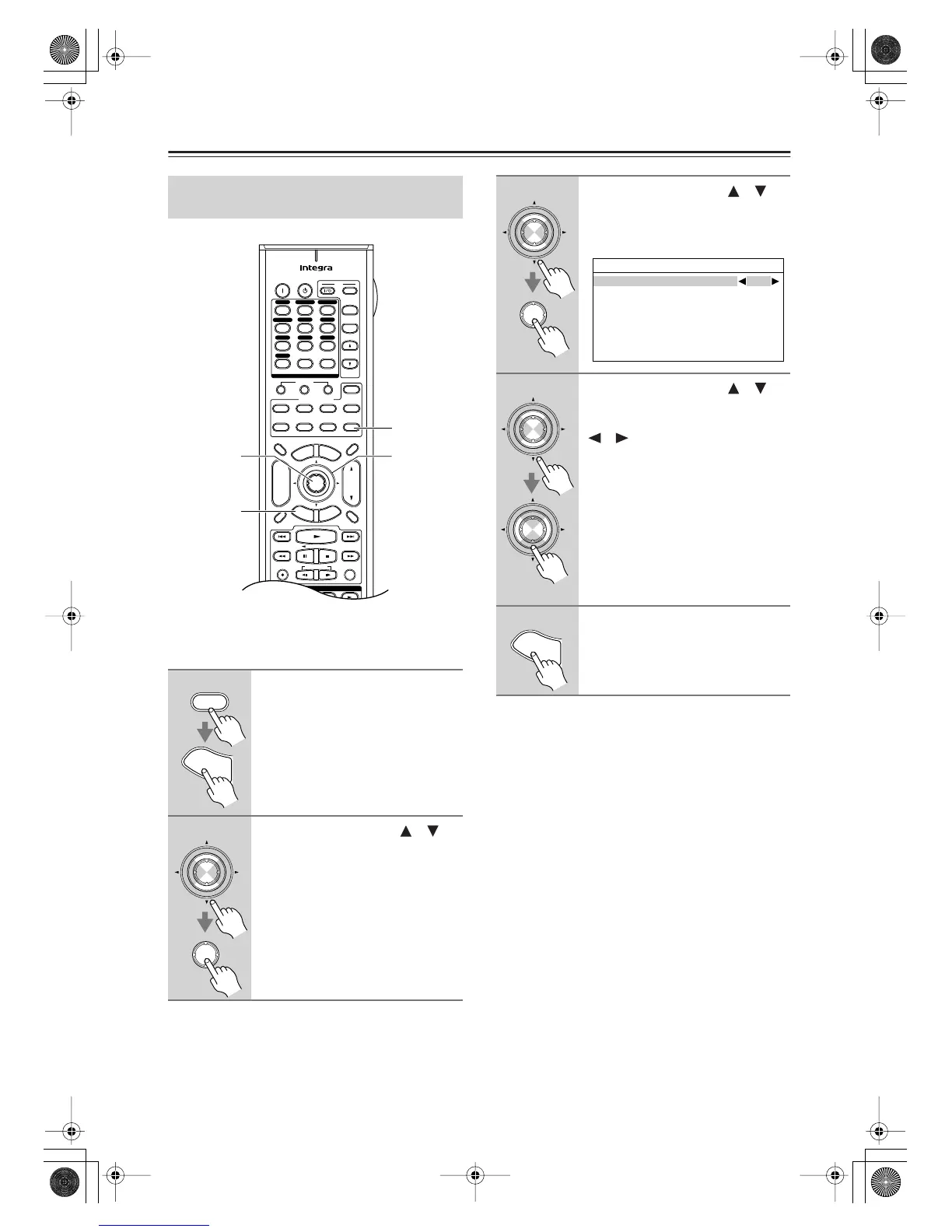
For the onscreen setup menus to display properly, you
must specify the TV system used in your area.
Note:
• This procedure can also be performed on the AV
receiver by using its [Setup], [Enter], and arrow but-
tons.
TV Format Setup
(not North American models)
1
Press the [Receiver] button, fol-
lowed by the [Setup] button.
The main menu appears onscreen.
2
Use the Up and Down [ ]/[ ]
buttons to select “6. Miscella-
neous,” and then press [Enter].
The Miscellaneous menu appears.
+
-
On Standby
TV
Input
TV CH
TV VOL
--
/
---
10 11 12
D.TUN
+10
0
Clear
123
456
789
Input Selector
VCR
/
DVR CBL
/
SAT
DVD
Tape
Tuner
CD
Phono
Game
/
TV
Macro
12
3
VCRDVD
CDR/MD
CD
Zone
2
Remote Mode
Dimmer
Tape/AMP
Sleep
Receiver
TV Dock
Cable
VOL
CH
Disc
Album
+
-
Enter
T
o
p
M
e
n
u
M
e
n
u
Display Muting
E
x
i
t
G
u
i
d
e
Prev
CH
R
e
t
u
r
n
S
e
t
u
p
Audio
Repeat
Play Mode
Listening Mode
Playlist
RandomRec
Direct
Stereo
THX All ST
Subtitle
Surround
SAT
Zone
3
AUX 1 AUX 2
2, 3
2–4
1
1, 5
Receiver
S
e
t
u
p
Enter
Enter
3
Use the Up and Down [ ]/[ ]
buttons to select “2. OSD Setup,”
and then press [Enter].
The OSD Setup menu appears.
4
Use the Up and Down [ ]/[ ]
buttons to select “TV Format,”
and then use the Left and Right
[ ]/[ ] buttons to select:
Auto:
Select this to have the AV
receiver automatically detect
the TV system from the video
input signals.
NTSC:
Select if the TV system in
your area is NTSC.
PAL:
Select if the TV system in
your area is PAL.
5
Press the [Setup] button.
Setup closes.
Enter
Enter
6-2.OSD Setup
Immidiate Display
On
Monitor Type 4:3
Display Position Bottom
TV Format Auto
Enter
Enter
S
e
t
u
p
DTR-7.8En.book Page 58 Friday, April 27, 2007 2:18 PM



 To Next Page