23
Connecting Your Speakers
—Continued
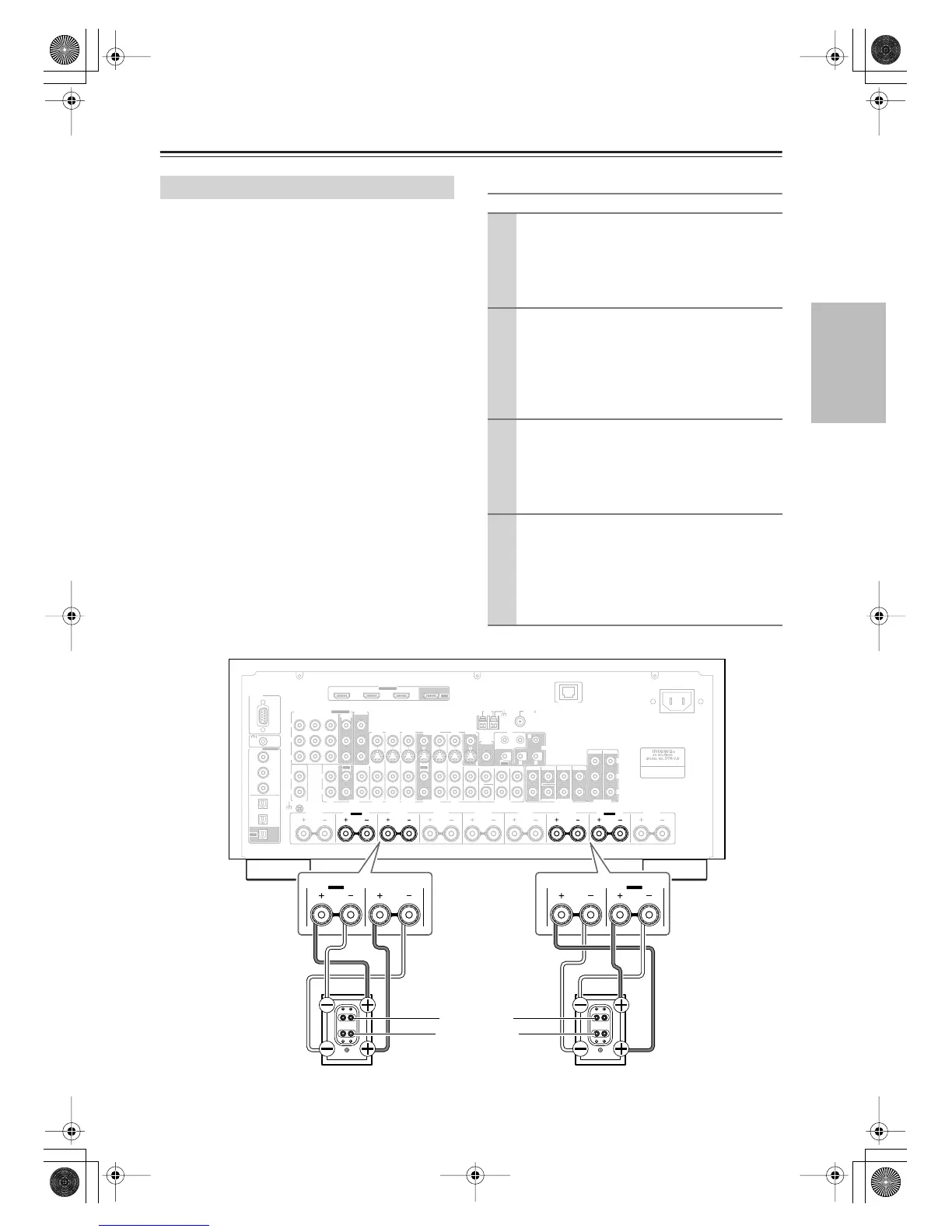
The FRONT L/R and SURR BACK L/R terminal posts
can be used with front speakers and surround back
speakers respectively, or bi-amped to provide separate
tweeter and woofer feeds for a pair of front speakers that
support bi-amping, providing improved bass and treble
performance.
• When bi-amping is used, the AV receiver is able to
drive up to 5.1 speakers in the main room.
•For bi-amping, the FRONT L/R terminal posts con-
nect to the front speakers’ tweeter terminals. And the
SURR BACK L/R terminal posts connect to the front
speakers’ woofer terminals.
• Once you’ve completed the bi-amping connections
shown below and turned on the AV receiver, you must
set the Speaker Type setting to Bi-Amp to enable bi-
amping (see page 44).
Important:
• When making the bi-amping connections, be sure
to remove the jumper bars that link the speakers’
tweeter (high) and woofer (low) terminals.
• Bi-amping can only be used with speakers that support
bi-amping. Refer to your speaker manual.
• Use only front speakers with an impedance of 8 ohms
or higher for bi-amping. Failure to do so may seriously
damage the AV receiver.
Bi-amping Speaker Hookup
Bi-amping the Front Speakers
1
Connect the AV receiver’s FRONT R positive (+)
terminal to the right speaker’s positive (+) tweeter
(high) terminal. And connect the AV receiver’s
FRONT R negative (–) terminal to the right
speaker’s negative (–) tweeter (high) terminal.
2
Connect the AV receiver’s SURR BACK R posi-
tive (+) terminal to the right speaker’s positive (+)
woofer (low) terminal. And connect the AV
receiver’s SURR BACK R negative (–) terminal to
the right speaker’s negative (–) woofer (low) ter-
minal.
3
Connect the AV receiver’s FRONT L positive (+)
terminal to the left speaker’s positive (+) tweeter
(high) terminal. And connect the AV receiver’s
FRONT L negative (–) terminal to the left
speaker’s negative (–) tweeter (high) terminal.
4
Connect the AV receiver’s SURR BACK L posi-
tive (+) terminal to the left speaker’s positive (+)
woofer (low) terminal. And connect the AV
receiver’s SURR BACK L negative (–) terminal to
the left speaker’s negative (–) woofer (low) ter-
minal.
RS232
DIGITAL
COAXIAL
OPTICAL
REMOTE
CONTROL
IN 1
IN 1
IN 2
IN IN IN IN
PHONO
ZONE2 R ZONE2 LFRONT R FRONT LSURR R CENTER SURR L
SURR BACK R
CD TAPE AUX 1
GAME/TV
GAME/TV CBL/SAT
CBL/SAT
AUX 1 VCR/DVR
VCR/DVR DVD
DVD
GND
IN 2
IN 3
LL
V
S
RR
ASSIGNABLE
(DVD)
(CBL/SAT)
(VCR/DVR)
(GAME/TV)
(CD)
OUT
HDMI
IN 1IN 2IN 3
ASSIGNABLE
OUT
COMPONENT VIDEO
ASSIGNABLE
IN 3
Y
C
B
/P
B
C
R
/P
R
IN 2 IN
1(DVD)
MONITOR
OUT 1
OUT
IN IN
OUT
IN IN FRONT FRONTCENTER
SUBWOOFER SUBWOOFER
CENTERSURR SURR
MULTI CH
PRE OUT
SURR BACK SURR BACK
AM
ANTENNA
FM75
AC INLET
Bi-AMP
SURR BACK L
Bi-AMP
ETHERNET
MONITOR OUT 2
/ZONE 2 OUT
ZONE 2 ZONE 3
PRE OUT
L
R
SW
AB
IR
12V TRIGGER OUT
IN
AB
OUT
V
S
MONITOR
OUT
ZONE 2
OUT
C
FRONT R
SURR BACK R
Bi-AMP
FRONT L
SURR BACK L
Bi-AMP
Right speaker Left speaker
Tweeter (high)
Woofer (low)
DTR-7.8En.book Page 23 Friday, April 27, 2007 2:18 PM



 To Next Page