29
Connecting Your Components
—Continued
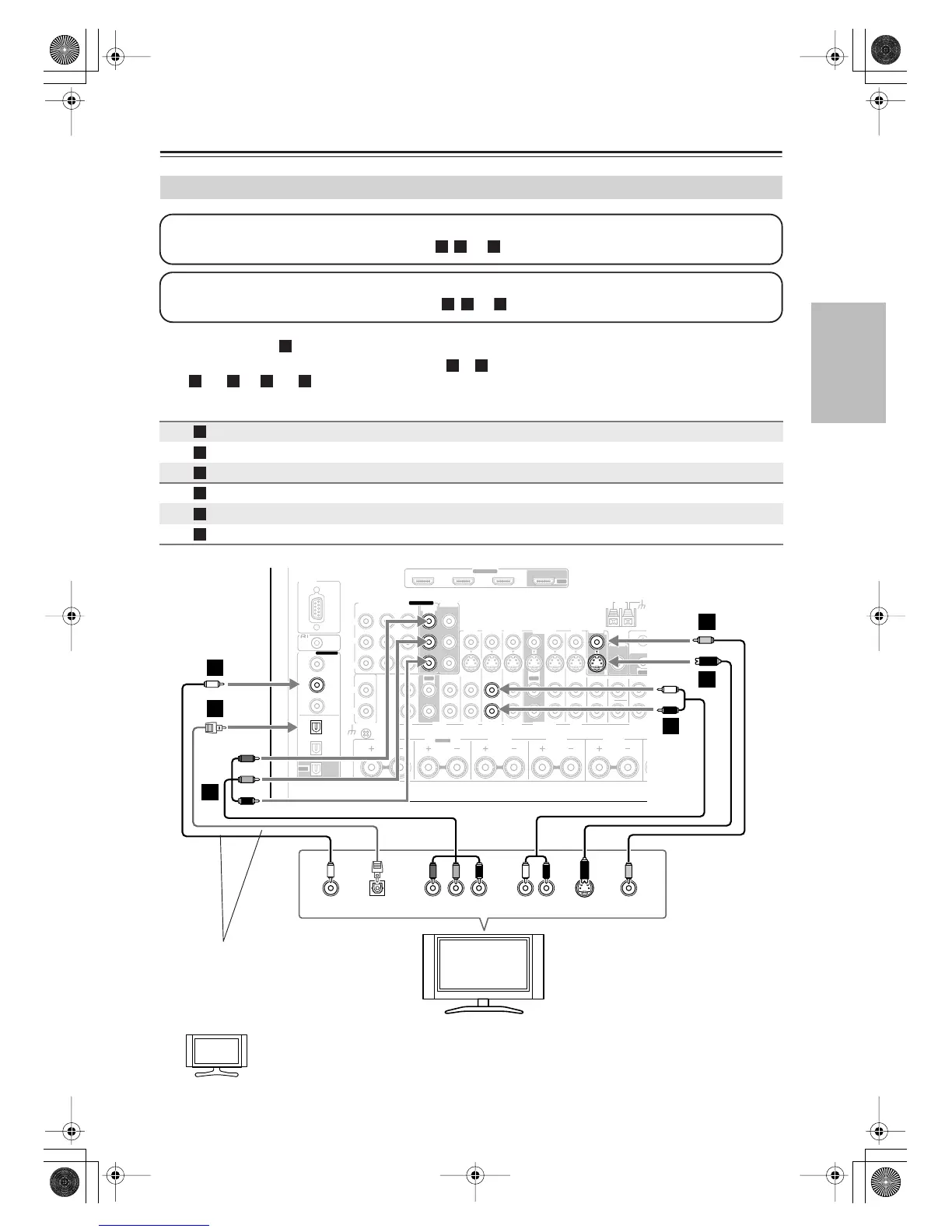
•With connection , you can listen to and record audio from your TV or listen in Zone 2 or Zone 3.
•To enjoy Dolby Digital and DTS, use connection or . (To record or listen in Zone 2 or Zone 3 as well, use
and , or and .)
If your TV has no audio outputs, connect an audio output from your VCR or cable or satellite
receiver to the AV receiver and use its tuner to listen to TV programs through the AV receiver (see
pages 32 and 34).
Connecting a TV or Projector
Connection AV receiver Signal flow TV Picture quality
COMPONENT VIDEO MONITOR OUT 1
⇒
Component video input
Best
MONITOR OUT S
⇒
S-Video input Better
MONITOR OUT V
⇒
Composite video input
Standard
GAME/TV IN L/R
⇐
Analog audio L/R output
DIGITAL COAXIAL IN 2
⇐
Digital coaxial output
DIGITAL OPTICAL IN 1
⇐
Digital optical output
Step 1: Video Connection
Choose a video connection that matches your TV ( , , or ), and then make the connection.
A B
Step 2: Audio Connection
Choose an audio connection that matches your TV ( , , or ), and then make the connection.
a b



 To Next Page