39
Connecting Your Components
—Continued
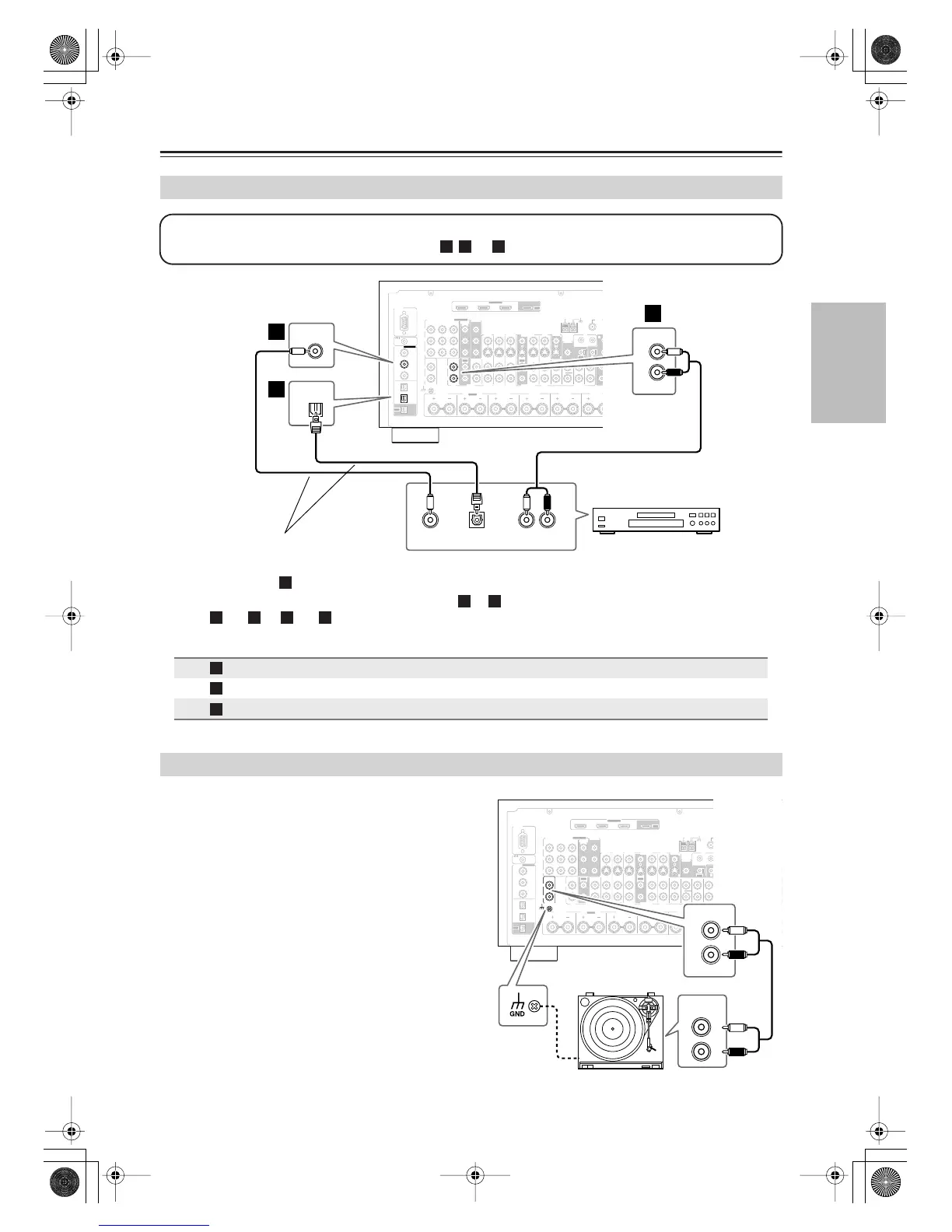
•With connection , you can listen to and record audio from the CD player or listen in Zone 2 or Zone 3.
•To connect the CD player digitally, use connection or . (To record or listen in Zone 2 or Zone 3 as well,
use and , or and .)
The AV receiver’s PHONO IN is designed for use with a
moving magnet (MM) type cartridge.
Use an analog audio cable to connect the AV receiver’s
PHONO IN L/R jacks to the audio output on your turn-
table.
Notes:
• If your turntable has a ground wire, connect it to the
AV receiver’s GND screw. With some turntables, con-
necting the ground wire may produce an audible hum.
If this happens, disconnect it.
• If your turntable has a moving coil (MC) type car-
tridge, you’ll need a commercially available MC head
amp or MC transformer. Connect your turntable to the
head amp or transformer, and connect that to the AV
receiver’s PHONO IN L/R jacks.
•You can also use a phono equalizer to connect a turn-
table with an MC-type cartridge. See your phono
equalizer’s manual for details.
Connecting a CD Player
Connection AV receiver Signal flow CD
CD IN L/R
⇐
Analog audio L/R output
DIGITAL COAXIAL IN 2
⇐
Digital coaxial output
DIGITAL OPTICAL IN 2
⇐
Digital optical output
Connecting a Turntable
RS232
DIGITAL
COAXIAL
OPTICAL
REMOTE
CONTROL
IN 1
IN 1
IN 2
IN IN IN IN
PHONO
ZONE2 R ZONE2 LFRONT R FRONT LSURR R CENTER SURR L
SURR BACK R
CD TAPE AUX 1
GAME/TV
GAME/TV CBL/SAT
CBL/SAT
AUX 1 VCR/DVR
VCR/DVR DVD
DVD
GND
IN 2
IN 3
L L
V
S
R R
ASSIGNABLE
(DVD)
(CBL/SAT)
(VCR/DVR)
(GAME/TV)
(CD)
OUT
HDMI
IN 1IN 2IN 3
ASSIGNABLE
OUT
COMPONENT VIDEO
ASSIGNABLE
IN 3
Y
C
B
/P
B
C
R
/P
R
IN 2 IN
1(DVD)
MONITOR
OUT 1
OUT
IN IN
OUT
IN IN FRONT FRONTCENTER
SUBWOOFER SUBWOOFER
CENTERSURR SURR
MULTI CH
PRE OUT
SURR BACK SURR BACK
AM
ANTENNA
FM75
AC INLET
Bi-AMP
SURR BACK L
Bi-AMP
ETHERNET
MONITOR OUT 2
/ZONE 2 OUT
ZONE 2 ZONE 3
PRE OUT
L
R
SW
AB
IR
12V TRIGGER OUT
IN
AB
OUT
V
S
MONITOR
OUT
ZONE 2
OUT
C
COAXIAL
IN 2
COAXIAL
OUT
AUDIO
OUT
LR
OPTICAL
OUT
OPTICAL
IN 2
L
R
IN
CD
b
c
a
Step 1:
Choose a connection that matches your CD player ( , , or ), and then make the connection.
a b



 To Next Page