48
First Time Setup
—Continued
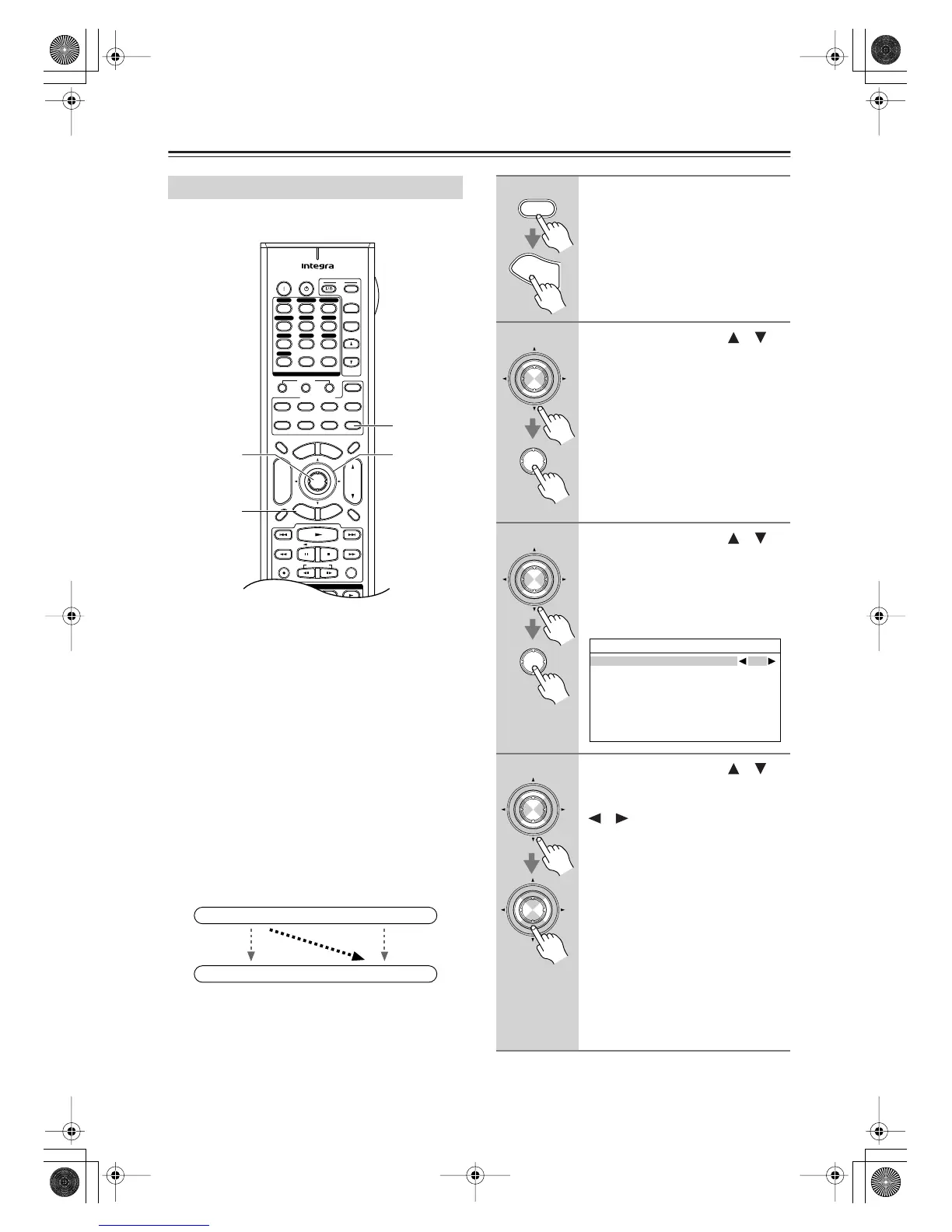
If you connect a video component to a COMPONENT
VIDEO IN, you must assign that input to an input
selector. For example, if you connect your DVD player
to COMPONENT VIDEO IN 3, you must assign COM-
PONENT VIDEO IN 3 to the DVD input selector.
By default, the DVD input selector is assigned to COM-
PONENT VIDEO IN 1, and all of the other input selec-
tors (i.e., VCR/DVR, CBL/SAT, GAME/TV, AUX 1,
AUX 2, TAPE, TUNER, CD, PHONO) are assigned to
the “- - -” option.
If you’ve connected your TV to the AV receiver with a
component video cable, you can set the AV receiver so
that composite video and S-Video sources are upcon-
verted (
*
) and output by the COMPONENT VIDEO
MONITOR OUT 1 or 2. You can set this for each input
selector by selecting the “- - -” option.
Component Video Input Setup
+
-
On Standby
TV
Input
TV CH
TV VOL
--
/
---
10 11 12
D.TUN
+10
0
Clear
123
456
789
Input Selector
VCR
/
DVR CBL
/
SAT
DVD
Tape
Tuner
CD
Phono
Game
/
TV
Macro
12
3
VCRDVD
CDR/MD
CD
Zone
2
Remote Mode
Dimmer
Tape/AMP
Sleep
Receiver
TV Dock
Cable
VOL
CH
Disc
Album
+
-
Enter
T
o
p
M
e
n
u
M
e
n
u
Display Muting
E
x
i
t
G
u
i
d
e
Prev
CH
R
e
t
u
r
n
S
e
t
u
p
Audio
Repeat
Play Mode
Listening Mode
Playlist
RandomRec
Stereo
Subtitle
Surround
SAT
Zone
3
AUX 1 AUX 2
2, 3
2–4
1
1, 5
IN
OUT
(
*
)
Composite video, S-Video
Composite video, S-Video
Component video
Component video
1
Press the [Receiver] button, fol-
lowed by the [Setup] button.
The main menu appears onscreen.
2
Use the Up and Down [ ]/[ ]
buttons to select “1. Input/Output
Assign,” and then press [Enter].
The Input/Output Assign menu
appears.
3
Use the Up and Down [ ]/[ ]
buttons to select “3. Component
Video Input,” and then press
[Enter].
The Component Video Input menu
appears.
4
Use the Up and Down [ ]/[ ]
buttons to select an input selec-
tor, and use the Left and Right
[ ]/[ ] buttons to select:
IN1:
Select if the video component
is connected to COMPO-
NENT VIDEO IN 1.
IN2:
Select if the video component
is connected to COMPO-
NENT VIDEO IN 2.
IN3:
Select if the video component
is connected to COMPO-
NENT VIDEO IN 3.
- - -:
Select to output composite
video and S-Video sources
from the COMPONENT
VIDEO OUT.
Receiver
S
e
t
u
p
Enter
Enter
Enter
Enter
1-3.Component Video Input
DVD
IN1
VCR/DVR ---
CBL/SAT ---
GAME/TV ---
AUX1 ---
AUX2 ---
Enter
Enter
DTR-7.8En.book Page 48 Friday, April 27, 2007 2:18 PM



 To Next Page