116
Zone 2 and Zone 3
—Continued
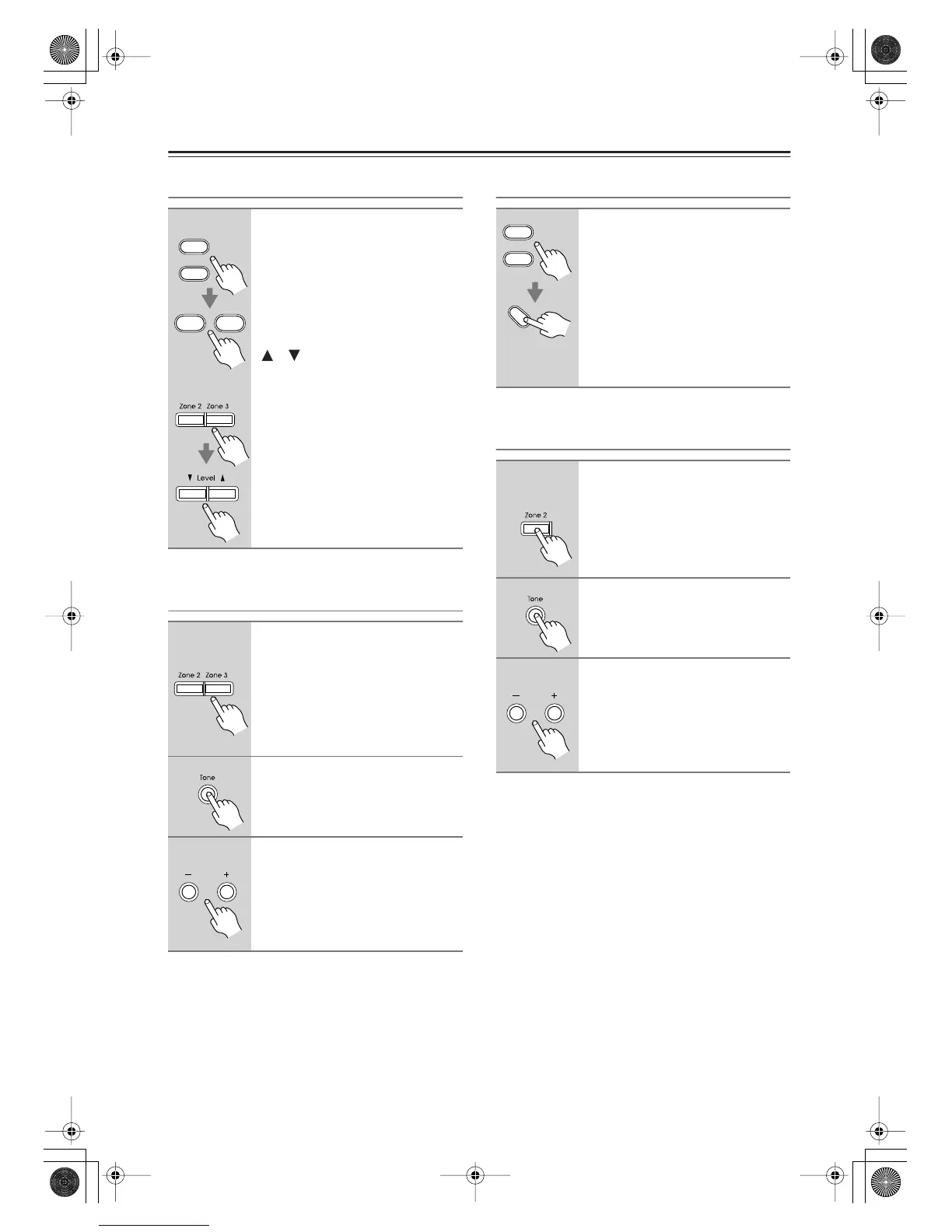
Adjusting the Volume of Zones
Adjusting the Balance of Zones
Muting Zones
Adjusting the Tone of Zone 2
Notes:
• Zones can also be unmuted by adjusting the volume.
• The tone cannot be adjusted for Zone 3.
• The Zone 2 level, balance, and tone functions have no
effect on the ZONE 2 PRE OUT when the Zone 2 Out
setting is set to Fixed (page 114).
• The Zone 3 level and balance functions have no effect
on the ZONE 3 PRE OUT when the Zone 3 Out set-
ting is set to Fixed (page 114).
On the remote controller, press
the [Zone 2] or [Zone 3] Remote
Mode button, and then use the
[Level–] and [Level+] buttons.
On the AV receiver, press the
[Zone 2] or [Zone 3] button, and
then use the Level Up and Down
[ ]/[ ] buttons.
1
On the AV receiver, press the
[Zone 2] or [Zone 3] button.
2
Press the AV receiver’s [Tone]
button repeatedly to select Bal-
ance.
3
Use the Tone Plus [+] and Minus
[–] buttons to adjust the balance.
You can adjust the balance from 0 in the
center to +10 dB to the right or +10 dB
to the left in 2 dB steps.
Zone
2
Zone
3
Level
+
Level
-
AV receiver
Remote
controller
AV receiver
On the remote controller, press
the [Zone 2] or [Zone 3] Remote
Mode button, and then press the
[Muting] button.
To unmute a zone, on the remote
controller, press the [Zone 2] or
[Zone 3] Remote Mode button,
and then press the [Muting] but-
ton again.
1
On the AV receiver, press the
[Zone 2] button.
2
Press the AV receiver’s [Tone]
button repeatedly to select Bass
or Treble.
3
Use the Tone Plus [+] and Minus
[–] buttons to adjust the bass or
treble.
You can boost or cut the Bass or Treble
from –10 dB to +10 dB in 1 dB steps.
Zone
2
Zone
3
Muting
AV receiver
DTR-7.8En.book Page 116 Friday, April 27, 2007 2:18 PM



 To Next Page