66
Listening to the Radio
—Continued
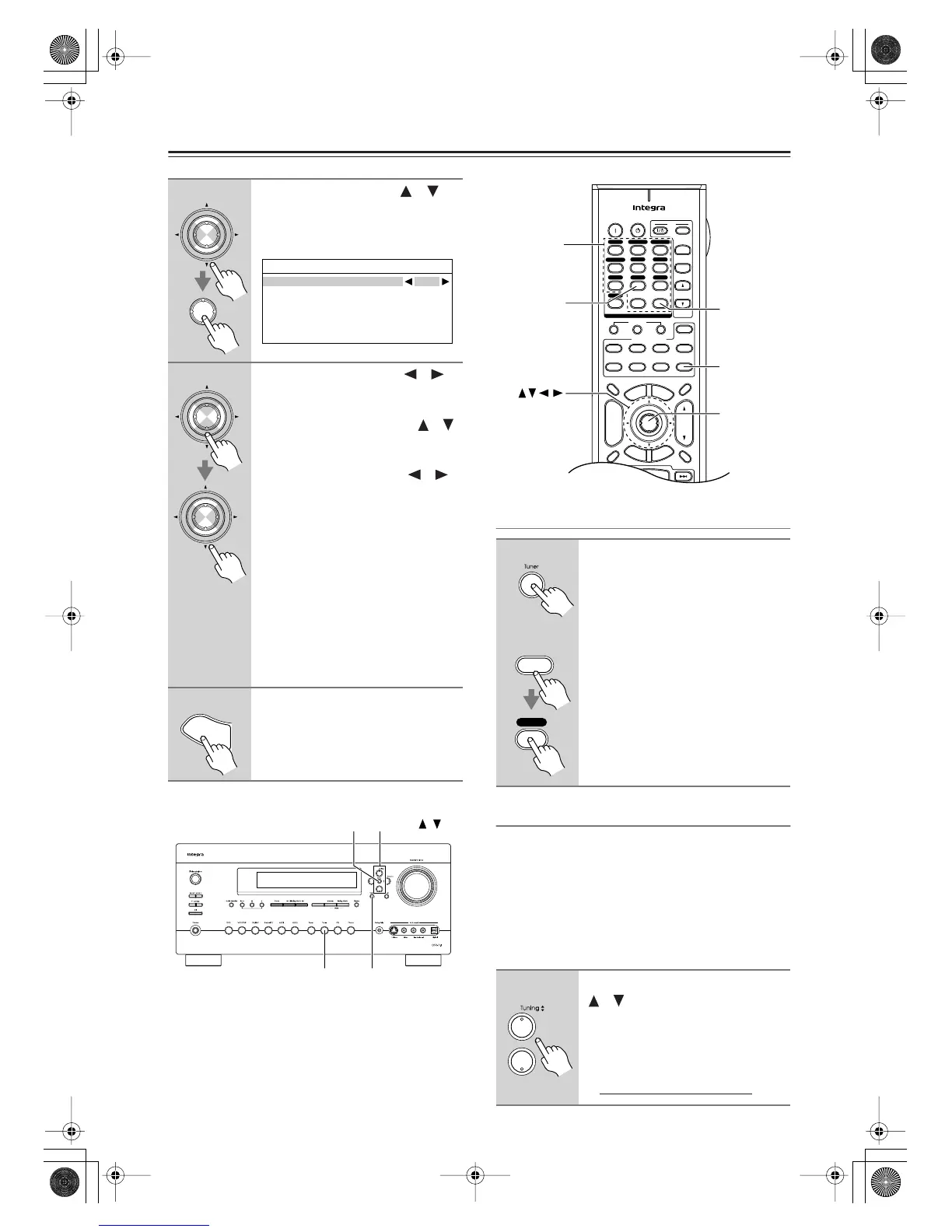
Selecting XM Satellite Radio
Signing Up for XM Satellite Radio
Once you have installed the XM Mini-Tuner and Home
Dock, you are ready to subscribe to XM Satellite Radio.
You’ll need a major credit card and your XM Radio ID.
There are three places you can find your 8-character XM
Radio ID:
1. On the XM Mini-Tuner
2. On the XM Mini-Tuner packaging
3. On XM Channel 0, as explained below
3
Use the Up and Down [ ]/[ ]
buttons to select “3. Tuner,” and
then press [Enter].
The Tuner screen appears.
4
Use the Left and Right [ ]/[ ]
buttons to select “XM.”
If there are 2 items on the Tuner
screen, use Up and Down [ ]/[ ]
buttons to select “Satellite
Radio.”
Pressing the Left and Right [ ]/[ ]
buttons cycles through the following
options: None
→
XM
→
SIRIUS
→
XM
/
SIRIUS
None
: Select if you’re not using
satellite radio.
XM
: Select to use XM Satellite
Radio.
SIRIUS
: Select to use SIRIUS Satel-
lite Radio.
XM/SIRIUS
:Select to use XM Satel-
lite Radio and SIRIUS Sat-
ellite Radio.
5
When you’ve finished, press the
[Setup] button.
Setup closes.
Enter
Enter
7-3.Tuner
Satellite Radio None
Enter
Enter
S
e
t
u
p
Tuner
Setup
Enter
Tuning /
On the AV receiver, press the
[Tuner] Input Selector button
repeatedly to select XM.
On the remote controller, press
the [Receiver] Remote Mode but-
ton, and then press the [Tuner]
Input Selector button repeatedly
to select XM.
If “CHECK XM TUNER” appears on
the display, make sure the XM Mini-
Tuner is connected properly.
1
Use the Tuning Up and Down
[ ]/[ ] buttons to select RADIO
ID.
Your XM Radio ID number is dis-
played. Write it below for reference.
ID
+
-
On Standby
TV
Input
TV CH
TV VOL
--
/
---
10 11 12
D.TUN
+10
0
Clear
123
456
789
Input Selector
VCR
/
DVR CBL
/
SAT
DVD
Tape
Tuner
CD
Phono
Game
/
TV
Macro
12
3
VCRDVD
CDR/MD
CD
Zone
2
Remote Mode
Dimmer
Tape/AMP
Sleep
Receiver
TV Dock
Cable
VOL
CH
Disc
Album
+
-
Enter
T
o
p
M
e
n
u
M
e
n
u
Display Muting
E
x
i
t
G
u
i
d
e
Prev
CH
R
e
t
u
r
n
S
e
t
u
p
SAT
Zone
3
AUX 1 AUX 2
Receiver
Tuner
D.TUN
Enter
Number
buttons
Tuner
Remote
controller
AV receiver
Receiver
DTR-7.8En.book Page 66 Friday, April 27, 2007 2:18 PM



 To Next Page