71
Listening to the Radio
—Continued
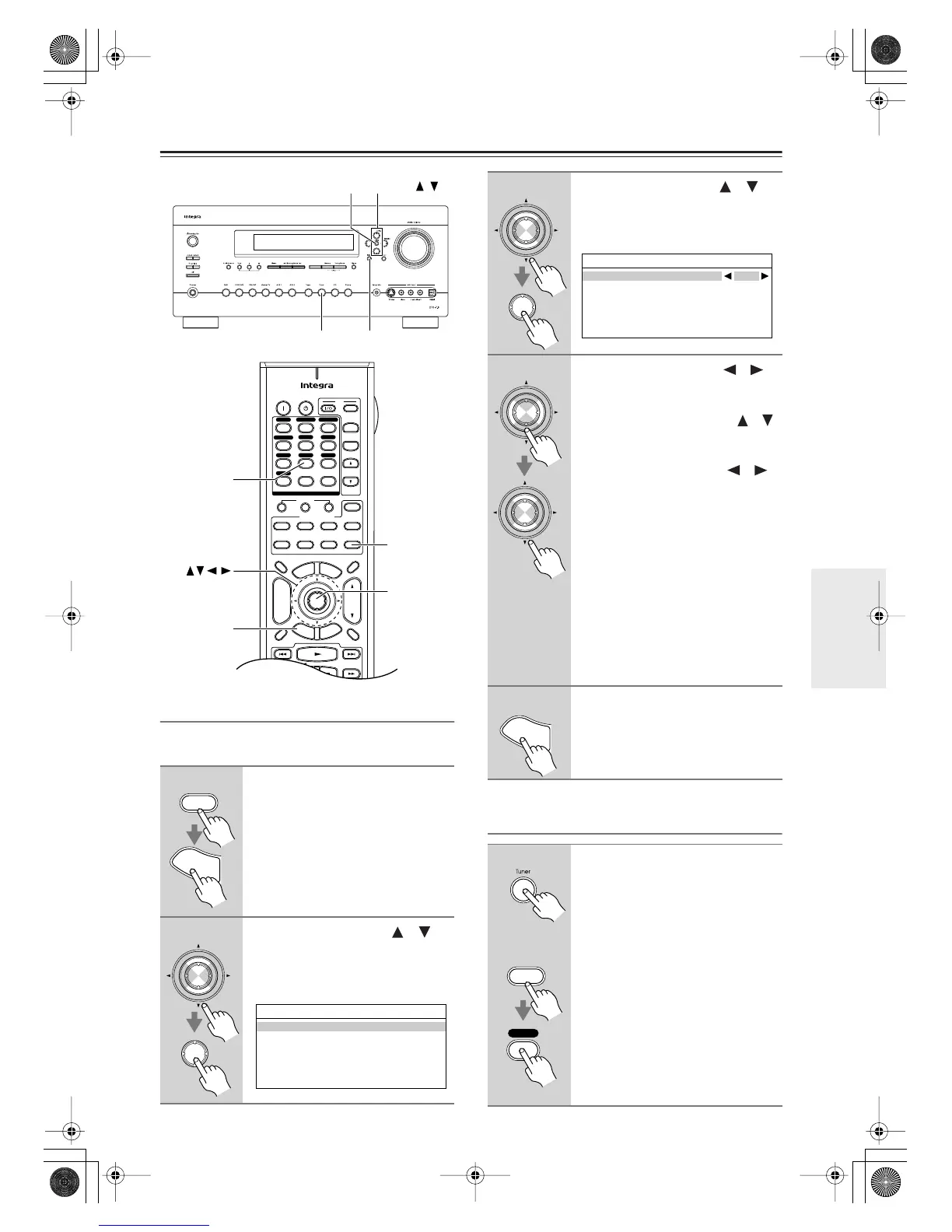
Setting the Satellite Radio Mode
Before you can listen to SIRIUS Satellite Radio, you
must set the Satellite Radio mode to SIRIUS.
Selecting SIRIUS Satellite Radio
1
Press the [Receiver] Remote
Mode button, followed by the
[Setup] button.
The main menu appears onscreen.
2
Use the Up and Down [ ]/[ ]
buttons to select “7. Hardware
Setup,” and then press [Enter].
The Hardware Setup menu appears.
+
-
On Standby
TV
Input
TV CH
TV VOL
--
/
---
10 11 12
D.TUN
+10
0
Clear
123
456
789
Input Selector
VCR
/
DVR CBL
/
SAT
DVD
Tape
Tuner
CD
Phono
Game
/
TV
Macro
12
3
VCRDVD
CDR/MD
CD
Zone
2
Remote Mode
Dimmer
Tape/AMP
Sleep
Receiver
TV Dock
Cable
VOL
CH
Disc
Album
+
-
Enter
T
o
p
M
e
n
u
M
e
n
u
Display Muting
E
x
i
t
G
u
i
d
e
Prev
CH
R
e
t
u
r
n
S
e
t
u
p
Playlist
RandomRec
SAT
Zone
3
AUX 1 AUX 2
Receiver
Setup
Enter
Tuner
Tuner
Setup
Enter
Tuning /
Receiver
S
e
t
u
p
Enter
Enter
7.Hardware Setup
1.Remote Control
2.Zone2/Zone3
3.Tuner
4.Analog Multich
5.HDMI
3
Use the Up and Down [ ]/[ ]
buttons to select “3. Tuner,” and
then press [Enter].
The Tuner screen appears.
4
Use the Left and Right [ ]/[ ]
buttons to select “SIRIUS.”
If there are 2 items on the Tuner
screen, use Up and Down [ ]/[ ]
buttons to select “Satellite
Radio.”
Pressing the Left and Right [ ]/[ ]
buttons cycles through the following
options: None
→
XM
→
SIRIUS
→
XM
/
SIRIUS
None
: Select if you’re not using
satellite radio.
XM
: Select to use XM Satellite
Radio.
SIRIUS
: Select to use SIRIUS Satel-
lite Radio.
XM/SIRIUS
:Select to use XM Satel-
lite Radio and SIRIUS Sat-
ellite Radio.
5
When you’ve finished, press the
[Setup] button.
Setup closes.
On the AV receiver, press the
[Tuner] Input Selector button
repeatedly to select SIRIUS.
On the remote controller, press
the [Receiver] Remote Mode but-
ton, and then press the [Tuner]
Input Selector button repeatedly
to select SIRIUS.
If “CHECK SR TUNER” appears on
the display, make sure the SiriusCon-
nect receiver is connected properly. If
“ANTENNA ERROR” appears, make
sure the antenna is connected properly.
Enter
Enter
7-3.Tuner
Satellite Radio None
Enter
Enter
S
e
t
u
p
Tuner
Remote
controller
AV receiver
Receiver
DTR-7.8En.book Page 71 Friday, April 27, 2007 2:18 PM



 To Next Page