D-0116684-B – 2020/03
OtoRead™ - Instructions for Use - US Page 21
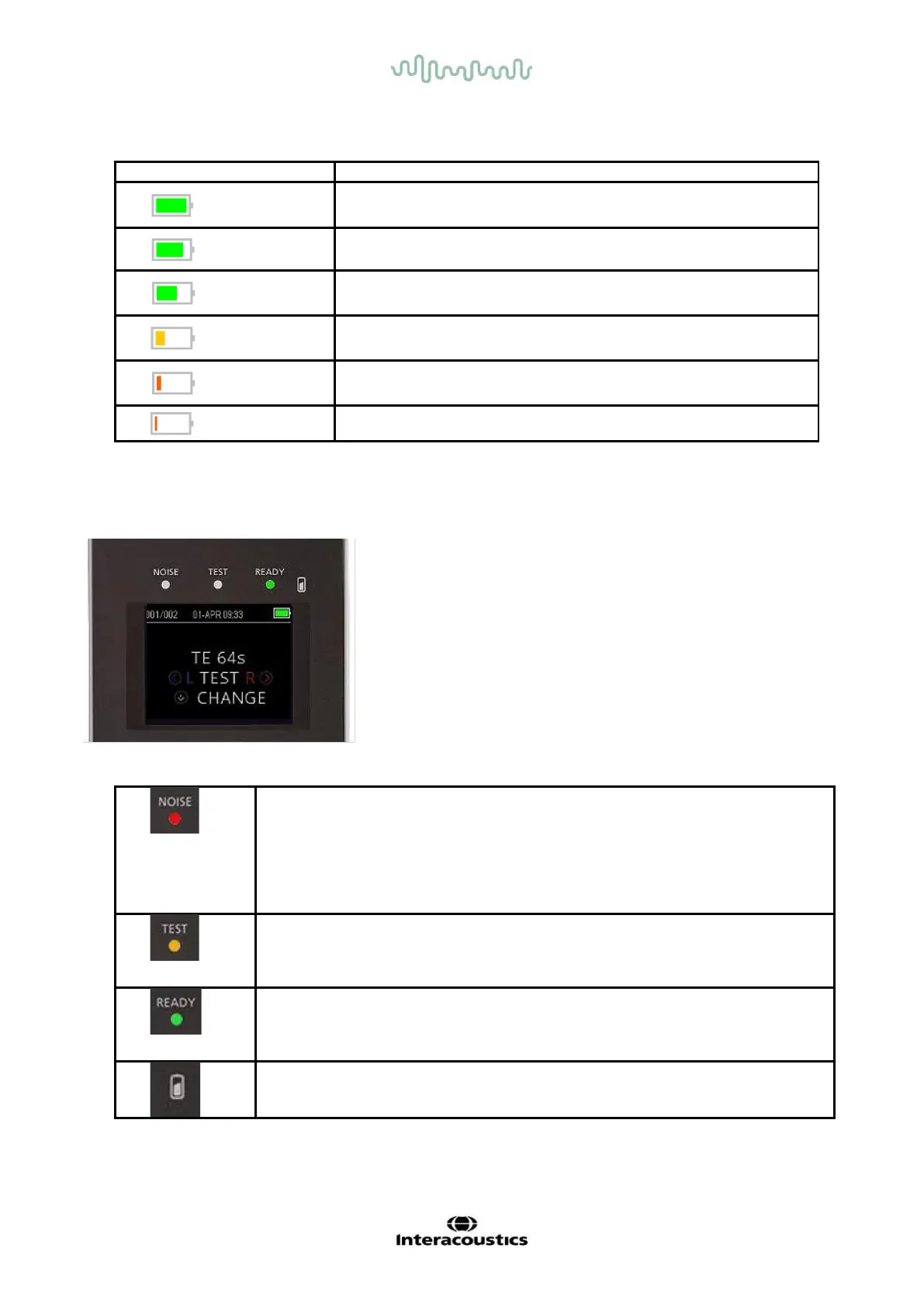
Table 1: Explanation of charge status symbols
> 95 %
95 - 75 %
75 - 50 %
50 - 25 %
25 – 12 %
< 12%
3.6 LED Indicators (lights)
The OtoRead has 3 LED test status indicators located above the OLED display. The table below describes
the meaning of the indictor lights.
Table 2: Explanation of LED indicators
The indicator labeled ‘NOISE’ provides a visual indication (RED)
that the noise level measured during the test exceeds a nominal
threshold.
Also used to indicate some error conditions and when the outcome of
test is REFER, NOISY, or NO SEAL.
The indicator labeled ‘TEST’ provides a visual indication (ORANGE)
that the selected test is being performed. This indicator will remain on
during the test function.
The indicator labeled ‘READY’ lets the user know that the instrument
is not currently performing a test function and that it is available to
perform a test function.
The battery symbol provides a visual indication (BLUE) of the battery
recharging function and battery status. The rate of illumination of the indicator
provides a means of identifying the status of the charging function.















 To Next Page