SW500 Wired Scale System
700431
Rev G, December 2021
Page 37
SERIAL OUTPUT
Serial Output is available on the stereo jack (RS232) and the USB port located on the
left side of the indicator. The Serial Output setting has four options to choose from as
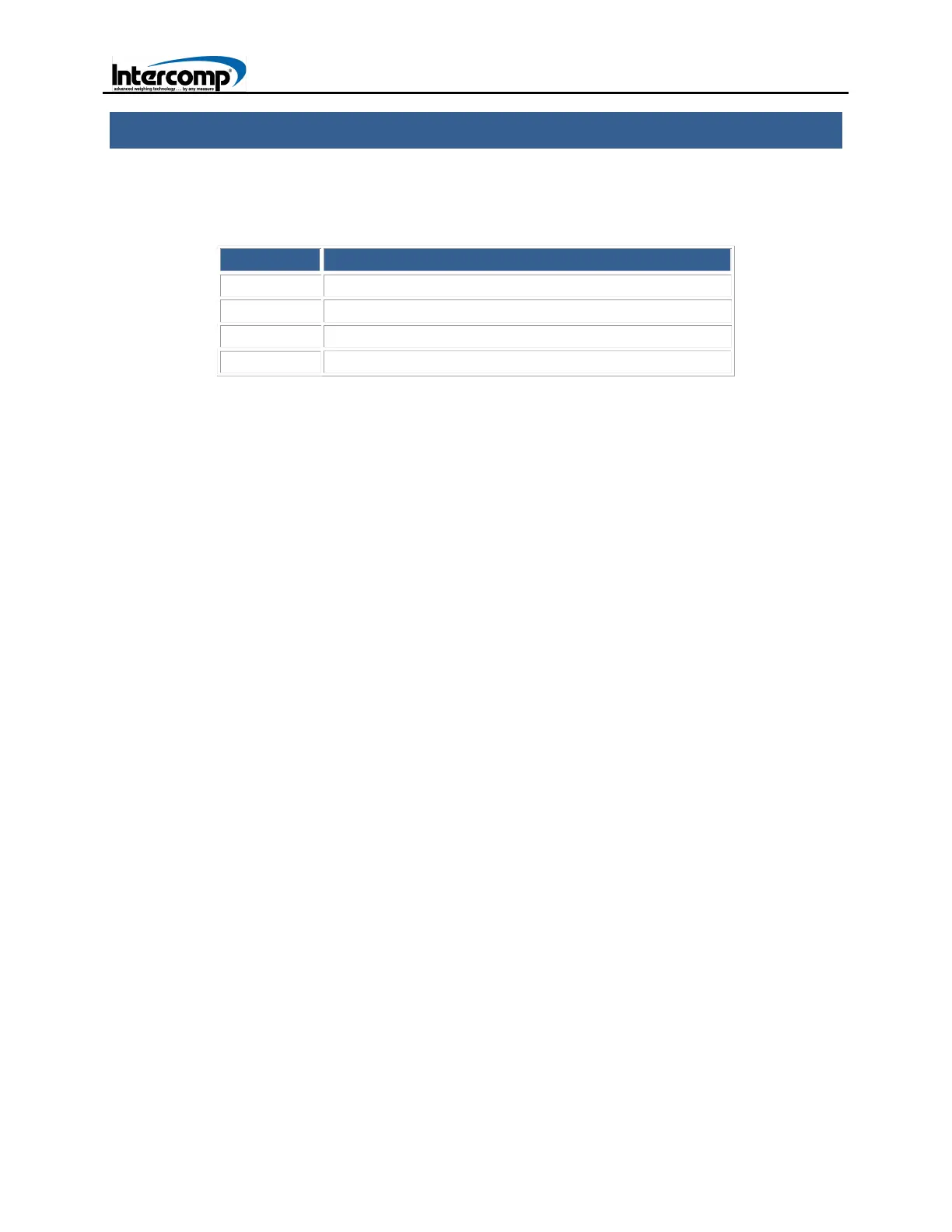
shown in the following table.
OPTION DESCRIPTION
1 OFF (on demand print screen)
2 Multi-Line Continuous Output
3 Total Only Continuous Output
4 13-Line Continuous Output
To change the Serial Output setting, press the PRINT key to access the PRINT Menu.
Press the 2 key to access the PRINTING OPTIONS Menu. Press the 1 key to view the
three Serial Output setting options. Refer to the PRINT (Serial Output) description in the
Indicator Overview section for additional information.
The transmitted signal has the following characteristics:
Fixed 8 data bits, no parity, 1 stop bit.
Baud Rate is configurable. Refer to the PRINT (Serial Output) description in the
Indicator Overview section for additional information on setting the Baud Rate.
MULTI-LINE CONTINUOUS OUTPUT
The MULTI-LINE setting enables a multi-line print output. The number of lines
displayed is dependent on the number of scales in the system. The following is an
example of a multi-line output using (4) scales.
1: 500
2: 1000
3: 1201
4: 1150
3851 lb TOTAL of 04 SCALES
TOTAL ONLY CONTINUOUS OUTPUT
When the TOTAL ONLY continuous output is selected, the indicator will transmit a line
with the total weight approximately four times per second:
“ 5002<cr><lf>”
“ 5002<cr><lf>”
“ 5004<cr><lf>”



 To Next Page